When instructors and digital academies turn course handouts into learning videos by breaking existing PDF packets into three-minute, scene-based explainers, students arrive at live workshops having actually absorbed the baseline concepts and worked examples. Instead of spending weekend hours recording and editing long webcam lectures from scratch, educators use the study guides they already wrote as the direct blueprint for narrated video lessons.
Sponsored article prepared for Leadde.ai.
Every instructor, boot camp mentor, and corporate trainer sits on a small mountain of written teaching material. Over a few semesters or training cohorts, you accumulate detailed PDF handouts, lab worksheets, study guides, and weekly reading packets. Those documents contain your best explanations and carefully chosen examples, yet students increasingly struggle to finish long text handouts before class or live workshop sessions.
Why educators turn course handouts into learning videos instead of filming long lectures
When learners study on phones during a commute or review material late in the evening after work, a ten-page PDF feels heavy. Many students skim the bold terms, skip the worked examples, and arrive at live sessions unprepared. Evidence from EDUCAUSE digital learning research and large-scale studies on student video engagement published in CBE Life Sciences Education show that student completion drops sharply when instructional videos exceed six minutes, whereas short, segmented concept clips keep attention high and improve pre-class readiness.
Most educators who try to build a video library start by setting up a webcam and recording themselves talking over a document or whiteboard. While that works for a single emergency review session, it creates three persistent headaches when you try to build a reusable course catalog:
- High recording fatigue: Speaking clearly for fifteen minutes without stumbling over a formula or losing your place in a handout takes multiple takes. A thirty-minute recording session easily turns into two hours of retakes and trimming.
- Pacing that loses mobile learners: Raw webcam recordings often wander. When a video spends four minutes on a tangent before reaching the core concept, self-paced learners click away and never return to the module.
- Painful curriculum updates: If you change a case study, update a coding library, or revise a grading rubric next semester, you cannot easily patch a single paragraph inside a continuous webcam recording.
From static PDFs to structured scene-by-scene video lessons
Rather than starting from a blank camera recording, digital academies and educators can turn training material into learning videos by converting their existing handouts and lesson outlines into structured scenes. When a handout is broken down into visual learning cards paired with natural spoken narration, the written packet you already spent hours perfecting becomes the blueprint for the video.
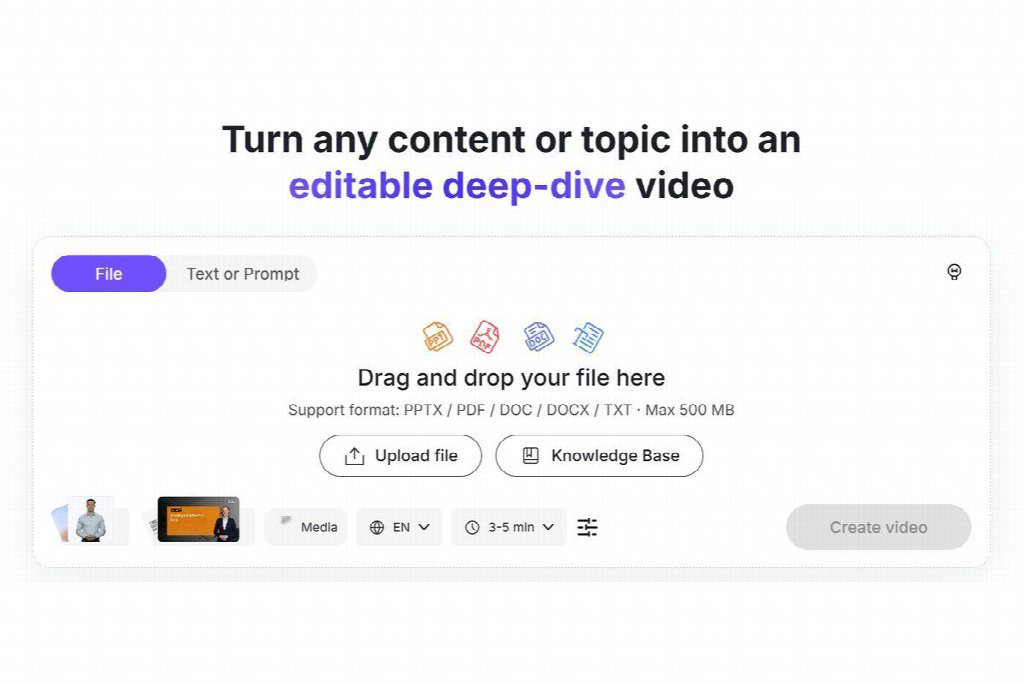
Converting a course handout into segmented visual cards and spoken narration scenes inside the Leadde workspace.
| Course production task | Manual webcam and timeline editing | Handout-to-video scene workflow |
| Starting material | Requires writing a separate teleprompter script from scratch | Builds directly from existing PDF handouts, notes, or slides |
| Lesson pacing | Varies with live speaking speed and unscripted pauses | Structured into 20-second visual scenes with focused narration |
| Updating one example next term | Re-record the video and re-upload the entire lesson | Edit the text in Scene 4, regenerate audio, and export |
| Bilingual or regional support | Requires fluent speakers to record separate video tracks | Translate the approved scene scripts and generate localized audio |
Four steps to turn course handouts into learning videos that students finish
A good handout and a good video lesson share the same educational goal, but they use different pacing. Following a repeatable four-step conversion routine keeps your videos concise and easy for students to follow.
1. Map one handout section to one three-minute video
A six-page study packet usually covers three or four distinct learning objectives. Do not cram the entire packet into one fifteen-minute video. Instead, turn each major section heading into its own three-minute micro-lesson.
For instance, a data analytics handout might become three separate clips: how to clean missing values in a dataset, how to choose between mean and median imputation, and how to verify the cleaned table before plotting. Students are far more likely to watch three focused three-minute videos than one twelve-minute lecture.
2. Rewrite dense paragraphs into conversational explanations
Written handouts pack multiple clauses into a single sentence because readers can pause and re-read a line. Listeners watching a video cannot easily parse complex nested clauses on the fly.
When reviewing the scene script generated from your handout, split long academic sentences into short, direct statements of twelve to eighteen words. Replace formal transitions like “In addition, it is imperative to observe” with natural spoken cues like “Here is the detail that trips most people up.”
3. Pair every concept with one worked example scene
Abstract definitions slide right past tired learners unless they are immediately anchored to a concrete example. For every scene that introduces a rule, formula, or framework, dedicate the very next scene to a single worked example pulled from your handout.
Keep the visual on that scene clean: show the input at the top, the step that changes it in the middle, and the resulting output at the bottom. Let the narration walk through those three lines in order so the student’s eyes and ears follow the exact same path.
4. End with a two-question self-check before the live workshop
The best way to turn passive video watching into active recall is to close the final scene of every video with one or two specific practice prompts from the original worksheet. Tell students exactly what they should be able to answer or bring to the next live session, and link the full downloadable PDF handout right below the video player for deeper reference.
Students retain technical concepts faster when they can watch a three-minute worked example alongside their study notes.
How blended video and handout modules improve classroom time
When students watch a clear, three-minute video walkthrough alongside their reading packet before class, the dynamic of live sessions shifts immediately. Instructors spend far less time repeating baseline definitions from page one of the handout and far more time coaching students through edge cases, lab exercises, and group critiques. Even better, when exam review week arrives, students have a searchable library of bite-sized video explainers they can revisit whenever a topic needs a quick refresher.