Are you interested to buy GCash shares during the Mynt IPO? GCash is undoubtedly the most popular e-wallet app in the Philippines. And now for the first time ever, anyone can buy a piece of the company using only their smartphone or computer.
Mynt Inc., the company behind GCash, will sell shares to the public from October 6 to 12, 2026. If you want to know how to buy GCash IPO shares, the answer depends on which account you already have. Retail investors have several ways to buy shares during the offer period and also after the stock lists on the Philippine Stock Exchange (PSE) on October 20 under the ticker GCASH.
The initial public offering (IPO) is already the largest in Philippine history. Mynt set its final price at ₱6.60 per share on October 1, a 34 percent cut from the ₱10 ceiling in its prospectus. The base offer of about 8.03 billion shares is worth roughly ₱53 billion. It could reach about ₱60.9 billion if the overallotment option is fully exercised.
I’m no stranger to the stock market, by the way. In fact, for the past few years, I’ve bought and invested in stocks both locally and internationally. For US stocks, I use GoTrade and Interactive Brokers (IBKR), while for local stocks, I go with COL Financial and DragonFi.
In this guide, I’ll teach you how to buy GCash IPO shares online, especially if you’re a newbie with no experience in the stock market. But before you send money to your stockbroker, here’s are some friendly reminders: Do Your Own Research (DYOR) and Not Financial Advice (NFA).
Disclaimer: Investing in an IPO involves risk, including the loss of part or all of your money. Share allocation is not guaranteed, and the price of GCASH after listing may rise or fall below the ₱6.60 offer price. Offer terms, dates, and procedures may change, so read the final prospectus and the offer terms on PSE EDGE before you subscribe. Consider your finances, goals, and risk tolerance, and consult a licensed professional if you are unsure. This article is for educational purposes only. It is not investment advice, and Tech Pilipinas does not recommend that you buy or sell any security. Tech Pilipinas and its writers are not responsible for any losses or damages arising from decisions made based on this article. You invest at your own risk.
Table of Contents
GCash IPO: Facts and Figures
| Detail | Information |
|---|---|
| Company | Mynt Inc. (operator of GCash) |
| Ticker | GCASH (PSE Main Board) |
| Final offer price | ₱6.60 per share |
| Offer period | October 6 to 12, 2026 |
| Listing date | October 20, 2026 |
| Base offer | 8,027,409,600 shares (up to 1.61 billion new, up to 6.42 billion existing) |
| Overallotment option | Up to 1,204,111,400 shares |
| Implied market value at offer price | About ₱442 billion |
A 100-share lot at ₱6.60 comes to ₱660 before fees. Mynt’s own minimum, maximum, and lot size appear on its Offer Details page, so confirm them there before you apply.
How to Buy GCash IPO Shares
Before the Internet, people who want to buy stocks had to call their stockbroker. Nowadays, there are several stock brokerage apps (such as COL Financial and DragonFi) where you can instantly purchase stocks with a few taps of the screen or keyboard.
However, buying shares during an IPO is not really that easy. For one, brokers are allocated only a limited amount of shares to sell to customers. This means that if you buy 100 shares, you might only get 50, or even none at all. It all depends on supply and demand.
So don’t dive into the IPO thinking that you can buy 10,000 GCash shares and get them all. If demand is lower than the supply, then obviously you will get your full order. But for a highly anticipated and hyped IPO, scale-backs are expected and you might only receive a portion of your order.
Now, here are my recommended online stock brokerage platforms if you want to buy GCash shares during the Mynt IPO.
COL Financial
COL Financial is the leading online stock brokerage in the country. This is where most Filipino investors traded stocks before mobile apps became the norm.
COL Financial also has a web app that you can access using your mobile phones. Go to this page to install the COL Financial mobile app.
Follow these steps to subscribe to the GCash IPO through COL Financial.
- Log in to your COL Financial account. Don’t have an account? Click here to open one.
- Select “Click here to subscribe to MYNT, INC. (GCASH) IPO.”
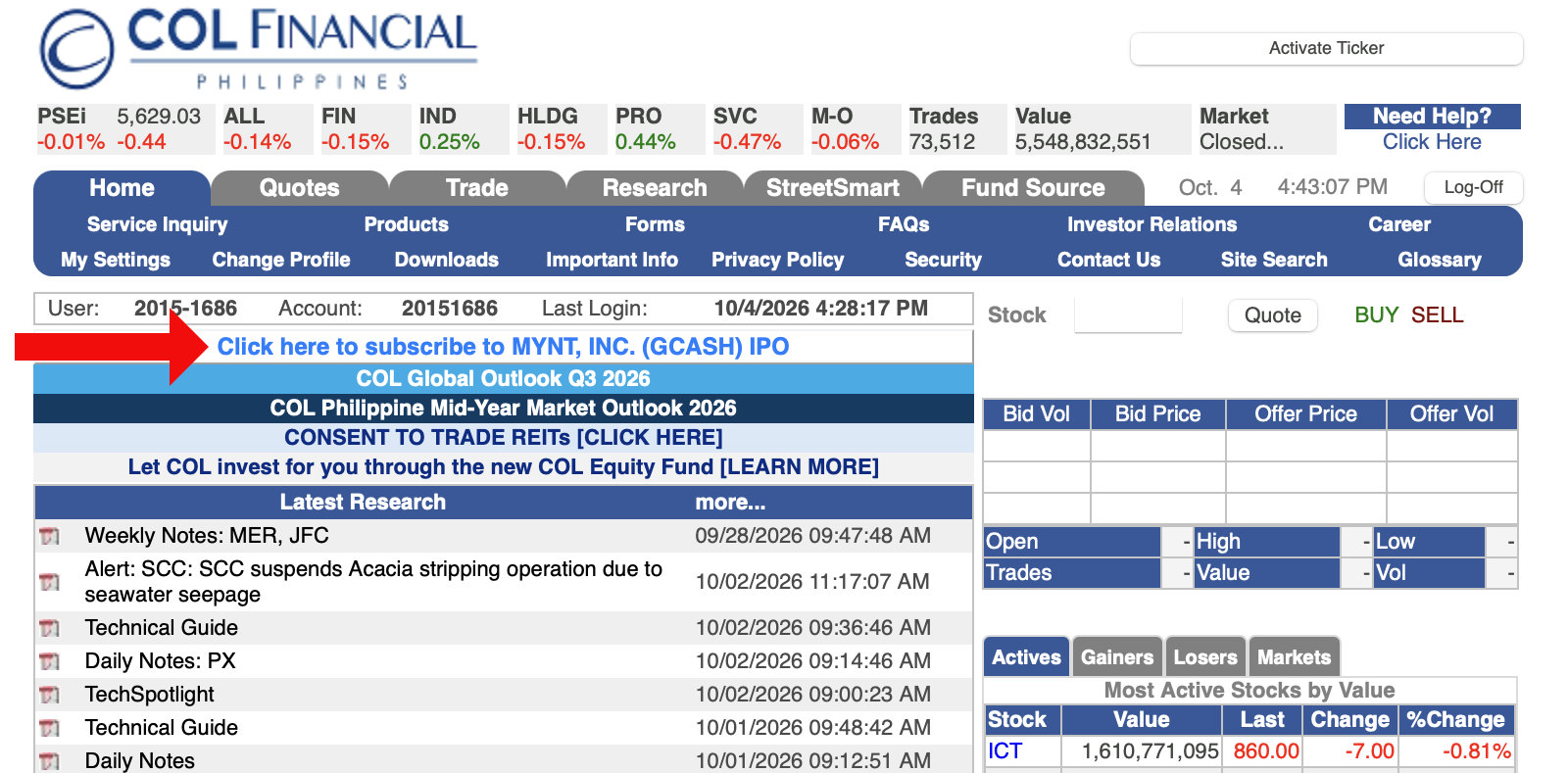
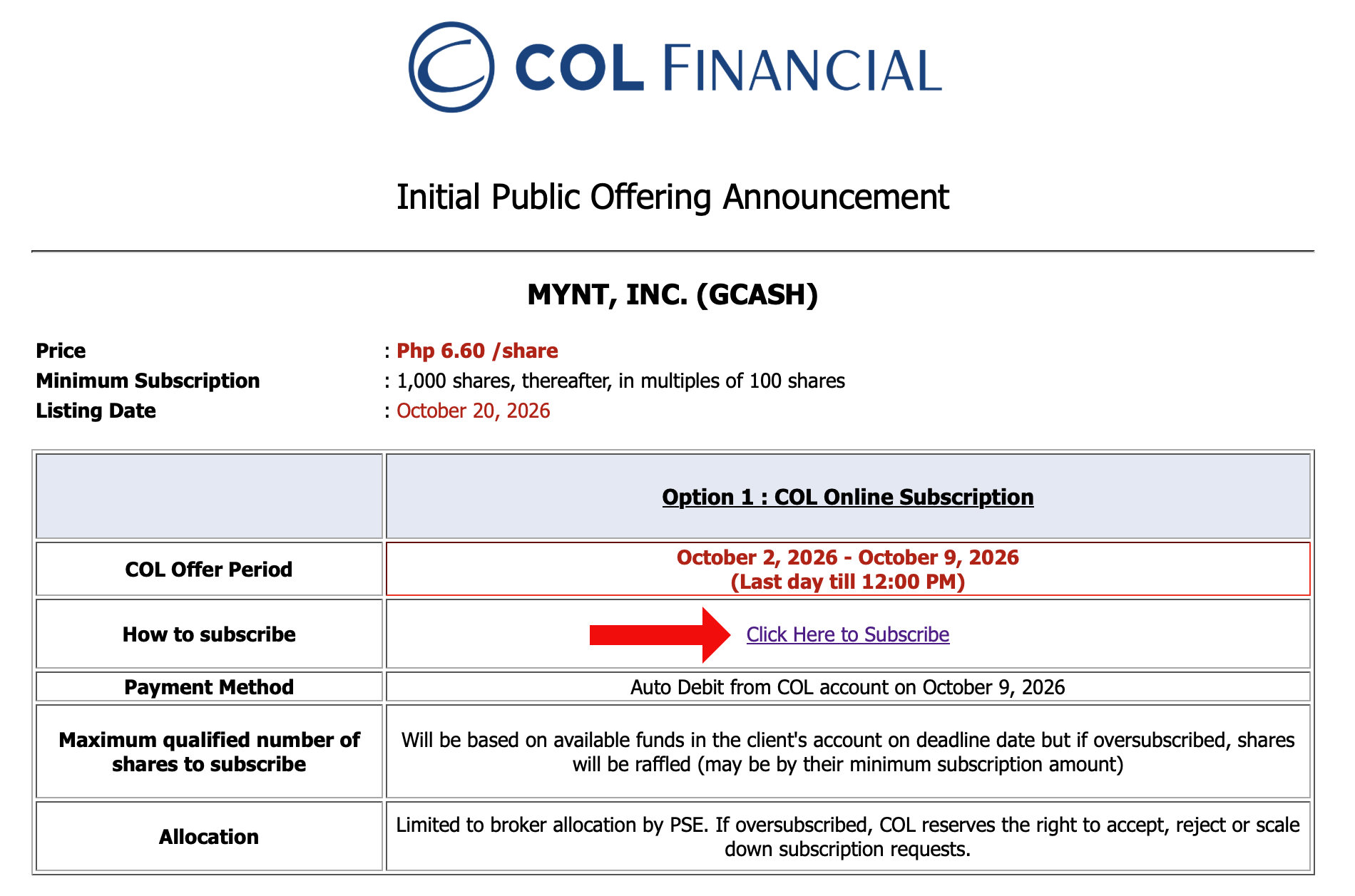
- Read the “Initial Public Offering Announcement” and then select “Click Here to Subscribe.”
- Read the “Warranty on Eligibility to Subscribe to the Offering” and then click “I/we confirm.”
- Read the “IPO/FOO Request Form” as well as its Terms and Conditions.
- Enter the number of shares you want to buy (minimum of 1,000 shares) and click “Calculate Subscription Value” to see your total subscription price.
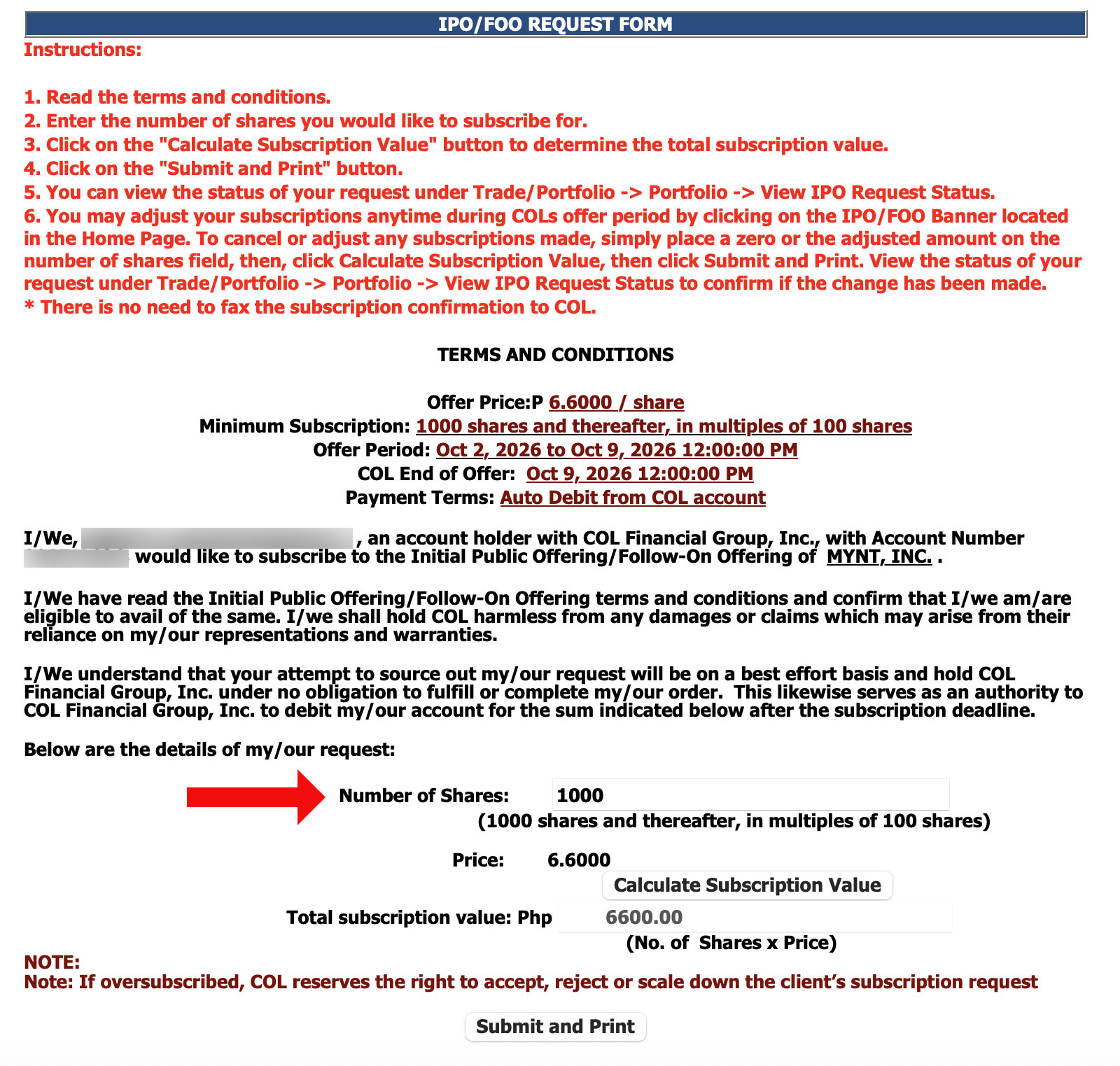
- Click “Submit and Print.”
- Your IPO request has been submitted. Print it for your records.
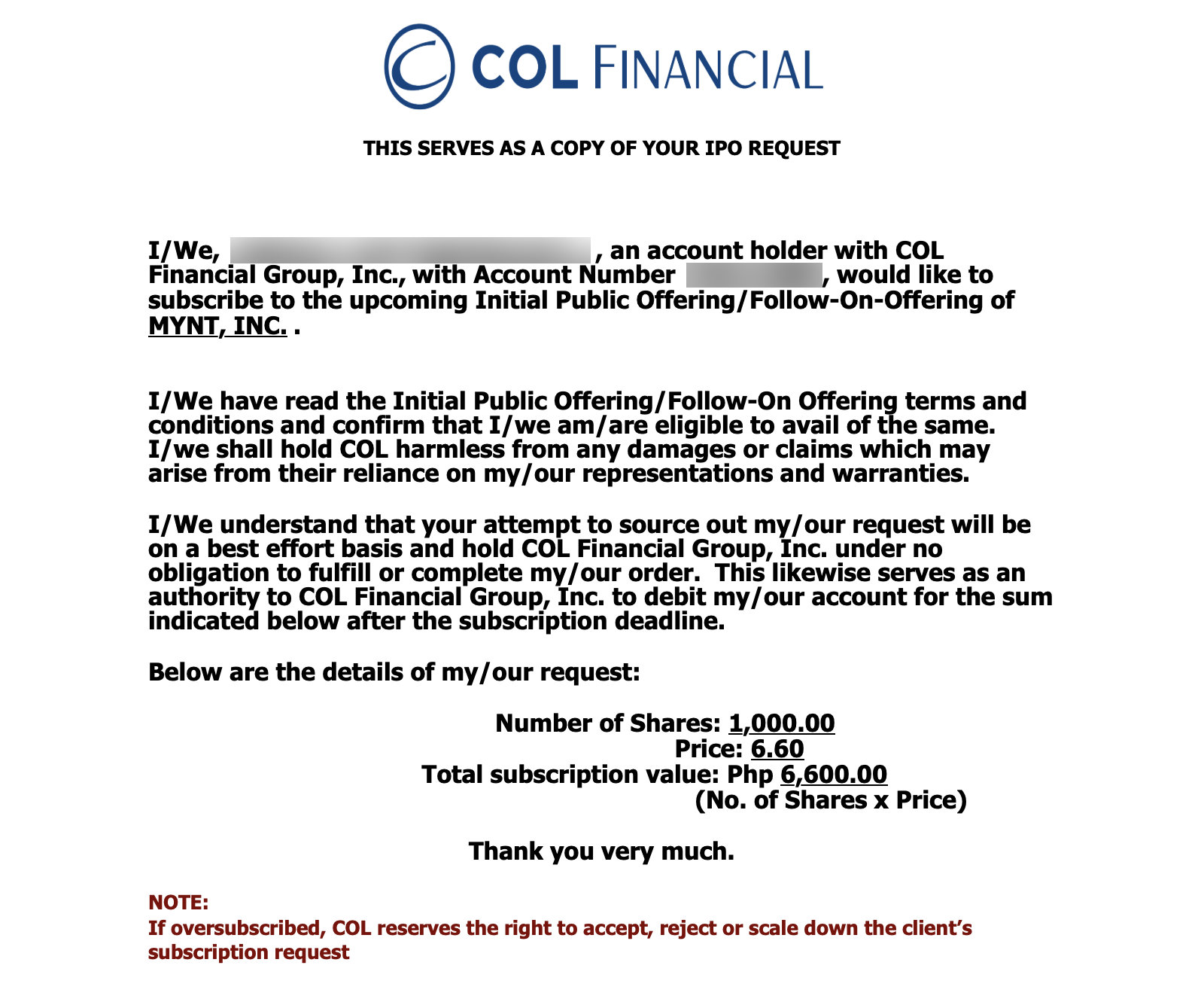
Take note that your total subscription amount will be debited from your COL Financial account after the subscription deadline on October 9, 2026. So make sure that you have sufficient funds to pay for your subscription.
PSE EASy
The PSE Electronic Allocation System or PSE EASy is the Philippine Stock Exchange’s (PSE) own electronic subscription platform.
To open an account, visit the PSE EASy website and click “Sign Up” (or go this page directly). Once created and activated, login to your account and follow these steps to subscribe to the GCash IPO:
- Go to Active Offerings. All open offerings are listed on the PSE EASy homepage. Look for the GCash or Mynt IPO, and click View Offer Details to read it first or Subscribe Now to proceed.
- Read the Offer Details. Before you subscribe to the offering, make sure that you read all the important information such as start and end dates, lot size, and minimum/maximum number of shares.
- Fill out the Application to Purchase form. Select your stockbroker, enter your order size (number of shares), and choose a payment method. The system computes the total price of your subscription in pesos. Click Proceed to Payment to continue.
- Confirm your subscription. A pop-up shows the offer name, number of shares subscribed, and total amount. Review the figures and click Okay.
- Complete your payment via the method you chose, either E-Payment or Over-the-Counter. Over-the-counter payments may take two to three days to post, so e-payment is the faster and easier option.
- A “Successful Subscription” message appears once the payment goes through. You can then view the subscription under My Portfolio.
As I’ve mentioned, if retail demand exceeds the shares that were set aside for small investors, your order may be scaled back. So only apply for the amount that you actually want.
GStocks PH in the GCash App
Do you know that you can buy GCash shares in the GCash app itself? That’s correct! Though GCash is not a stockbroker itself, it has a partnership with one: AB Capital Securities Inc.
This is probably the easiest and most convenient option for beginners who are dipping their toes in the stock market. All you need is a registered and verified GCash account, as well as sufficient funds to purchase shares of companies you like.
Part 1: Register in GStocks
- Open the GCash app and select GStocks PH.
- Select AB Capital Securities Inc. as your broker.
- The app redirects you to investatrade, the online trading platform that handles the account.
- Review or edit your personal information, then confirm.
Part 2: Add funds
Before you can buy stocks through GStocks, you need to fund your account by cashing in from your GCash wallet.
For the GCash/Mynt IPO, the minimum amount to purchase is 100 shares. At ₱6.60 per share, that’s ₱660. Take note, however, that there may be broker and/or platform fees, so you should leave some extra funds for that.
- Select or enter the amount to cash in, then tap Submit.
- You’ll be redirected to GCash to process and complete the top-up.
- The amount cashed in wil appear automatically in your Total Portfolio.
- You will also receive an email notification of your cash-in transaction.
Part 3: Subscribe to the GCash IPO
- From Home, go to IPO and tap Subscribe Now.
- You’ll be redirected to the Open Stock Offering screen.
- Check the offer dates, price per share, and minimum shares.
- Enter how many shares you want and confirm.
- Wait for the result. You may get full, part, or no shares.
- If you are approved, the shares appear in your portfolio on the listing date.
Complete the GStocks registration and top-up before October 6, 2026. An incomplete registration or an unposted cash-in can keep you out of the first days of the IPO.
Buy GCASH on the Open Market After October 20
If you miss the offer period, or your application is not fully filled, you can still buy GCash shares once it’s listed in the open market.
Place an order through GStocks, COL Financial, DragonFi, or any PSE broker, the same way you buy any other stock.
The price will then depend on how the stock trades, so it can sit well above or below the original IPO price of ₱6.60.
Frequently Asked Questions
Can I buy GCash IPO shares directly in the GCash app?
Yes, you can buy GCash shares through GStocks PH, the investing feature inside the app. Open the GCash app, select GStocks PH, and tap the IPO banner during the offer period of October 6 to 12.
How much does a GCash IPO share cost?
The final offer price is ₱6.60 per share. A 100-share lot costs ₱660 before fees.
Will I get all the shares that I apply for?
Not necessarily. You may get full, part, or no shares, and orders may be scaled back if demand is high.
When can I sell my GCash shares?
Shares are expected to list and trade on the PSE on October 20, 2026, under the ticker GCASH. You can sell your GCash/Mynt shares on or after that date.
Is the GCash IPO a good investment?
That is a decision for each investor. Read the prospectus, check Mynt’s profitability and risks, and invest only money that you can afford to lose. This guide explains the buying process and is not financial advice.
Wrapping Up
There you have it. You just learned how to buy GCash shares during the Mynt IPO. Keep in mind that GCash is not the only game in town; you can also buy shares of other companies that are listed in the Philippine Stock Exchange.
As always, remember that stock market investing involves risk, so only invest money that you can afford to lose. This guide is for educational purposes only and not financial advice. Do your own research and perform due diligence before investing your money.