
Tracking progress and key performance indicators (KPIs) is an essential part of any organization, for making sure projects are running properly. Without the proper check-in processes, it can be impossible to be sure your team is hitting their goals, staying on budget, or staying on time. When tracking progress with traditional methods, such as spreadsheets or in-person meetings, it usually results in confusion and disorganization. Lark bridges the gap in tracking progress and KPI’s with a centralized and streamlined solution to allow teams to be more aware of their efforts, track things in real-time, and make data-driven decisions.
This blog will value adding how to track progress and KPIs through Lark project management features. With Lark tools, you will access real-time project progress, track project advancement towards goals, and pivot your project to maintain alignment on track and scope.
- Centralizing tasks and progress tracking
One of the most significant challenges when monitoring project progress is keeping all the information in one place. Traditional methods like email threads, individual task lists, or disjointed meetings can leave you scrambling to gather information on progress and KPIs. Fortunately, project management tools like Lark allow you to centralize everything in one intuitive platform.
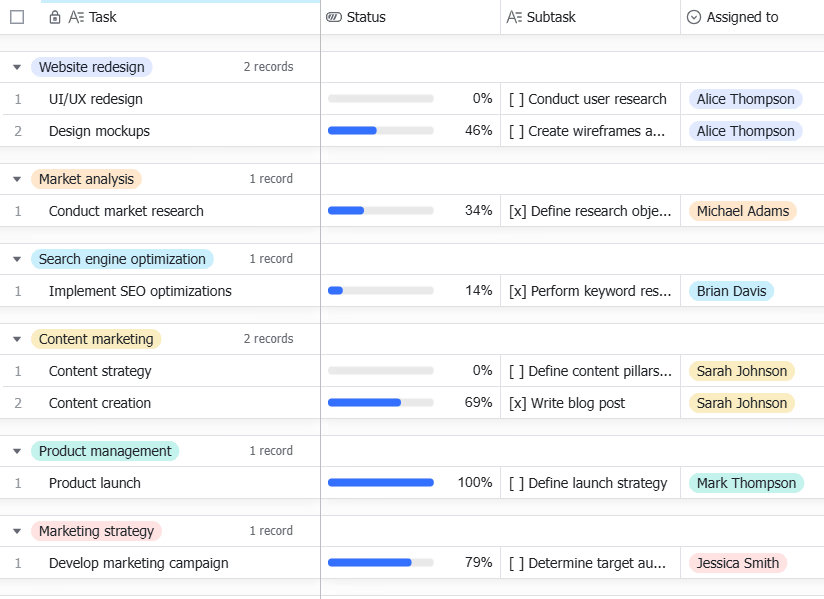
With Lark, you have the ability to create tasks, assign them to your team members, and specify deadlines, all in one interface. Each task is real-time updated, so you can see right away if it is completed or if there has been an interruption. For managers, it means never having to chase down team statuses or dig through endless email threads. It is also a full tracking application, allowing each task to show exact time spent on each component of the project and determine if the team is tracking accordingly. The visibility of time spent on each task allows for early detection of roadblocks, thereby enabling you to intervene before they become bigger issues.
- Setting and tracking KPIs with dashboards
Key performance indicators (KPIs) are essential for understanding whether a project is successful. Lark provides customizable dashboards that allow you to track KPIs in real time. Whether you’re focused on task completion, resource allocation, or meeting deadlines, Lark enables you to set clear KPIs for each project and visualize them with intuitive graphs and charts.
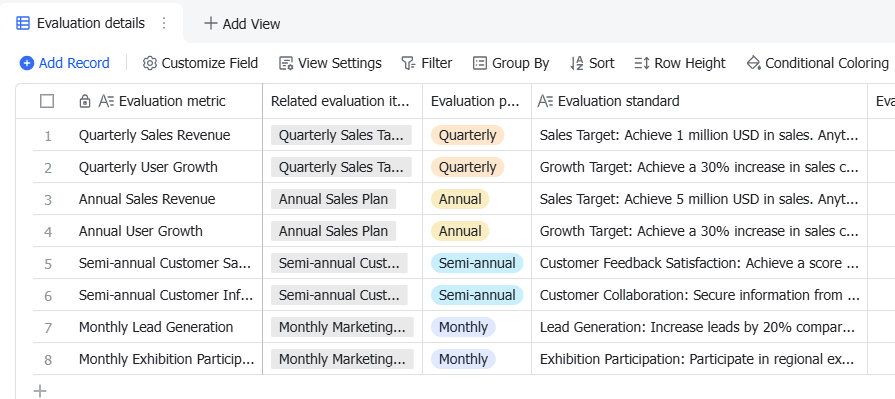
For instance, if you’re developing a marketing campaign, you can set KPIs around the timelines of content production, the approval process, and campaign launch dates. By pulling these KPIs into your Lark dashboard, you can track them continually, which will make it a lot easier to redirect tactics if a KPI isn’t being met.
Lark also allows you to assign KPI metrics to individual tasks, so that every team member sees how their contributions factor into overall performance. This not only keeps everyone aligned, but also encourages accountability and ownership of the project’s goals.
- Automating progress reports and notifications

The need for manual progress reports can often slow down teams and create unnecessary administrative overhead. Lark solves this problem with its ability to automate progress reporting and notifications. Instead of spending time gathering data from various sources and creating reports manually, Lark Base’s Dashboard and View feature allows users to easily visualize data in columns and charts, track the process efficiently, and analyze it more easily. These features provide a clear overview of project progress, helping project managers stay on top of deadlines and priorities while making data-driven decisions.
These automated reports provide an up-to-date overview of the project’s status, making it easy to see whether everything is on track. You can schedule these reports to be sent daily, weekly, or whenever you prefer. This feature is perfect for project managers who need regular updates but don’t have the time to track everything manually.
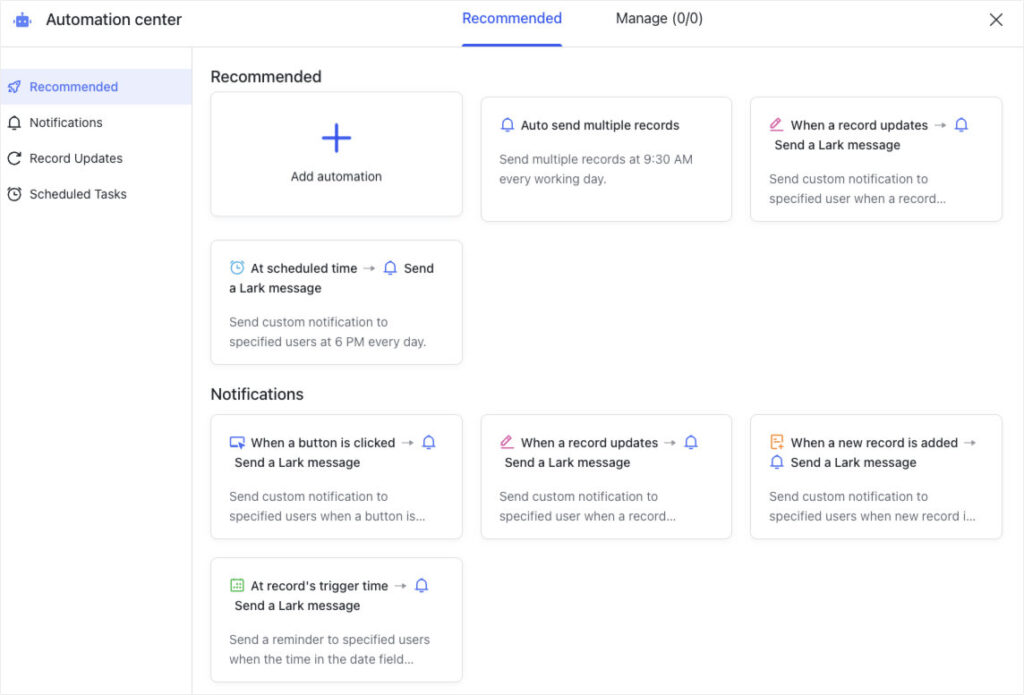
Additionally, Lark ensures automated workflow around your enterprise, which means tasks are automatically triggered when certain milestones are reached. This reduces the chances of tasks slipping through the cracks and ensures that the project moves forward smoothly. Automated reminders for upcoming deadlines or milestones can be sent to team members, helping everyone stay on track.
- Collaborative progress monitoring with real-time feedback
When it comes to monitoring progress, collaboration is essential, and with Lark’s real-time feedback functionality, collaboration becomes seamless. With Lark Base and Lark Docs, team members can leave comments directly on tasks and documents, provide feedback, and share knowledge all within the platform. This eliminates the need for lengthy email chains and simplifies communication, making it easier for team members to stay aligned on tasks and objectives, especially when tracking KPIs.
For example, if a team member completes a task and submits the work for a review, the reviewer can keep all the feedback in the comments section of the task. If the author needs to adjust the work, they will receive real-time notifications and implement changes without the encumbrance of lengthy back-and-forth emails. If a task is submitted, it never goes unnoticed, and every team member is aware of the project’s progress.
Most notably, real-time collaboration with Lark Base allows teams to identify potential issues early and take quick action. If a task is falling behind, team members can collaborate immediately within the platform, ensuring that everyone stays on track. By using Lark Base for task management, team members can update progress, communicate efficiently, and ensure that the project remains aligned with KPIs and deadlines, ensuring successful project delivery.
- Monitoring project health and adjusting strategies
Sometimes, despite all efforts, projects may not go as planned. External factors like resource shortages, unexpected challenges, or shifts in priorities can impact the original timeline. In such cases, Lark business process management software helps monitor project health by allowing you to adjust strategies in real time.
With Lark, you can track every aspect of your project’s performance through Lark Base. Using the View and Dashboard features, you can see project data in different formats, such as task progress, key performance indicators (KPIs), and task nodes. If a task or KPI is falling behind, you can quickly analyze the data and adjust resources accordingly. For instance, if the marketing team is behind schedule on content production, Lark Base allows you to easily reassign tasks, extend deadlines, or shift priorities – all while maintaining a clear view of the overall project’s progress.
Moreover, Lark provides comprehensive insights into resource allocation and efficiency. This means you can track how resources are being used and whether adjustments need to be made to meet the desired outcomes. With these tools, you can not only stay on top of deadlines but also ensure that the overall project health is in good condition.
- Streamlined communication and instant updates
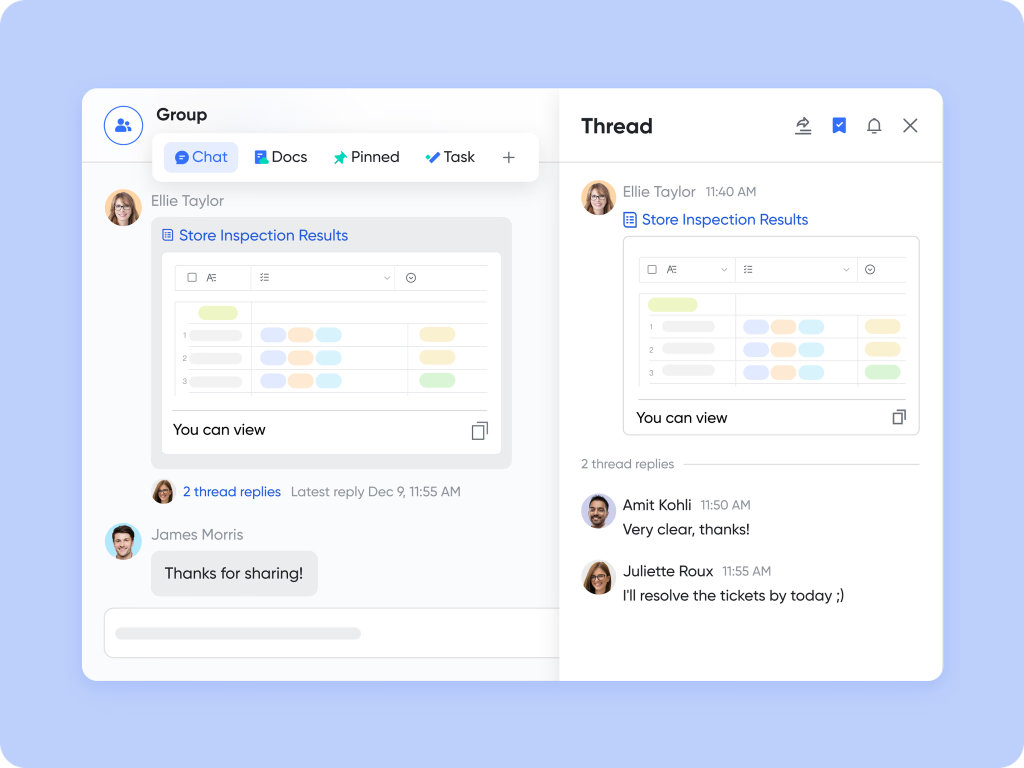
With Lark Messenger, file sharing, and video conferencing, Lark makes it easy to maintain clear communication throughout the project lifecycle. Whether you’re sending a quick message to a team member, sharing a document for feedback, or holding a video meeting to discuss project updates, Lark Messenger and Lark Meetings ensure that everyone stays aligned and informed.
Instant updates mean that no critical information is lost in emails or fragmented across different platforms. Everything you need to know about the project’s progress is in one central place, accessible to everyone in real-time.
Conclusion
Monitoring progress and KPIs is essential for ensuring that projects are completed on time, within budget, and to the required standards. Lark simplifies the entire process, from task delegation and KPI tracking to real-time feedback and automated reporting. By centralizing all project information in one platform, Lark ensures that teams can collaborate efficiently, stay on track, and meet their objectives.
With innovative features such as automated workflows, real-time communication, and business process management software, Lark empowers project managers to track progress, monitor KPIs, and make data-driven decisions. Whether you’re working on a small internal project or managing complex workflows across multiple departments, Lark provides the tools necessary to succeed.