


• Home
  • About Us
  • Advertise
  • Archives
  • Contact Us
  • Smartphone Prices
Monday, June 22, 2026
Tech Pilipinas
  • Telecoms
  • Government
  • Fintech
  • Internet
  • Social Media
  • Tutorials
  • Entertainment
  • E-commerce
  • Deals
  • More
    • Gaming
    • Gadgets
    • Mobile
    • Apps
    • Business
    • News
    • Security
No Result
View All Result
  • Telecoms
  • Government
  • Fintech
  • Internet
  • Social Media
  • Tutorials
  • Entertainment
  • E-commerce
  • Deals
  • More
    • Gaming
    • Gadgets
    • Mobile
    • Apps
    • Business
    • News
    • Security
No Result
View All Result
Tech Pilipinas
No Result
View All Result

Home » News » MySSS Card now available for existing RCBC DiskarTech users

MySSS Card now available for existing RCBC DiskarTech users

Luis Reginaldo Medilo by Luis Reginaldo Medilo
May 6, 2026
in News, Government
Follow us on Google
0
SHARES
Share on FacebookShare on Twitter

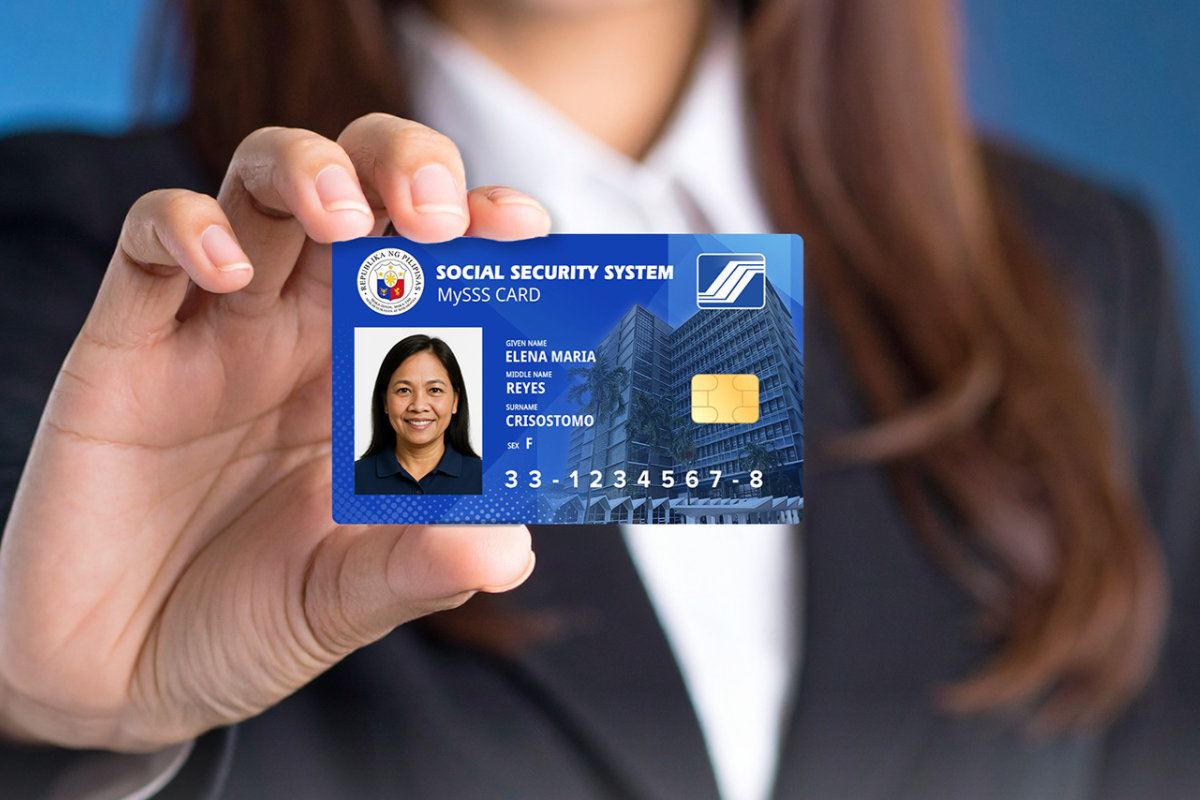
Good news for current RCBC DiskarTech users! The SSS has announced that the MySSS Card is now available for existing DiskarTech account holders. Previously, the MySSS Card was available only to SSS members who have not yet opened a DiskarTech account.

The card combines a government ID with a debit card, letting SSS members use one card for identification, cash withdrawals, and everyday payments. SSS members can also use the MySSS card – powered by RCBC DiskarTech – to receive their loans, pensions and benefits.

For Filipinos who already use RCBC DiskarTech – the mobile banking app RCBC built for unbanked and underserved users – this removes the need to carry a separate SSS ID. The card works wherever debit cards are accepted, so members can use it to withdraw cash, pay bills, or shop without keeping two cards in their wallet.

Getting the card takes two steps. First, existing DiskarTech users need to upgrade their account to a Regular Savings Account through the app. Once that’s done, they can apply for the MySSS Card through the My.SSS portal, and then complete the application process on the DiskarTech app. Read this article to learn how to apply for the new MySSS Card.

Eligible users can start the upgrade and application process by opening the RCBC DiskarTech app on Google Play (for Android users) and the App Store (for iOS users).


Tags: Social Security SystemSSS
Add as a preferred source on Google

If you enjoyed reading this article, you can help support independent tech journalism by adding Tech Pilipinas as a preferred source.

Don't Miss An Article!
Sign up for our free newsletter and get updated every time we publish a new article. We work very hard to bring you the latest happenings in the Philippine and global tech scene.
We will not share your email address. We really hate spam!
Previous Post

UNISOC T9300 Ultimate Powers nubia Neo 5 5G, Delivering Competitive Gaming Performance for Filipino Gamers

Next Post

TESDA offers free online AI courses for all Filipinos

Luis Reginaldo Medilo

Luis Reginaldo Medilo

Luis Reginaldo Medilo is the founder and editor-in-chief of Tech Pilipinas. He has over 25 years of hands-on experience with computers and the Internet, and has been writing about Philippine technology for over a decade, covering fintech, telecoms, government digital services, and consumer gadgets.

You May Also Like

News

BSP lifts fee moratorium as DOF pushes to cut bank transfer costs to ₱2

June 19, 2026
News

1 in 3 Filipinos aware of cybersecurity, PSA survey finds

June 19, 2026
Government

How to Apply for the Pag-IBIG SAFE Loan Online (2026 Step-by-Step Guide)

June 18, 2026
News

PAGCOR orders all gambling ads replaced with helpline materials

June 18, 2026

Leave a Reply Cancel reply

Your email address will not be published. Required fields are marked *

Latest Articles

BSP lifts fee moratorium as DOF pushes to cut bank transfer costs to ₱2

June 19, 2026

1 in 3 Filipinos aware of cybersecurity, PSA survey finds

June 19, 2026

Best 18 Software Developers in the Philippines

June 18, 2026

How to Apply for the Pag-IBIG SAFE Loan Online (2026 Step-by-Step Guide)

June 18, 2026

PAGCOR orders all gambling ads replaced with helpline materials

June 18, 2026

Featured Articles

passport appointment

How to Schedule a DFA Passport Appointment Online (2025 Updated Guide)

December 15, 2025

How to Apply for a UMID ID Card or SSS ID Online (2026 Updated Guide)

January 20, 2026

How to Apply for the DOST Scholarship Program (2025 Updated Guide)

December 15, 2025

How to Get a Pag-IBIG Loyalty Card or ID (2026 Updated Guide)

January 20, 2026

How to Get a PhilHealth ID Card (2025 Updated Guide)

December 15, 2025
Facebook Twitter Instagram Youtube Pinterest Telegram

About Us

Tech Pilipinas is the Philippines’ digital lifestyle and technology magazine, helping millions of Filipinos keep up with the challenges of the fast-paced, ever-changing world of technology.

Office Address: General Maxilom Avenue, Cebu City, Cebu, Philippines
Email: [email protected]
Phone: +639055450299

Get it on Google Play

Browse by Category

  • AI
  • Apps
  • Business
  • Computers
  • Deals
  • E-commerce
  • Entertainment
  • Fintech
  • Gadgets
  • Gaming
  • Government
  • Internet
  • Mobile
  • News
  • Reviews
  • Security
  • Social Media
  • Software
  • Technology
  • Telecoms
  • Tutorials
  • Uncategorized
  • ZIP Codes

Popular Tags

BIR BPI Facebook GCash Globe HDMF Messenger mobile wallet online banking online payments online shopping Pag-IBIG PayMaya PLDT Republika ng TM Smart Social Security System SSS Talk N' Text WiFi

Copyright © 2017-2026, Tech Pilipinas and Luis Reginaldo Medilo. All Rights Reserved.
Tech Pilipinas ® is a registered trademark with the Intellectual Property Office of the Philippines with Registration No. 4/2023/00502052.
No part of this site may be copied, reproduced, modified or distributed without the prior written consent of Tech Pilipinas.
Contact Us | Copyright Notice | Disclosure Policy | Disclaimer | Privacy Policy | Editorial Policy | Corrections Policy | Code of Ethics

  • Home
  • Categories
    • Apps
    • Business
    • Computers
    • Deals
    • E-commerce
    • Fintech
    • Gadgets
    • Gaming
    • Government
    • Internet
    • Mobile
    • News
    • Reviews
    • Security
    • Social Media
    • Software
    • Telecoms
    • Tutorials
    • Entertainment
  • About Us
  • Archives
  • Advertise
  • Contact Us
  • Smartphone Prices