If you’ve heard about the latest UPLIFT cash assistance program, you might be wondering whether you’re one of the low-wage workers eligible to receive financial aid from the Department of Social Welfare and Development (DSWD) and the Social Security System (SSS). Payouts started on July 20, 2026, and many SSS members are constantly checking their bank accounts in anticipation.
What makes this cash aid program so confusing is the fact that there’s no application form to fill out and no confirmation email to wait for. The money either shows up in your enrolled bank account – or it doesn’t, leaving a lot of Filipinos in the dark.
Don’t be discouraged, however. I put together this guide to help you to determine your eligibility for the UPLIFT program as well as to check the status of your UPLIFT cash aid disbursement.
SSS UPLIFT Eligibility Requirements
Before checking your status, make sure that you’re qualified for cash assistance. The SSS has published these UPLIFT eligibility requirements and you must meet all of them to qualify for financial aid.
- You must be an active, paying, employed SSS member.
- You have a disbursement account registered with SSS as of April 30, 2026.
- Your Monthly Salary Credit (MSC) is ₱20,000 or below.
- You have at least one posted SSS contribution in 2025 or 2026.
One thing to note is that the SSS does not decide who receives aid. The list of qualified beneficiaries comes from the 2024 Community-Based Monitoring System (CBMS) data collected by the Philippine Statistics Authority (PSA). The DSWD funds the assistance program and the SSS checks the records and credits the amount to the member’s enrolled disbursement account.
There is no need to apply. If you meet all four eligibility requirements above and you’re included in the CBMS-based list, the cash aid is credited automatically to your account.
How to Check Your UPLIFT Status
If you want to know the current status of your UPLIFT cash assistance payout, here are a few ways to check it.
Check Notifications in Your My.SSS Account
The most dependable way to verify your UPLIFT status is by checking your notifications on your My.SSS account. Here are the steps to do it:
- Log in to your My.SSS portal and look for the bell icon near the top right of the dashboard, right next to your profile photo.
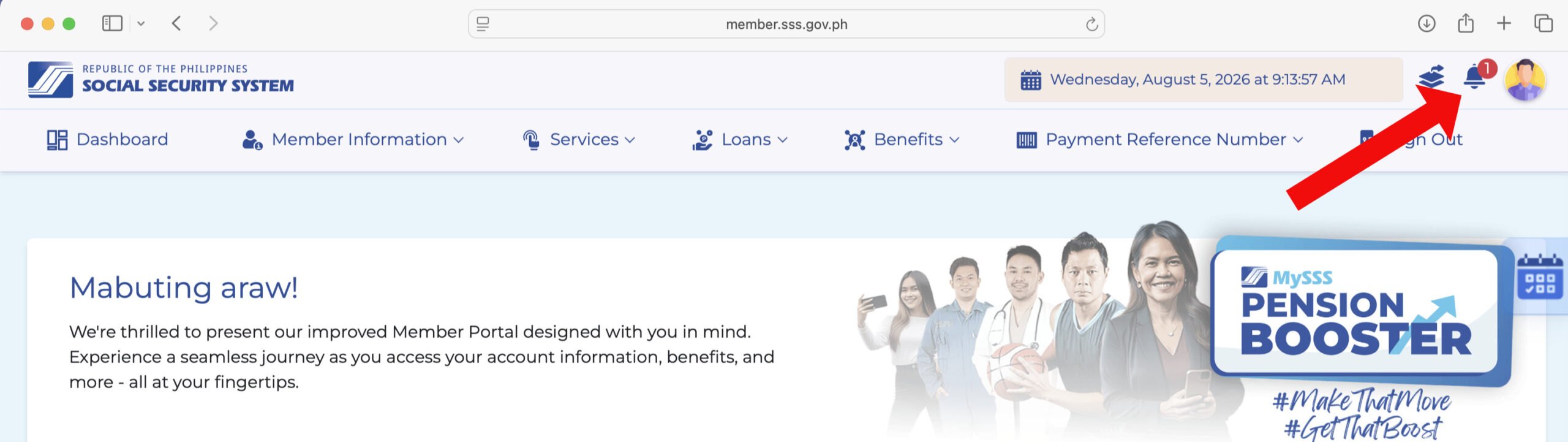
- Click the bell to open your Notification list.
- Look for an entry labeled Wage Subsidy Program. This is the notification SSS uses for UPLIFT Group 3 crediting, so the label won’t say “UPLIFT” outright.
- Click the notification to open it. If you’re a confirmed Group 3 beneficiary, the message will name the DSWD UPLIFT Assistance – Group 3 program, confirm the ₱2,000 credited for that month, and show the disbursement account (bank or e-wallet) it was sent to.
- If you don’t see a “Wage Subsidy Program” entry in your notification list, this usually means that no credit has been released to you yet, or that you’re not eligible to receive the cash aid.
Check Your Disbursement Account Enrollment
This method will not exactly tell you that you have received money, but it will show you which disbursement account the SSS has on file. This will determines whether you’ll get credited at all.
Follow these steps to check your disbursement account enrollment in SSS:
- Go to the official My.SSS portal and log in with your SSS number and password.
- Once logged in, click Services and then Disbursement Account from the main menu.
- Check the account listed under My Disbursement Account. Confirm the account number matches an active bank account or e-wallet (e.g., GCash, Maya) that you currently use.
- If no account is listed, or the listed account is closed or inactive, this is very likely the reason why you haven’t received anything. UPLIFT’s Group 3 tranche is credited automatically, so an outdated or missing DAEM enrollment means that you won’t receive a payout.
- If you haven’t enrolled a disbursement account or if it’s outdated, just follow the steps to enroll it.
Check Your Bank or E-Wallet Account (If Enrolled via DAEM)
If your bank or e-wallet is already enrolled in the Disbursement Account Enrollment Module (DAEM), the next step is to check whether the money has already been credited to your account. Here’s how to do it:
- Log in to your bank or e-wallet account.
- Check your transaction history for a government-linked credit around your expected disbursement date.
- If your bank doesn’t show real-time postings, a same-day passbook update or ATM balance check may be more reliable than the app.
Bank-based disbursements sometimes post a day or two later than e-wallet credits, since they go through an additional interbank clearing step.
What to Do If You Believe You Qualify But Didn’t Receive Anything
If you’ve checked all of the above and you still didn’t receive anything, read the following details to see if you still qualify for UPLIFT cash assistance.
Confirm your Monthly Salary Credit (MSC). Group 3 eligibility requires an SSS salary credit of ₱20,000 or below. Your MSC is not the same as your actual salary; it’s a bracketed figure. Check yours against the current SSS contribution table, or look under your contributions record in your My.SSS account.
Check your disbursement account registration date. SSS requires the enrolled account to have been on file as of April 30, 2026. If you registered your bank account or e-wallet after that date, it may not be recognized for this round of crediting.
Check for a contribution gap in 2025 or 2026. SSS requires at least one (1) posted contribution within this period. If you had a lapse in contributions, even an eligible MSC and disbursement account won’t be enough.
Check whether you’re the household’s qualified beneficiary. SSS only credits one person per household. If a family member is also an SSS member and older than you, they may be the one receiving the aid instead.
Confirm your CBMS listing. Group 3 requires both an SSS salary credit under the threshold and inclusion in the 2024 Community-Based Monitoring System. Being an active SSS member alone doesn’t guarantee CBMS inclusion, and there’s currently no self-service way to check this directly.
Confirm your membership type. Group 3 requires an active, paying, employed SSS membership. Voluntary and self-employed members are excluded from this tranche, no matter how low their MSC is or how consistent their contributions are. OFW members who pay as voluntary contributors fall under this exclusion too. If this applies to you, your household may still qualify separately through 4Ps, the Walang Gutom Program, or Group 2’s CBMS listing, so it’s worth checking them instead.
Frequently Asked Questions
How do I check my SSS UPLIFT cash aid status?
Log in to your My.SSS account and check the notification bell for a “Wage Subsidy Program” alert, which confirms Group 3 crediting directly. You can also check your Disbursement Account Enrollment (DAEM) section to confirm which account SSS has on file.
Is there an official SSS tracker for UPLIFT payments?
Not a dedicated tracker page, but SSS does send a direct notification. Members who are confirmed Group 3 beneficiaries receive a “Wage Subsidy Program” alert in their My.SSS notification bell, naming the DSWD UPLIFT Assistance – Group 3 program and the amount credited. If this notification isn’t present, no credit has been issued yet.
Why haven’t I received my ₱2,000 yet even though I think I qualify?
The most common reasons are an outdated or missing DAEM enrollment, not being the oldest SSS member in your household, or not being listed in the 2024 CBMS data alongside your salary credit record. Regional rollout timing also varies.
Can I apply for the SSS UPLIFT cash aid if I wasn’t automatically included?
No public application process exists for Group 3. Eligibility is determined entirely through existing SSS salary credit and CBMS data.
Final Thoughts
Checking your UPLIFT status really comes down to two things: looking for the “Wage Subsidy Program” notification in My.SSS, and confirming which disbursement account SSS has on file if that notification hasn’t appeared yet.
This guide was last verified on August 6, 2026, and will be updated once SSS releases its own official advisory on Group 3 crediting. Bookmark this page (press Ctrl + D) in case you need to check back as more details come out.
If you’ve checked your account and still have questions, leave a comment below and I’ll try to help based on what I know.