
Do you know that PhilHealth members can avail of free medicines and medical consultations through YAKAP? You don’t have to spend a lot of money on healthcare as long as you’re a PhilHealth member!
The PhilHealth YAKAP Program, or Yaman ng Kalusugan Program, provides Filipinos with better access to primary healthcare. Covered services include consultations, selected laboratory and diagnostic tests, medicines, and preventive health services.
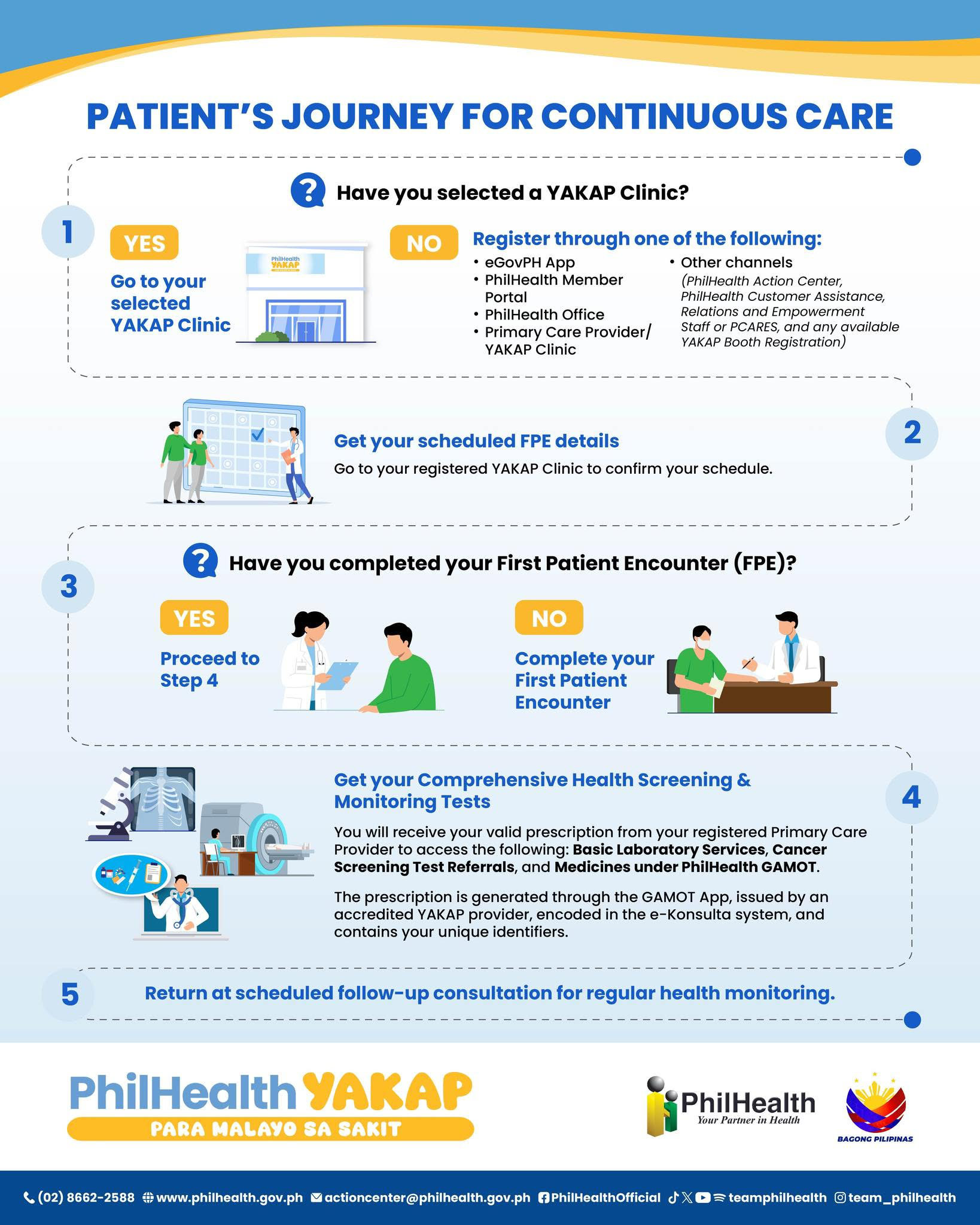
To avail of these benefits, you must first register with a PhilHealth-accredited YAKAP Clinic. You can select your clinic online through the eGovPH mobile app or the PhilHealth Member Portal, or in person at a PhilHealth Local Health Insurance Office (LHIO).
This guide covers how to apply for PhilHealth YAKAP, what you need to prepare, how to select your clinic, what happens at your First Patient Encounter, and how to register your dependents.
Table of Contents
What is the PhilHealth YAKAP Program?
YAKAP is a primary care program built around prevention and early detection. Its goal is to find health problems and treat them before they become serious, rather than to provide care after you fall ill.
You are eligible if you are a PhilHealth member or a qualified dependent, including children and senior citizens. You can use the services only at the YAKAP Clinic where you are registered.
Depending on your doctor’s assessment and current PhilHealth guidelines, your benefits may include:
- Primary care consultations with your registered YAKAP Clinic
- Health screening, risk assessment and a basic physical examination
- Selected laboratory and diagnostic tests ordered by your doctor
- Medicines covered under the YAKAP benefit package
- Cancer screening, if you qualify
- Referrals to partner facilities or specialists, and follow-up care
The program is especially useful if you need regular monitoring for conditions such as hypertension, diabetes and high cholesterol.
Requirements for PhilHealth YAKAP registration
Requirements vary slightly depending on your membership status and the registration channel you use. Prepare the following before you start:
- Your PhilHealth Identification Number (PIN)
- Updated PhilHealth membership records
- An active eGovPH or PhilHealth Member Portal account, if you register online
- The personal details of any qualified dependents you want to register
You will also go through identity verification. Under the 2026 guidelines, YAKAP providers help you complete identity verification and a liveness check through the PhilHealth Check Utility. This check takes place when you select your clinic, during your First Patient Encounter, and each time you use a benefit.
Step 1: Secure your PhilHealth Identification Number
You need a PhilHealth Registration Number (PIN) before you can register for YAKAP. If you already have one, you can go straight to clinic selection.
If you don’t have a PIN, register through the PhilHealth website or visit the nearest LHIO. If you’re an existing member, confirm that your name, birth date, address and dependent information are correct, since errors in your membership records can delay clinic selection.
Step 2: Select your PhilHealth YAKAP Clinic
PhilHealth maintains a nationwide list of accredited YAKAP Clinics. You can select your clinic online through the eGovPH mobile on your phone or the PhilHealth Member Portal on your computer.
If you prefer to register in person, visit a PhilHealth Local Health Insurance Office. All three channels also let you register your qualified dependents.
Method 1: Through the eGovPH Mobile App
Install and activate the eGovPH mobile app first. You can download the eGovPH app on Google Play or the App Store.
Once your account is active, do the following:
- Open the eGovPH app.
- Search for “PhilHealth“
- Select PhilHealth Member Portal.
- Tap Add YAKAP Provider.
- Under YAKAP Status, tap the Add YAKAP Provider button.
- Select the province and city/municipality, and press Search.
- Select your preferred YAKAP Clinic or YAKAP Package Provider.
- Tap Yes to complete the registration.
You can follow the same steps to register a qualified dependent.
Method 2: Through the PhilHealth Member Portal
Follow these steps to register through the PhilHealth Member Portal:
- Open the PhilHealth Member Portal on your web browser.
- Log in with your member account.
- Click YAKAP on the main menu.
- On the YAKAP Registration Status page, click the “Click here to select YAKAP Clinic” link.
- Select your preferred YAKAP Clinic and confirm your registration.
Aside from YAKAP Clinic selection, the portal also lets you view your contribution records, print your Member Data Record and pay certain contributions online.
Method 3: Through a PhilHealth Local Health Insurance Office
If you don’t have Internet access or an online account, visit an LHIO. Office staff can process the YAKAP Clinic selection for you and any qualified dependents.
Step 3: Complete your First Patient Encounter (FPE)
Selecting a clinic doesn’t complete your registration. You must also visit your selected YAKAP Clinic for your First Patient Encounter (FPE), which establishes your continuing care relationship with the clinic.
During your FPE, the healthcare provider may conduct:
- Medical history taking
- A health risk assessment
- Basic health screening and a physical examination
- Health education and counseling
The clinic may also ask you to complete enrollment or empanelment forms and the identity verification described above.
Step 4: Receive your tests, medicines and follow-up care
After your FPE, your doctor determines which services are medically appropriate for you. Laboratory and diagnostic tests are performed at your YAKAP Clinic when available. If a test is not offered on site, you are referred to a partner laboratory or diagnostic facility.
Your doctor may also prescribe medicines covered under the YAKAP package, schedule follow-up consultations or refer you to a specialist.
Registering your Dependents for YAKAP
Your qualified dependents must be registered with a YAKAP Clinic to use the benefits. They don’t have to use the same clinic as you.
You can register a dependent with a different accredited clinic that is closer to their home, school or work. This applies, for example, if your child studies in another city or your parent lives in a different province.
Frequently Asked Questions
Is the PhilHealth YAKAP program for sick patients?
No. YAKAP is a preventive and primary care program. Once you are registered, you can receive health assessments and screening even without an existing illness, which allows conditions to be detected early.
Do I need a PhilHealth Identification Number to register for YAKAP?
Yes. You need a PIN before you can select a YAKAP Clinic, and clinic selection cannot proceed without one. If you do not have a PIN, register with PhilHealth online or at a Local Health Insurance Office first.
Can I register for PhilHealth YAKAP online?
Yes. You can select your YAKAP Clinic through the eGovPH mobile app or the PhilHealth Member Portal. Walk-in registration is also available at PhilHealth Local Health Insurance Offices.
What should I do if my PhilHealth records are incorrect?
Mismatched names, birth dates or dependent records can block your YAKAP registration. File corrections with PhilHealth through the Member Portal or at a Local Health Insurance Office, then continue with clinic selection once your records are updated.
Can my dependents use the PhilHealth YAKAP Program?
Yes. Your qualified dependents, including children and senior citizens, are eligible. Each dependent must be registered with an accredited YAKAP Clinic, which may differ from yours.
Is my YAKAP registration renewed automatically every year?
For 2026, renewal depends on whether you completed your First Patient Encounter in 2025. If you did, you are automatically renewed with the same clinic. If you were assigned a clinic in 2025 but never completed an FPE, you are not renewed and must select a YAKAP Clinic again through the eGovPH app, the PhilHealth Member Portal or an LHIO.
Can I transfer to a different YAKAP Clinic?
Yes. If you were automatically renewed, you stay with your existing clinic for 2026 unless you file a formal transfer request. Transfer rules are subject to change, so check the current PhilHealth guidelines before you request one.
Can a YAKAP Clinic still select a clinic for me?
No. The clinic-assisted selection module in the My PhilHealth Portal was discontinued on March 1, 2026. You now select your YAKAP Clinic yourself through the eGovPH app or the PhilHealth Member Portal, or with help from a Local Health Insurance Office.
What happens after I select a YAKAP Clinic?
You must visit the clinic for your First Patient Encounter. During this visit, the provider takes your medical history, conducts screening and assessment, and then recommends tests, medicines, referrals or follow-up care as needed.