iTop Easy Desktop is a powerful tool designed to simplify and enhance your Windows experience. By providing intuitive features such as desktop organization, quick file access, and customizable layouts, it transforms cluttered screens into clean, efficient workspaces. Whether you’re managing tasks or maximizing productivity, iTop Easy Desktop ensures a seamless and user-friendly interface for a more streamlined digital workflow.
1. Icon Grouping into Boxes: A Visual Game-Changer
The core innovation behind iTop Easy Desktop lies in its Box System. This feature enables users to categorize and group their desktop icons into clean, labeled “boxes.” Whether it’s separating work apps from personal tools or organizing school assignments, design software, and utilities, the ability to create these boxes helps users:
- Reduce visual clutter
- Access files instantly
- Maintain a focused workspace
You can drag and drop files into boxes, rename them, and even customize their appearance, creating a visually pleasing and functional desktop environment that supports your workflow.
2. Smart Sorting: One Click, Total Order
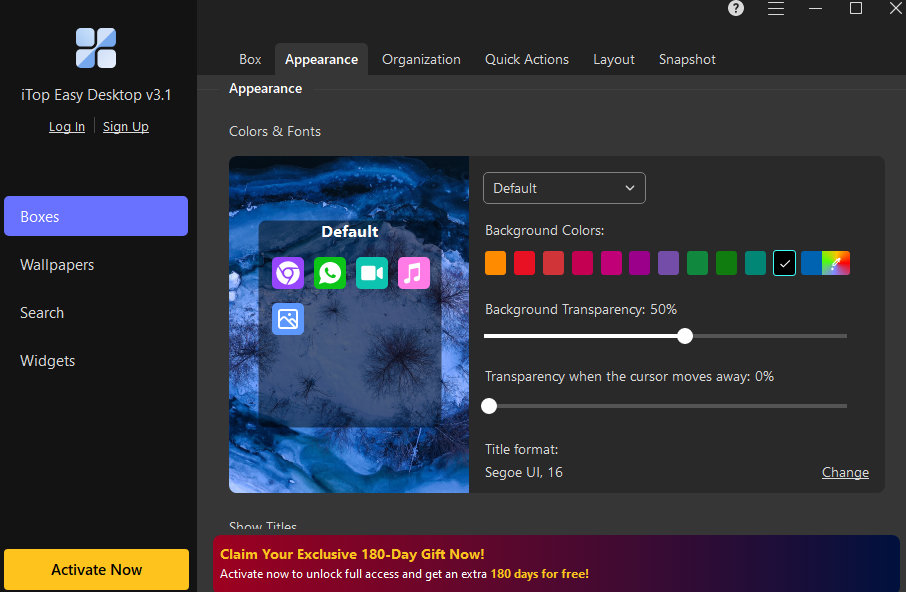
At the heart of iTop Easy Desktop is its innovative Box System, which groups desktop icons into neatly arranged, customizable containers called “Boxes.” These boxes can represent different categories – Work, Personal, Design Tools, Media, Study, or any theme that matches your needs.
Rather than scattering dozens of icons randomly across the screen, users can now enjoy a visually structured layout where everything has a designated place. These boxes are:
- Resizable and movable to suit the screen layout
- Color-coded or themed for better visual separation
- Titled and labeled to reflect the category or purpose
This not only makes your desktop more pleasant to look at but also significantly reduces the time spent looking for specific files or applications.
3. Hide and Show Icons: Privacy & Focus on Demand
Need to give a presentation or share your screen but don’t want others to see your files and icons? With the Hide/Show Icon feature, you can:
- Instantly hide all icons with one click
- Restore them anytime
- Maintain a distraction-free or private workspace
This feature is especially useful for virtual meetings, webinars, and classroom settings where screen sharing is frequent.
4. File Access at Fingertips: No More Digging Through Folders
iTop Easy Desktop dramatically improves navigation by allowing users to access any file from the desktop without opening File Explorer. You can:
- Launch files or programs directly from your categorized boxes
- Add folders inside boxes to create mini workspaces
- Pin your most-used documents for quicker access
This efficiency-focused design makes it an excellent tool for professionals who deal with dozens of files daily.
5. Revitalize Your Desktop with Lively Wallpaper
Tired of a boring, static desktop? iTop Easy Desktop can get mesmerized by stunning, dynamic wallpapers that breathe life into your desktop! Make your desktop more personal with dynamic wallpapers (videos, HTML), static images, and solid colors. Nature, Science Fiction, Cartoon, Holidays, Creations, and more are among the categories listed; you’ll find the perfect wallpaper to match your mood.
6. New iPomodoro – Time Management, Simplified

The latest version of iTop Easy Desktop introduces the iPomodoro, a powerful time management tool based on the popular Pomodoro Technique. This feature helps users break their work into focused intervals with short breaks in between, boosting concentration, reducing burnout, and promoting a healthy work rhythm. Ideal for remote workers, students, and digital creatives, the iPomodoro Widget is a smart addition to any productivity toolkit.
7. Folder Portal: Access What’s Outside the Desktop
The Folder Portal feature allows you to link folders from anywhere on your system directly to your desktop. Need quick access to your “Downloads,” “Projects,” or “Invoices” folder? Just create a box, link the folder, and work faster – without opening multiple File Explorer windows.
It’s a huge time-saver for those who manage files across multiple locations.
8. Search and Hotkeys: Speed Up Everything

iTop Easy Desktop includes a built-in smart search bar that helps you find files and programs faster than the standard Windows search. Combined with hotkeys, you can:
- Open apps instantly
- Switch between boxes
- Toggle Focus Mode
- Hide or show icons
These keyboard shortcuts reduce reliance on your mouse and boost productivity significantly.
9. Lightweight, Secure & Ad-Free
Despite its powerful feature set, iTop Easy Desktop remains light on system resources. It won’t slow down your PC or interfere with boot times. Designed with performance and privacy in mind, the tool is:
- Free from ads
- Free from bundled software
- Committed to user data security
It runs quietly in the background and respects your privacy – no annoying pop-ups or intrusive behavior.
10. Improved OneDrive Compatibility
iTop Easy Desktop has been upgraded to offer improved compatibility with OneDrive, addressing user feedback for better cloud integration. Users can now effortlessly access and work with files stored on OneDrive, including those secured by Microsoft’s file protection. This enhancement is particularly valuable for individuals who depend on OneDrive for remote access and automatic desktop backups, ensuring a smoother and more reliable experience.
Who Should Use iTop Easy Desktop?
While the software is versatile enough for all Windows users, it particularly shines for:
- Remote workers juggling multiple client projects
- Students and educators managing learning resources
- Content creators organizing design tools, assets, and drafts
- Office professionals work with documents and reports daily
- Gamers setting up clean access to games, launchers, and performance tools
In short, anyone tired of desktop clutter or eager to upgrade their interface will find real value in this tool.
Getting Started is Quick and Simple:
To begin transforming your desktop experience, simply download the tool from the official iTop Easy Desktop page. The installation process is straightforward, and once installed, the software will automatically detect your current layout and offer helpful suggestions to optimize it.
Conclusion:
The desktop is your command center. It should be intuitive, responsive, organized, and visually aligned with your workflow, not a chaotic dumping ground. iTop Easy Desktop provides a refined and intelligent interface that enhances your Windows experience. By blending visual order with powerful functionality, iTop Easy Desktop offers more than just a cleaner screen – it gives users a productivity edge, mental clarity, and full control over their digital environment.