



If you’ve been putting off an important expense or purchase because you don’t have the money for it, the Pag-IBIG SAFE Loan might be the answer to your prayer. I wrote about the launch of this program here at Tech Pilipinas, and since then, I’ve received a few questions about the application process. So I decided to write a dedicated step-by-step walkthrough for those interested to apply for this loan.
SAFE stands for Special Assistance for Financial Emergencies, and it’s the Pag-IBIG Fund’s latest initiative to help Filipino workers who are dealing with the economic effects of the Middle East crisis. Qualified Pag-IBIG members can borrow up to ₱10,000 with repayment terms of up to two years (24 months). For Filipinos who are dealing with a cash crunch with only private lenders and loan apps to turn to, the Pag-IBIG SAFE loan is definitely a big relief.
You don’t have to go to a Pag-IBIG branch to apply for this loan. The whole thing, from identity verification to fund disbursement, is handled by the Virtual Pag-IBIG website. If you have your documents ready, you can actually finish the entire application process in under 30 minutes. Really convenient and hassle free, isn’t it?
So are you ready to apply for the Pag-IBIG SAFE Loan? I went through the loan application process myself to put this guide together, and based on my experience, the application itself is straightforward as long you have your documents on hand.
Table of Contents
What is the Pag-IBIG SAFE Loan?
The Pag-IBIG SAFE Loan allows qualified Pag-IBIG members to borrow up to ₱10,000, or up to 90% of their total Pag-IBIG Regular Savings, whichever amount is lower. It carries a 5.95% annual interest rate and a three-month grace period before your first payment is due, with repayment terms of 12 or 24 months.
Pag-IBIG members with existing Multi-Purpose or Calamity Loans may still qualify for the SAFE Loan, subject to the agency’s borrowing limits. The amount a member can borrow will depend on their remaining borrowable equity, with the condition that their combined outstanding short-term loans do not exceed 90 percent of their regular savings.
Pag-IBIG SAFE Loan applications are open until September 8, 2026, and the loan is available to private and government employees, self-employed members, and OFWs who meet Pag-IBIG’s standard contribution requirements.
Pag-IBIG SAFE Loan Requirements
First things first, make sure that you have the following requirements ready:
- Your Pag-IBIG MID (Membership ID) number
- Your registered mobile number
- An active email address
- One valid government-issued ID with photo
- One selfie photo of yourself holding your ID
- A Pag-IBIG-linked disbursement option: either a Pag-IBIG Loyalty Card Plus from Asia United Bank (AUB) or UnionBank, or a Landbank Cash Card
If you don’t have a Pag-IBIG Loyalty Card Plus or Cash Card yet, get one before you apply. You can’t avail of the loan if you don’t have any of those two disbursement options. Read my guide on how to get a Pag-IBIG Loyalty Card from AUB or UnionBank.
How to Apply for the Pag-IBIG SAFE Loan Online
Step 1: Open the Short-Term Loan Application Page
Open your browser and go to the Virtual Pag-IBIG STL Application page. It’s a dedicated page for short-term loan applications, so there’s no need to log in or create a Virtual Pag-IBIG account.
A multi-screen popup will appear first, which outlines some general reminders about the loan application. Ignore the instruction to download and prepare a loan application form, since the Pag-IBIG SAFE Loan doesn’t require it.
Click Next through each screen until you reach the final one, then click Finish to close it.
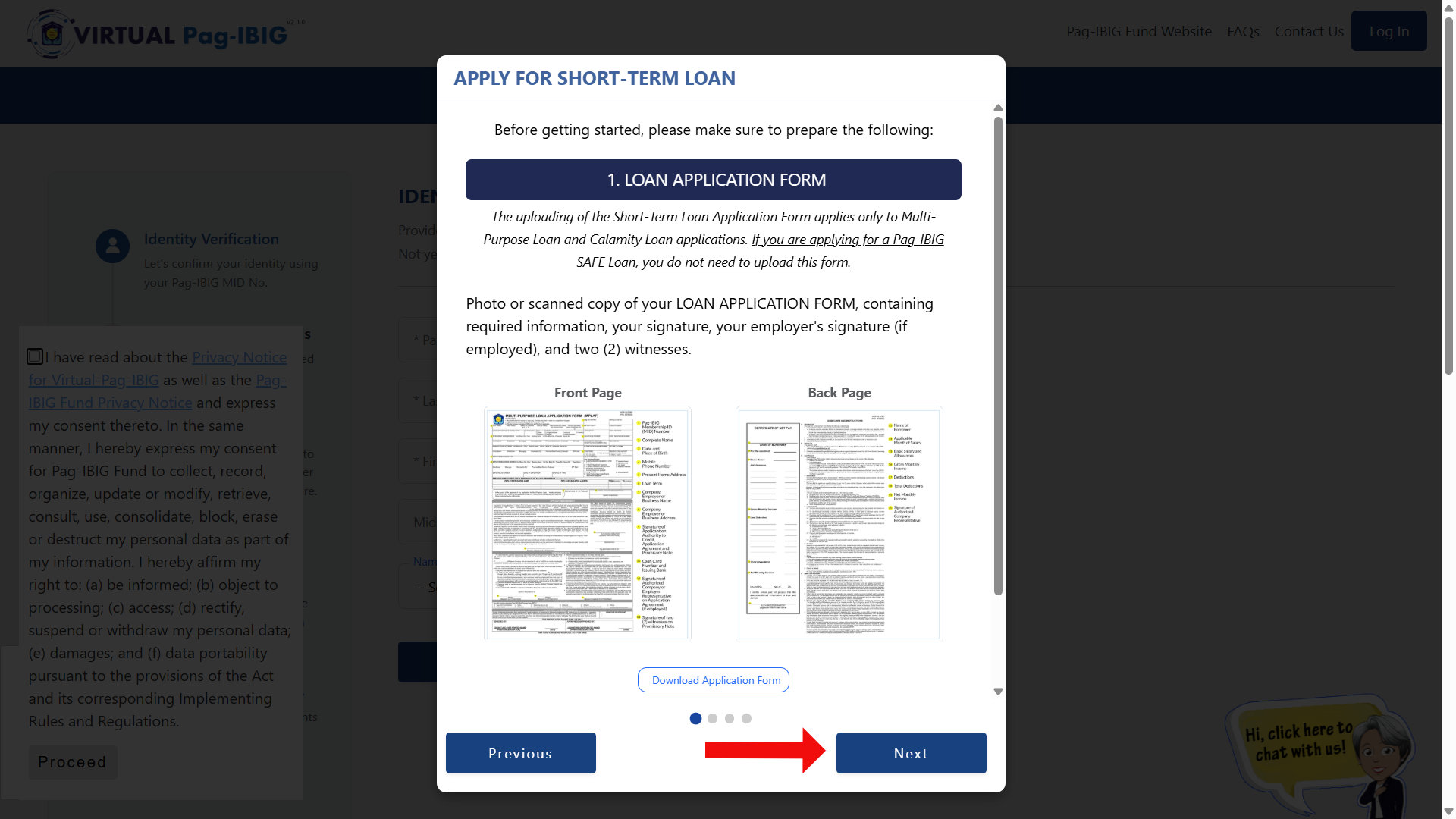
Check the box confirming you’ve read the Privacy Notice, then click Proceed. This is standard Data Privacy Act compliance, since the form is about to collect your personal and financial information.
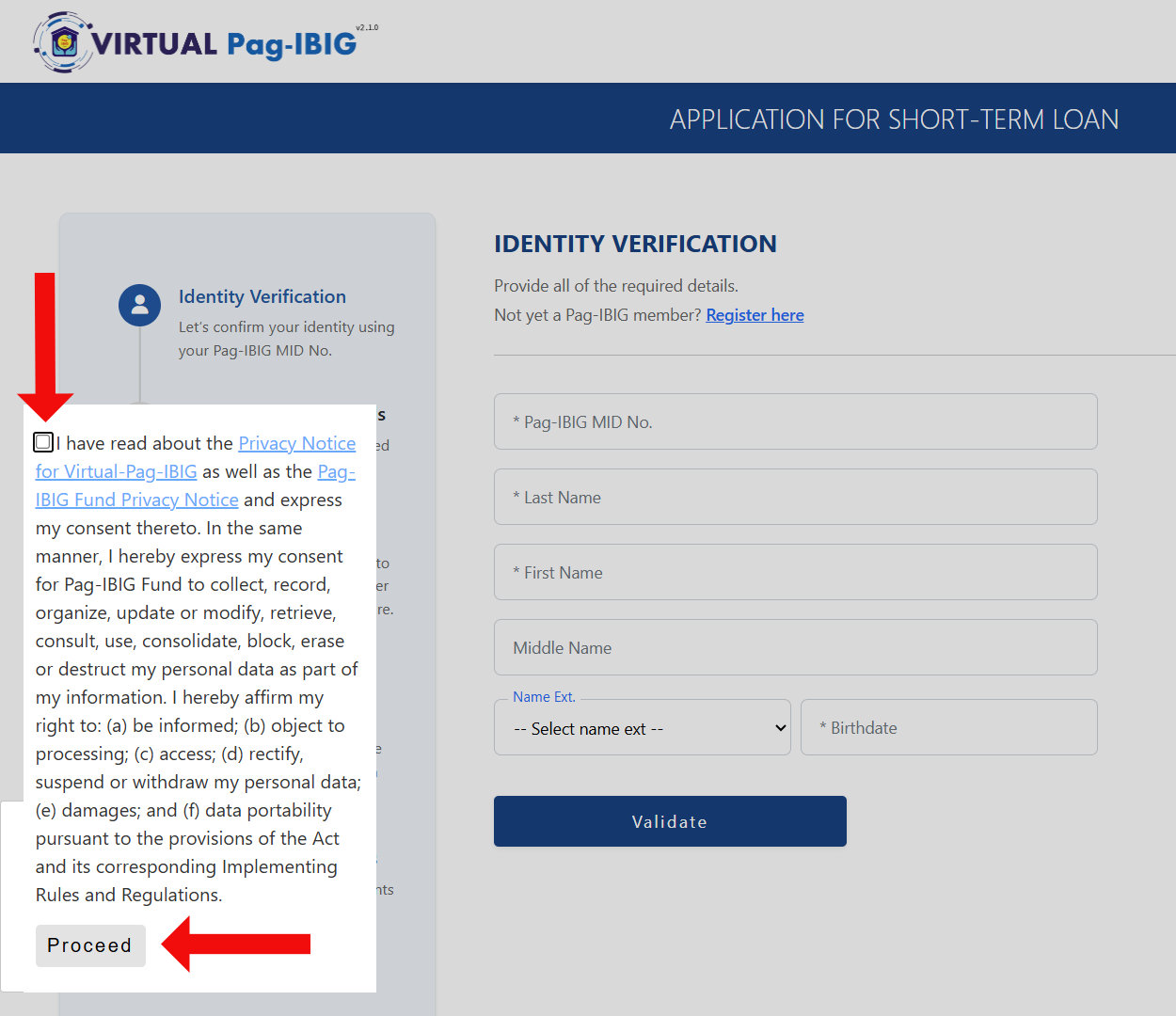
Step 2: Verify Your Identity
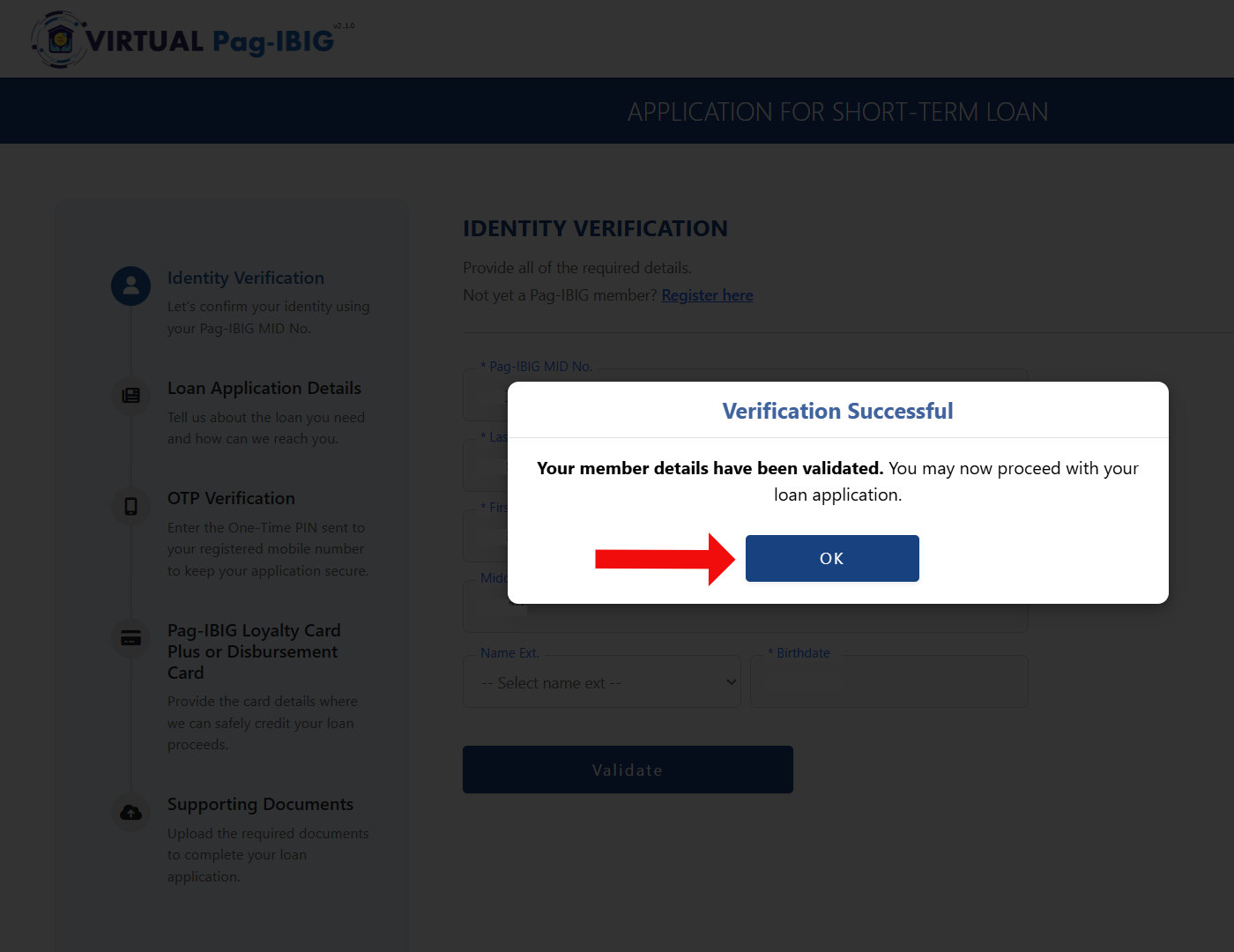
On the Identity Verification page, enter the following:
- Pag-IBIG MID Number – Enter your 12-digit Membership ID number. If you lost or forgot your Pag-IBIG MID number, read this guide on how to retrieve or recover it.
- Last Name – As registered with Pag-IBIG.
- First Name
- Middle Name
- Birthdate – Type in MM/DD/YYYY format.
Review your details carefully and then click Validate.
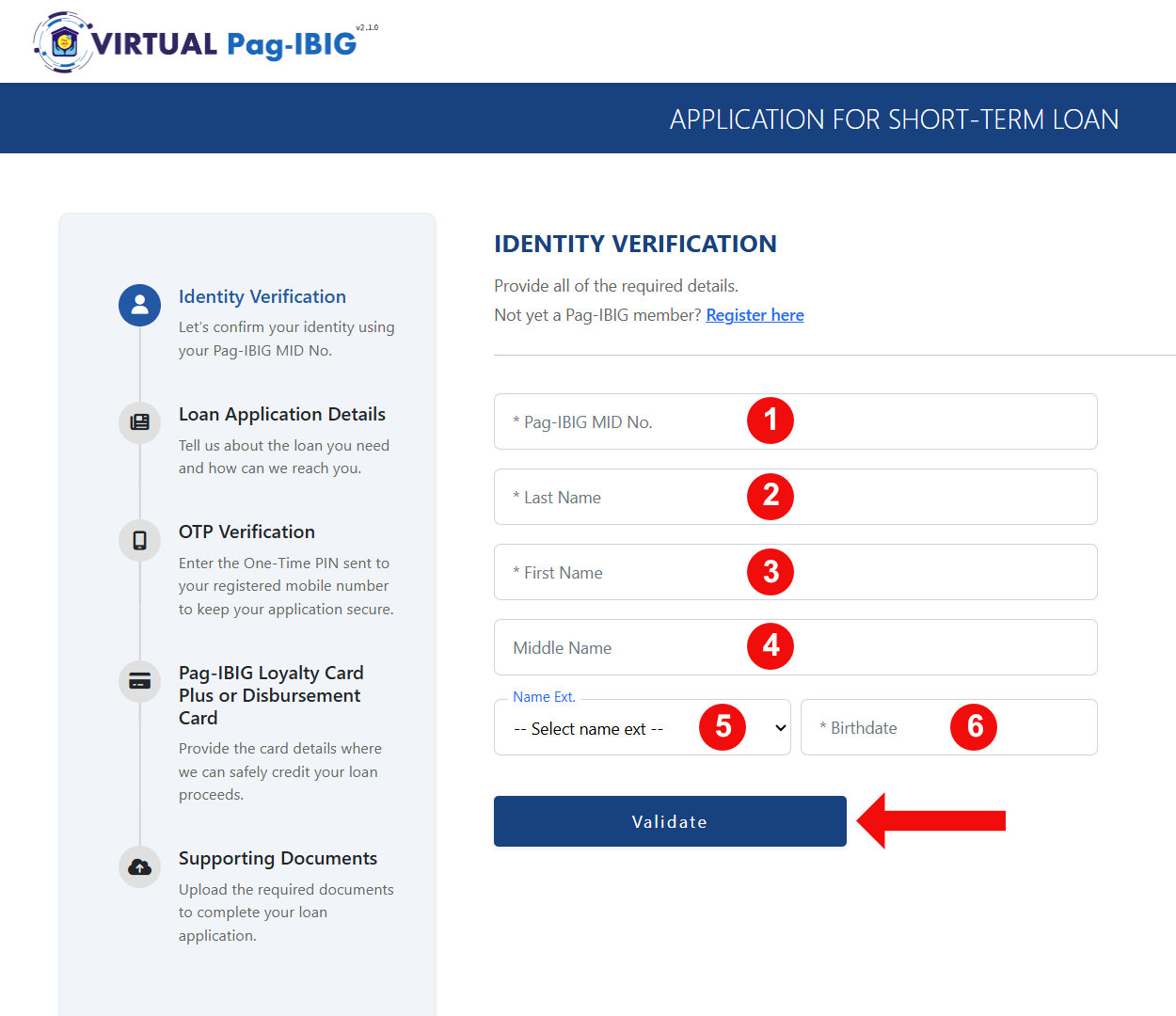
Note: Your name (including middle name) and date of birth must match your Pag-IBIG records exactly. If you got married or changed your name and haven’t updated your Pag-IBIG records, validation may fail. You’ll need to sort that out at the Pag-IBIG branch first.
A popup will confirm “Verification successful. Your member details have been validated.” Click OK to continue.
Step 3: Choose the SAFE Loan and Enter Your Loan Details
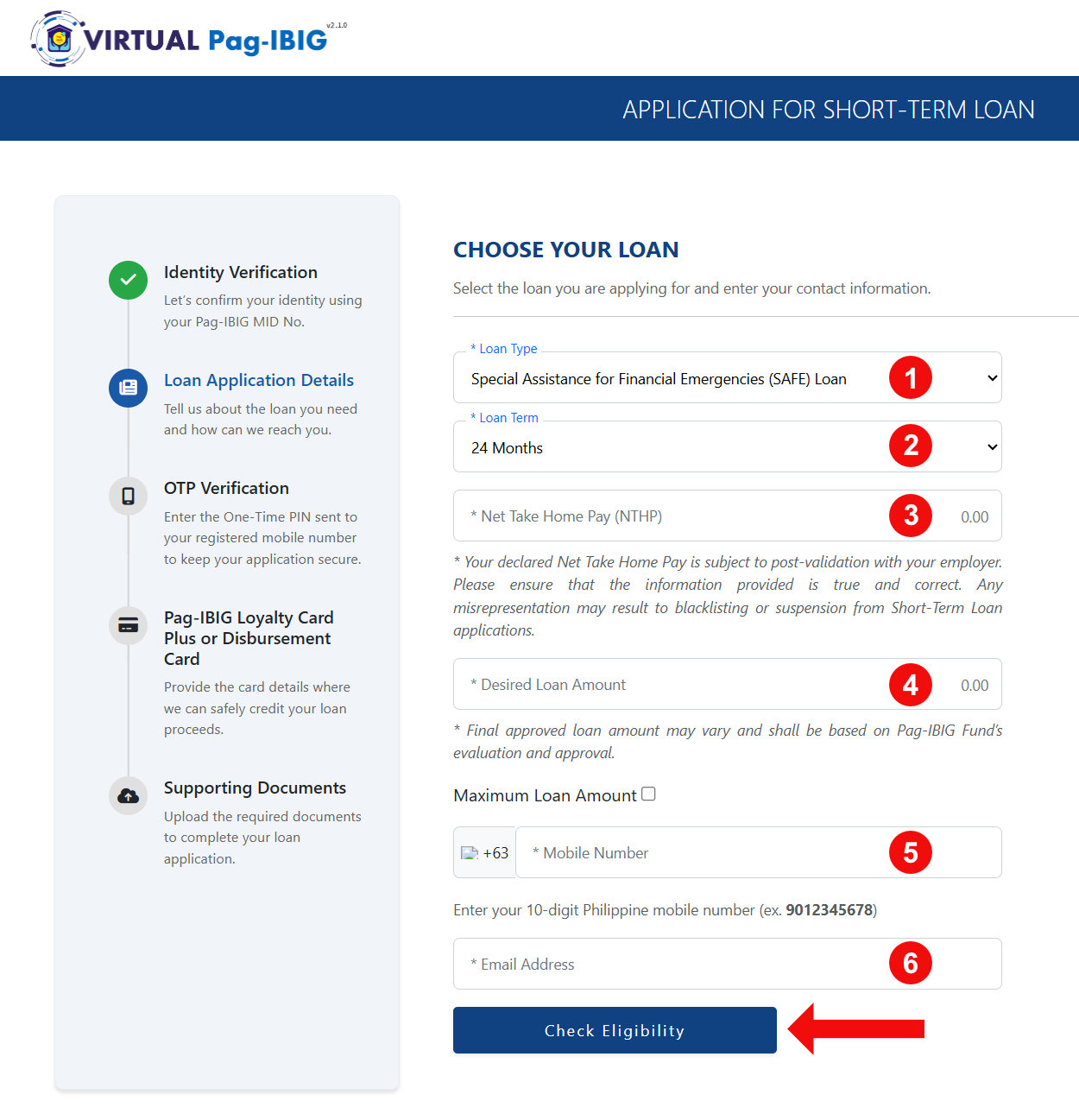
You may now enter your loan application details:
- Loan Type – Choose Special Assistance for Financial Emergencies (SAFE) Loan from the dropdown field.
- Loan Term – Select 12 or 24 months.
- Net Take Home Pay (NTHP) – Indicate your monthly take-home pay after deductions. This is subject to post-validation with your employer.
- Desired Loan Amount – Enter the amount that you’re willing to loan, up to a maximum of ₱10,000. The system will adjust this down automatically if your borrowable equity is lower.
- Mobile Number – Enter your 10-digit mobile number (e.g., 9123456789).
- Email Address – Loan status notifications will be sent here.
Click Check Eligibility when you’re done.
Step 4: Verify Your Mobile Number via OTP
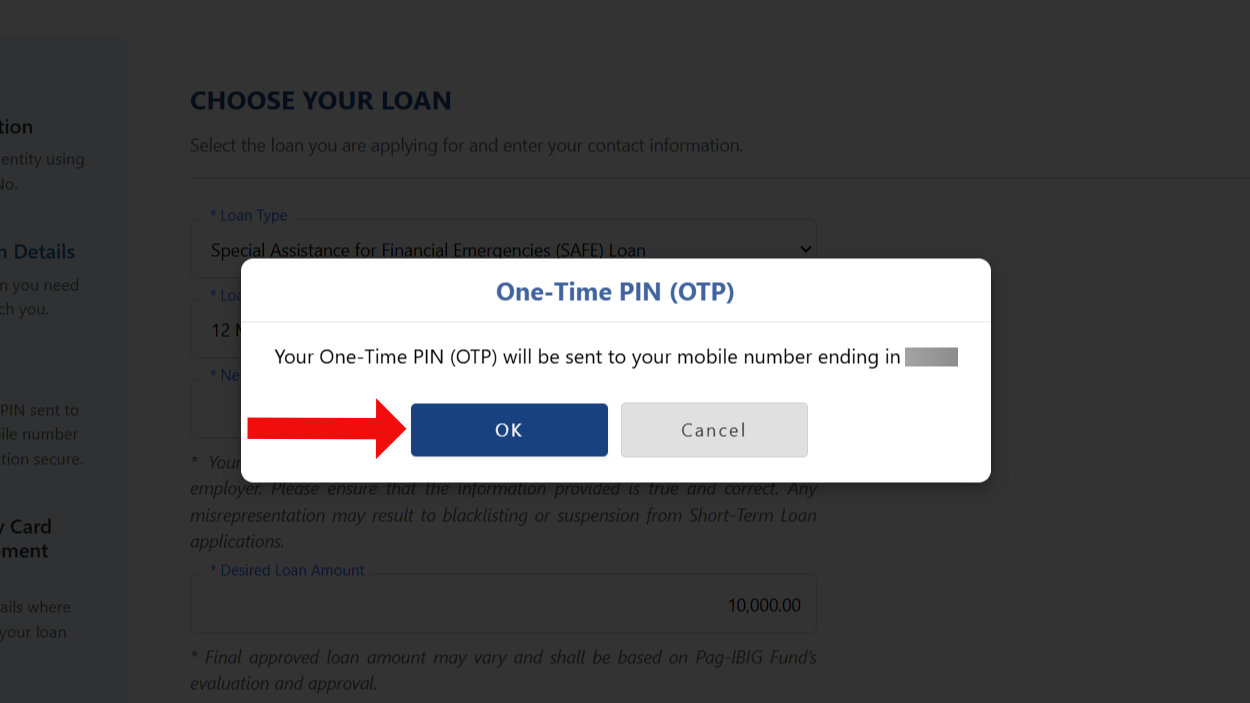
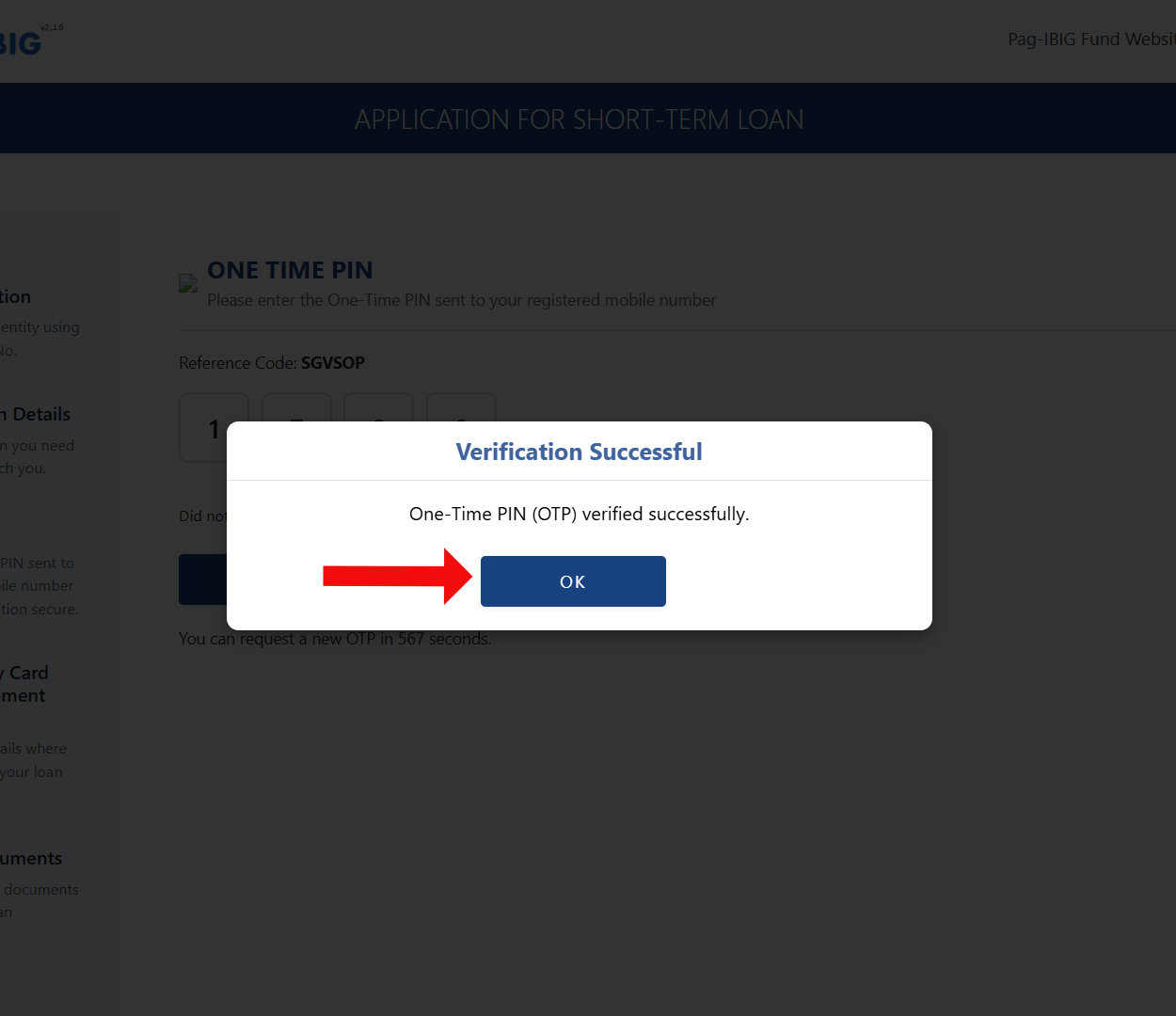
A dialog will tell you an OTP is being sent to your registered mobile number. Click OK, and then check your phone for the code.
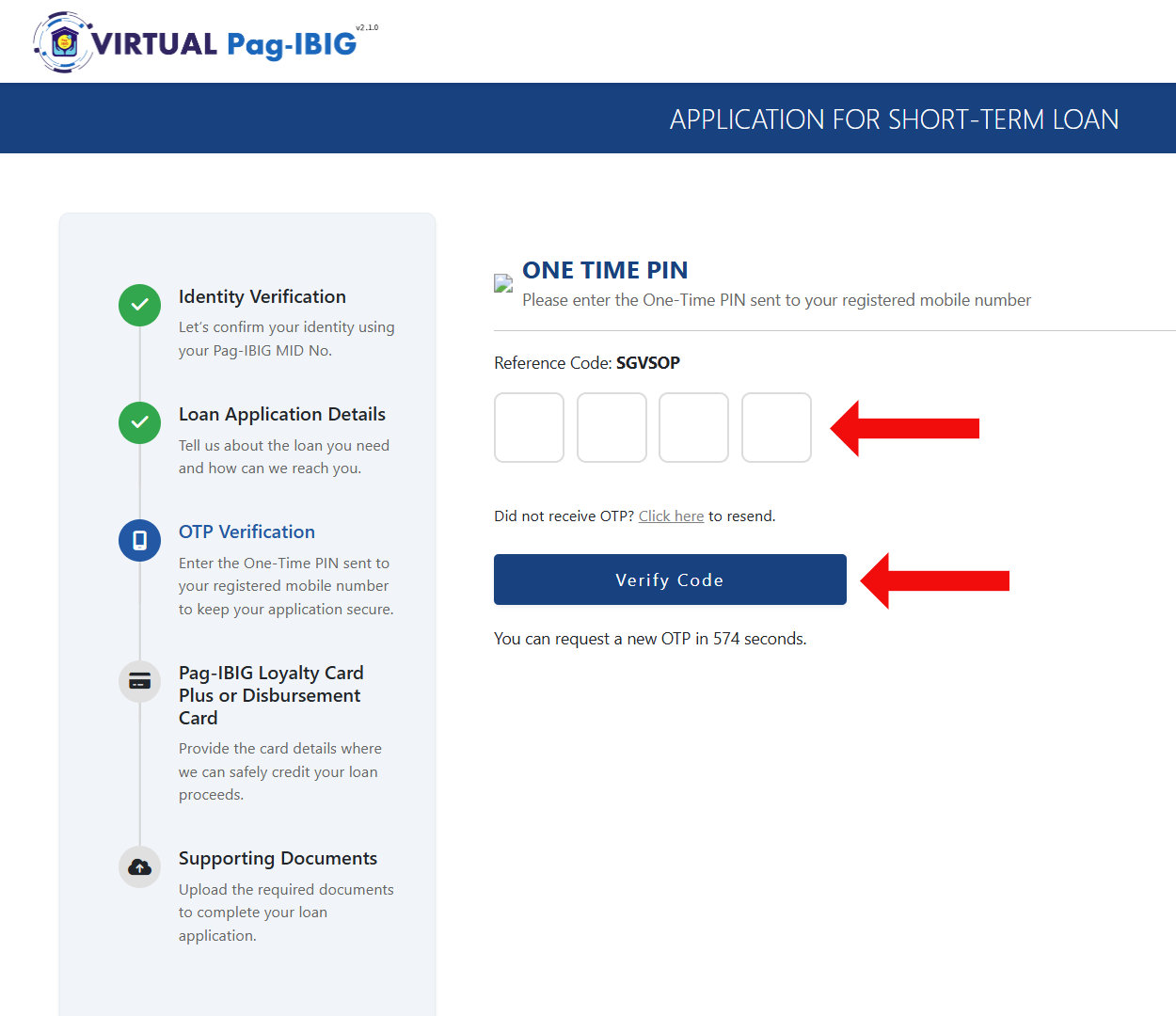
On the One-Time PIN page, enter the four-digit code you received and click Verify Code.
Note: The OTP usually arrives within a minute. If you didn’t receive a code, click the “Click here to resend” link to request a new one.
A “Verification Successful” popup will appear once the code is accepted. Click OK.
Step 5: Provide Your Disbursement Card Details
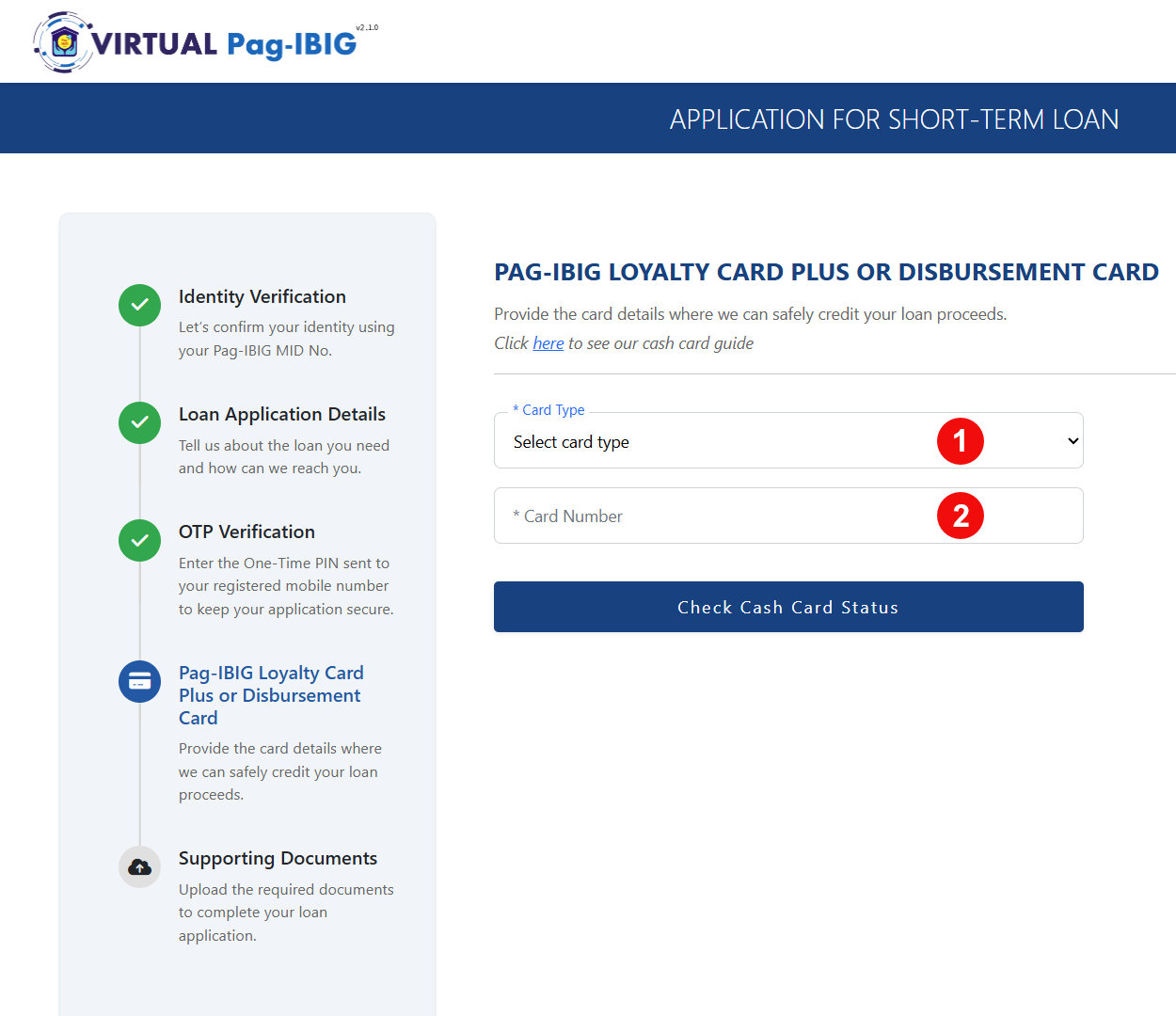
You’ll now be asked to provide the card details where Pag-IBIG will credit your loan proceeds:
- Card Type – Choose your disbursement card:
- Loyalty Card Plus – Asia United Bank (AUB)
- Loyalty Card Plus – UnionBank of the Philippines
- Cash Card – Landbank of the Philippines
- Card Number – The card number is usually located at the back of your card.
When you’re done, click Check Cash Card Status.
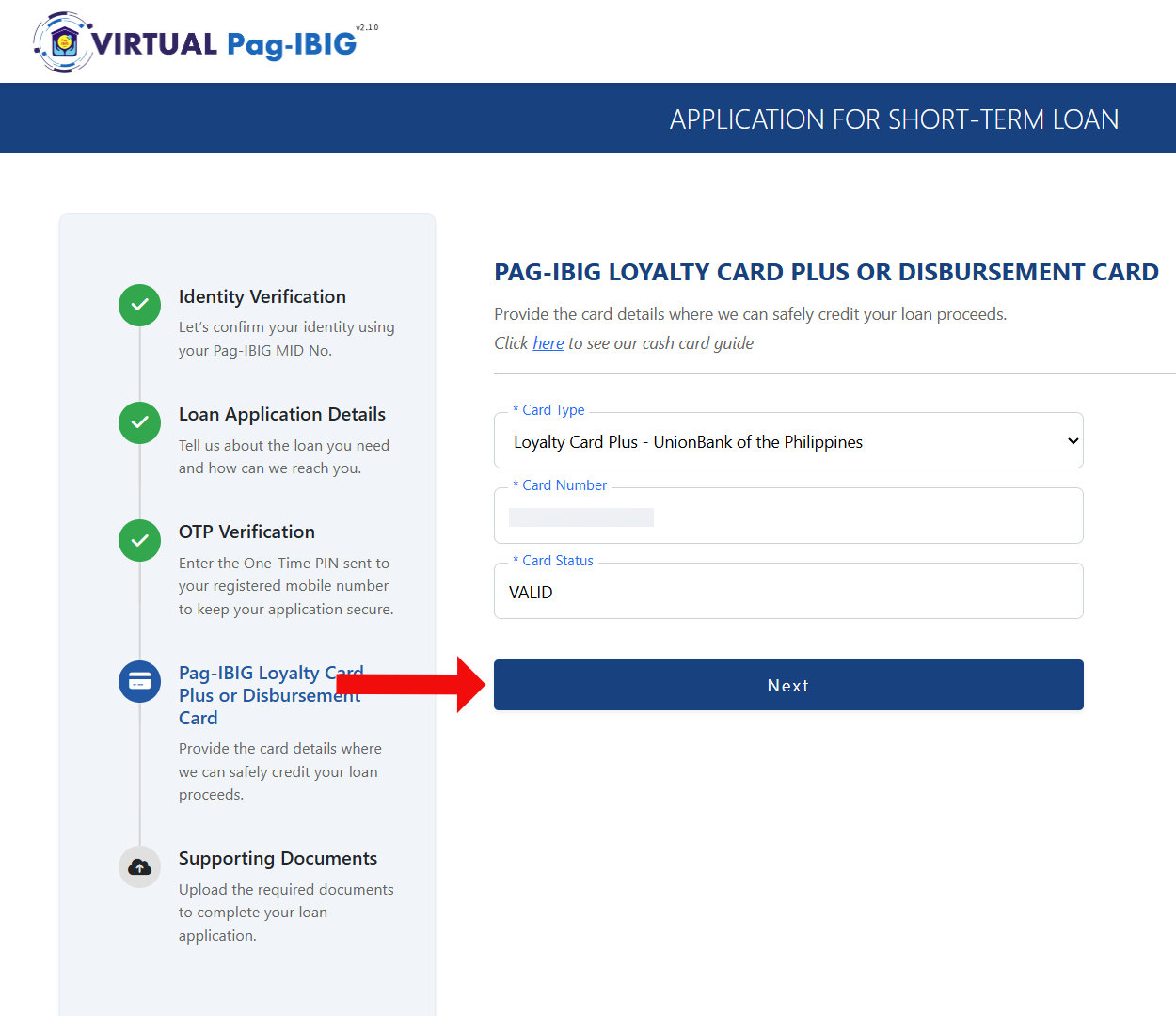
If the result comes back “Valid”, click Next to proceed. If it comes out as “Invalid,” double check that you selected the correct card type or entered the correct card number.
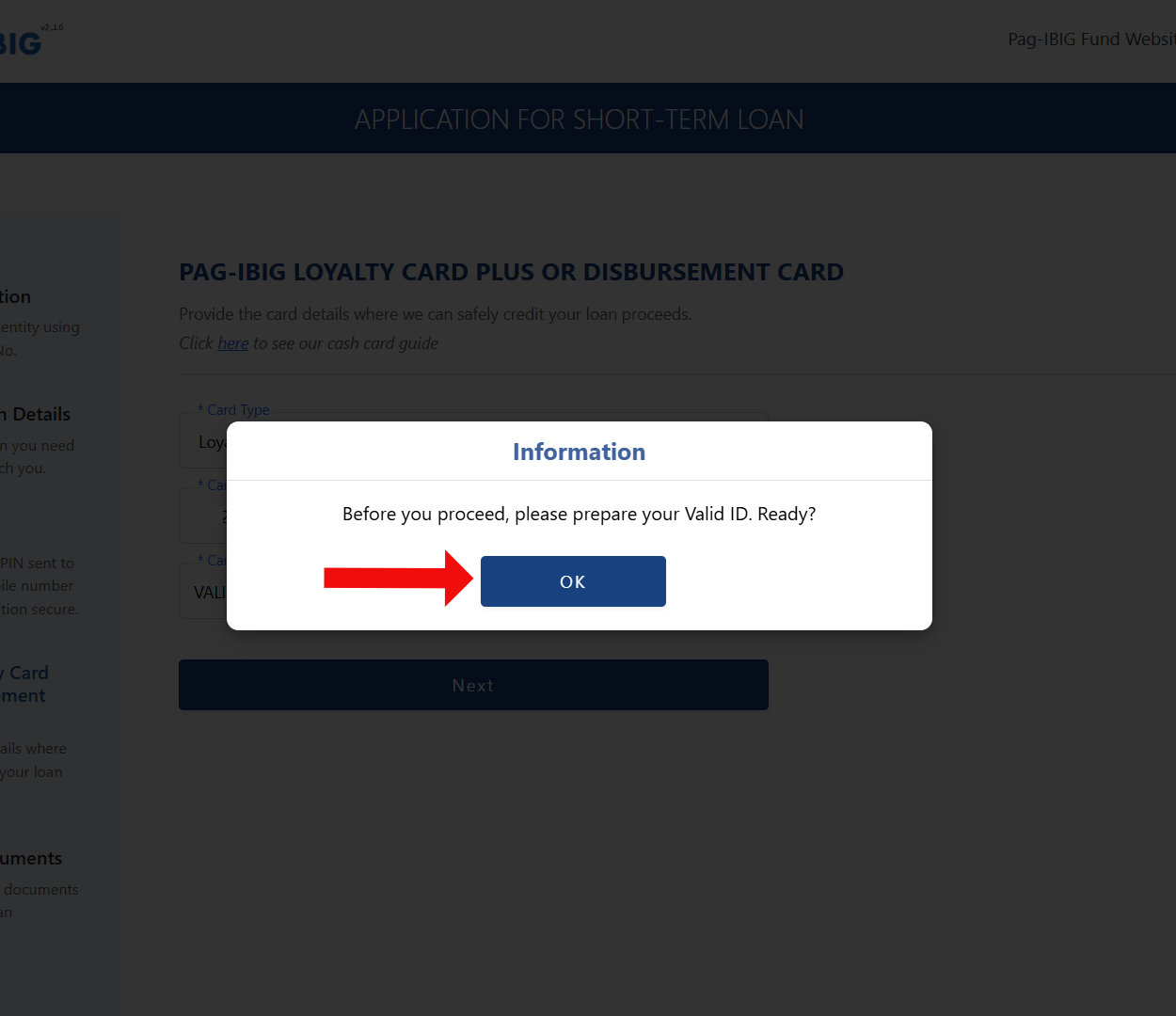
An information dialog will pop up reminding you to prepare your valid ID. Click OK once you have it ready, either physically in your hand or as a clear photo file.
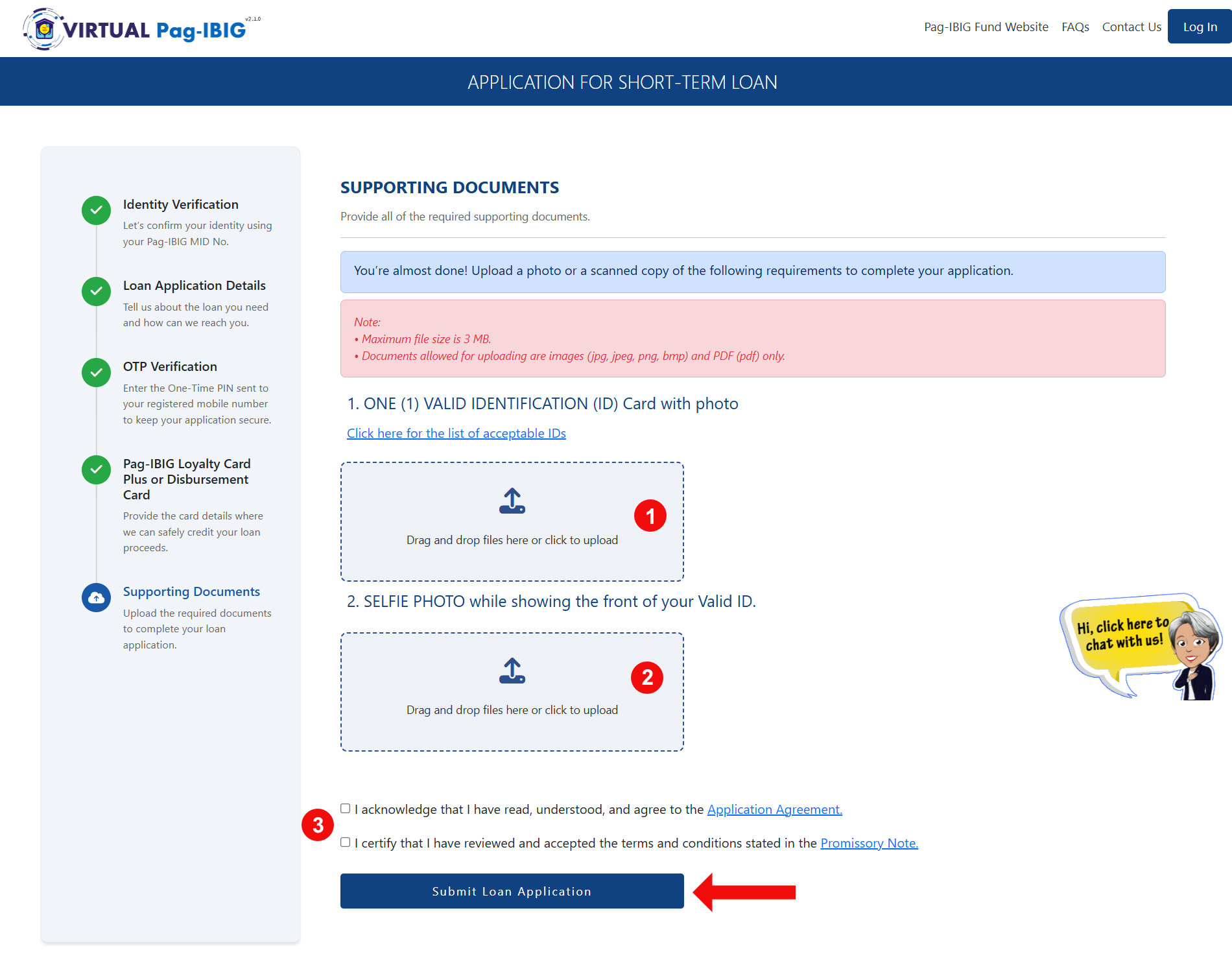
Step 6: Upload Your Supporting Documents
On the Supporting Documents page, you’ll need to upload:
- One valid ID with photo (clear scan or photo with all corners visible)
- A selfie photo while holding your valid ID, with the front of the ID visible in the same shot
Refer to this page for a list of valid IDs that are accepted by the Pag-IBIG Fund.
Check the boxes to confirm you’ve read and agree to the Application Agreement and the Promissory Note, then click Submit Loan Application.
Step 7: Application Submitted
Congratulations! Your Pag-IBIG SAFE Loan application has been submitted. Take note of the reference number and keep it for your records.
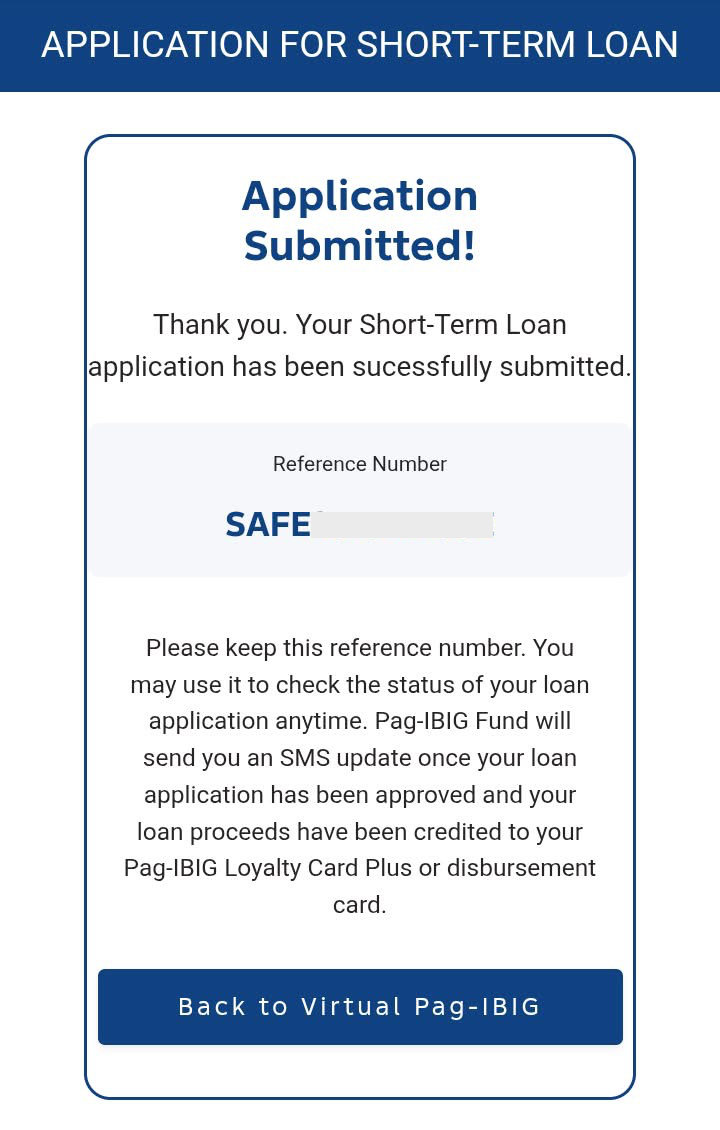
Once submitted, Pag-IBIG processes your application and credits the loan proceeds to your chosen disbursement card.
What Happens After You Submit
Once you submit your application, the system generates a reference number and sends a confirmation text message to your registered mobile number. This serves as proof that your application was received, so save or keep a copy of it for follow-up inquiries.
The Pag-IBIG Fund has not published an official processing timeline for the SAFE Loan. However, based on the processing pattern of comparable short-term loans such as the Calamity Loan, you can expect a relatively fast turnaround since it doesn’t go to your employer for approval. It proceeds directly to triage, after which it is routed to the Pag-IBIG branch that handles your case. Based on this pattern, processing typically takes around 2-3 business days.
Once a decision is made, members typically receive a text or email notification, and the application status updates to “Approved” (or “Cancelled,” if the application was denied). Loan proceeds are usually credited to the member’s Loyalty Card Plus or Cash Card within 1-2 days after approval.
Note: This timeline is based on members’ experiences with similar loan products rather than an official Pag-IBIG figure. Actual processing time may vary depending on application volume and the completeness of submitted documents.
How to Check Your Pag-IBIG SAFE Loan Application Status
Pag-IBIG has since updated its Loan Status Verification page to include SAFE Loan as a selectable category, so you can easily check your application status online. Here’s how to do it:
- Open the Virtual Pag-IBIG website.
- Select Apply for and Manage Loans.
- Click View Loan Status.
- Under type of loan, select SAFE Loan (SAFE).
- Enter your Pag-IBIG MID No. and Last Name, then click Submit.
- Your SAFE Loan status will be displayed, along with details like your loan application number and status date.
Note: You don’t need to login to your Virtual Pag-IBIG account to check your SAFE Loan status online. Just provide your MID number and last name as registered with Pag-IBIG.
If your status hasn’t updated after a week or more, or if something doesn’t look right, call the Pag-IBIG hotline at (02) 8724-4244 or use the chat icon on the Virtual Pag-IBIG site to follow up directly.
Frequently Asked Questions
Who can apply for the Pag-IBIG SAFE Loan?
Active Pag-IBIG members in good standing, including private and government employees, self-employed members, and OFWs, can apply as long as they meet Pag-IBIG’s existing contribution and borrowing equity requirements for short-term loans.
Can I apply for the SAFE Loan if I already have a Multi-Purpose or Calamity Loan?
Yes, but your available loan amount will depend on your remaining borrowable equity. Pag-IBIG requires that your combined outstanding short-term loans must not exceed 90% of your Regular Savings balance.
Do I need to go to a Pag-IBIG branch to apply?
No. The entire SAFE Loan application can be completed online through the Virtual Pag-IBIG STL Application page, including identity verification and document upload. Branch application remains available for members who prefer it.
How long does it take to receive the loan proceeds after approval?
Pag-IBIG has stated that approved loans are processed quickly, with proceeds credited directly to the member’s chosen Loyalty Card Plus or Cash Card. Processing time can vary depending on application volume and document verification.
What happens if I don’t have a Loyalty Card Plus or Cash Card yet?
You’ll need to apply for one before completing the SAFE Loan application, since the system requires a valid disbursement card status check. Both AUB and UnionBank issue the Loyalty Card Plus, while Landbank issues the Cash Card.
How can I check the status of my Pag-IBIG SAFE Loan application?
Yes. Pag-IBIG has added SAFE Loan as a selectable category on its Loan Status Verification page under Virtual Pag-IBIG. To check, go to Apply for and Manage Loans, click View Loan Status, select SAFE Loan (SAFE) as the loan type, then enter your Pag-IBIG MID number and last name to view your current status.
Wrapping Up
The Pag-IBIG SAFE Loan comes at a time when many Filipino workers are feeling the squeeze from rising fuel, electricity, and transport costs tied to the ongoing Middle East conflict. For members who would otherwise turn to 5-6 lenders or pawnshops to cover an urgent expense, this program offers a far more reasonable alternative: a manageable interest rate, a three-month grace period before repayment begins, and an application process that doesn’t require employer approval.
If you’re eligible for the Pag-IBIG SAFE loan, there’s little reason to delay. Review your eligibility, gather your documents, and submit your application well before the September 8, 2026 deadline. For any questions and concerns, call the Pag-IBIG 24/7 hotline (02) 8724-4244 or email [email protected].