• Home
  • About Us
  • Advertise
  • Archives
  • Contact Us
  • Smartphone Prices
Tuesday, July 14, 2026
Tech Pilipinas
  • Telecoms
  • Government
  • Fintech
  • Internet
  • Social Media
  • Tutorials
  • Entertainment
  • E-commerce
  • Deals
  • More
    • Gaming
    • Gadgets
    • Mobile
    • Apps
    • Business
    • News
    • Security
No Result
View All Result
  • Telecoms
  • Government
  • Fintech
  • Internet
  • Social Media
  • Tutorials
  • Entertainment
  • E-commerce
  • Deals
  • More
    • Gaming
    • Gadgets
    • Mobile
    • Apps
    • Business
    • News
    • Security
No Result
View All Result
Tech Pilipinas
No Result
View All Result

Home » Government » Your Guide to SSS Hotline and Contact Numbers (2025 Updated Guide)

Your Guide to SSS Hotline and Contact Numbers (2025 Updated Guide)

Here's how you can contact the Social Security System regarding your account

Luis Reginaldo Medilo by Luis Reginaldo Medilo
November 28, 2025
in Government
Follow us on Google
SSS hotline
15
SHARES
Share on FacebookShare on Twitter

If you have a question or concern about your Social Security System (SSS) account, it’s best to contact the SSS directly to get accurate answers to your queries. In this short guide, we will discuss the SSS hotline numbers and SSS contact numbers that you can use to reach the agency.

While Google and some websites offer plenty of information regarding your SSS account, sometimes it’s not sufficient. Calling SSS customer service will most likely answer your question or help solve your SSS-related problem because you’re getting information from the agency itself. You will get updated and accurate information about your SSS concerns such as contributions, benefits, loans, and other transactions.

In the past, the SSS hotline was available for only 16 hours per day but it was later extended to 24 hours per day. This means that you can even call them at midnight and an agent will promptly assist you.

Table of Contents

  • SSS Hotline Number and SSS Contact Number
  • IVRS Hotline Numbers
  • SSS International Toll-Free Numbers
  • SSS Text Inquiry
  • SSS Email and Social Media Accounts
  • Did This Help You?

SSS Hotline Number and SSS Contact Number

The best and quickest way to contact the SSS is to call them via their hotline numbers. You can call them any time of the day from 7:00 AM on Mondays to 7:00 PM on Saturdays. The SSS call center is closed on Sundays and public holidays.

SSS hotline

SSS Trunkline Number: (632) 8 920-6401

SSS Call Center Numbers: 8 920-6446 to 55

SSS Toll-Free Number: 1-800-10-2255777 (1-800-10-CALLSSS)

Before calling, be ready with your SSS number because the customer service agent will need it to check your records. If you don’t know or you forgot your SSS number, the agent will ask for verification such as your complete name, mother’s maiden name, and home address.

IVRS Hotline Numbers

The Interactive Voice Response System (IVRS) is an automated system that assists you with your SSS-related concerns. Members have to follow the computerized voice instructions to get answers to their basic questions.

IVRS Hotline Numbers:

  • Metro Manila: 917-7777
  • Baguio: 446-5902
  • Tarlac: 982-8739
  • San Pablo: 562-9289
  • Naga: 472-9795 and 472-8842
  • Cebu: 234-2053
  • Davao: 227-7273
  • Zamboanga: 992-2014

SSS International Toll-Free Numbers

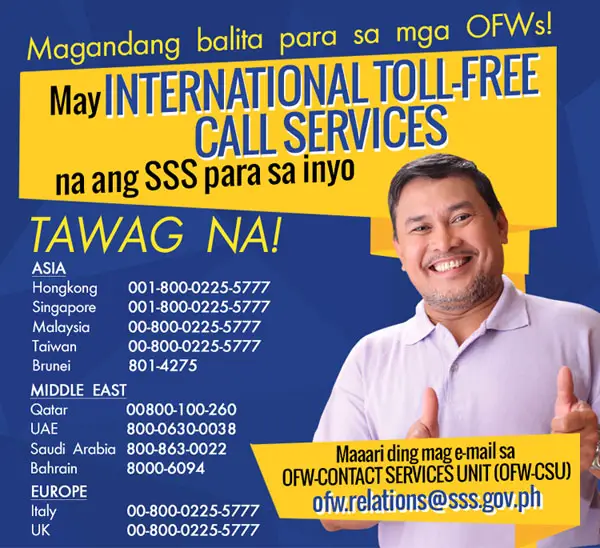
Overseas Filipino workers (OFWs) and Filipinos abroad can now call the SSS through their international toll-free numbers. At the moment, the service is available to only a few countries in Asia, the Middle East and Europe.
SSS international numbers

Asia Toll-Free Numbers:

  • Hong Kong: 001-800-0025-5777
  • Singapore: 001-800-0025-5777
  • Malaysia: 00-800-0225-5777
  • Taiwan: 00-800-0225-5777
  • Brunei: 801-4275

Middle East Toll-Free Numbers:

  • Qatar: 00800-100-260
  • United Arab Emirates: 800-0630-0038
  • Saudi Arabia: 800-863-0022
  • Bahrain: 8000-6094

Europe Toll-Free Numbers:

  • Italy: 00-800-0225-5777
  • United Kingdom: 00-800-0225-5777

SSS Text Inquiry
SSS contact number

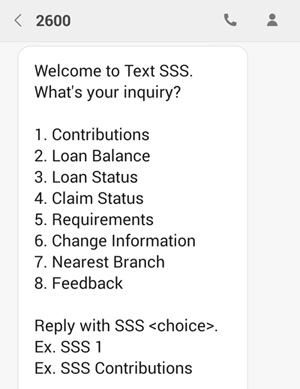
You can send an SMS or text message to inquire about your SSS contributions, loan balance, loan status, claim status, membership requirements, or to know your nearest SSS branch.

Simply text SSS to 2600 and follow the instructions in the text message you will receive. Each text message costs P2.50.

You may need to register by texting SSS REG <SS Number> <Date of Birth MM/DD/YYYY> to 2600. For example: SSS REG 1234567890 04/03/1981.

SSS Email and Social Media Accounts

If you don’t want to call or text, you can send SSS an email or a direct message on their social media accounts.

  • SSS Email Address: [email protected]
  • SSS Facebook Account: https://www.facebook.com/SSSPh
  • SSS Twitter Account: https://twitter.com/phlsss
  • SSS YouTube Account: https://www.youtube.com/user/MySSSPhilippines
  • SSS Website: https://www.sss.gov.ph

Did This Help You?

We hope that this handy guide will be of use whenever you need help with your SSS account or membership. Take note that some information might change without prior notice, so if a particular number is not working, then most likely it has been replaced. We’ll make sure to update this guide from time to time whenever a change is announced by the SSS.

If you have any questions or clarifications about this guide, please don’t hesitate to comment below.

Tags: Social Security SystemSSS
Add as a preferred source on Google

If you enjoyed reading this article, you can help support independent tech journalism by adding Tech Pilipinas as a preferred source.

Don't Miss An Article!
Sign up for our free newsletter and get updated every time we publish a new article. We work very hard to bring you the latest happenings in the Philippine and global tech scene.
We will not share your email address. We really hate spam!
Previous Post

Complete List of Philippine Bank Codes and SWIFT Codes

Next Post

DOH Concerned Over Rising Cases of Myopia in Children Due to Excessive Gadget Use

Luis Reginaldo Medilo

Luis Reginaldo Medilo

Luis Reginaldo Medilo is the founder and editor-in-chief of Tech Pilipinas. He has over 25 years of hands-on experience with computers and the Internet, and has been writing about Philippine technology for over a decade, covering fintech, telecoms, government digital services, and consumer gadgets.

You May Also Like

Government

How to Apply for the Pag-IBIG SAFE Loan Online (2026 Step-by-Step Guide)

June 23, 2026
Government

How to Bid on Foreclosed Properties via the Pag-IBIG Acquired Assets Online Public Auction (2026 Updated Guide)

June 16, 2026
Government

How to Apply for the Civil Service Exam Online via CSC eServe (2026 Step-by-Step Guide)

June 15, 2026
Government

How to Apply for the Civil Service Exam Online via OCSEAS (2026 Step-by-Step Guide)

June 10, 2026

Comments 2

  1. Mavery Keith Alfon says:
    7 years ago

    Hi. Gusto ko po sana malaman yung tungkol sa maternity 2 na hindi nakapag file previously that has ages of 10 and below? Please response. Thank you.

    Reply
  2. Rhodora Santos says:
    3 years ago

    Salamat po sa write up very useful.

    Reply

Leave a Reply Cancel reply

Your email address will not be published. Required fields are marked *

Latest Articles

SSS earmarks ₱40 billion for household solar panel loans

July 14, 2026

Bank of Commerce waives InstaPay, PESONet fees starting July 17

July 14, 2026

Best Antidetect Browsers for Agencies Managing Multiple Ad Accounts

July 14, 2026

Gatchalian flags widespread social media use among Filipino children

July 13, 2026

Dito posts fastest mobile Internet speeds in the Philippines in 2026

July 13, 2026

Featured Articles

passport appointment

How to Schedule a DFA Passport Appointment Online (2025 Updated Guide)

December 15, 2025

How to Apply for a UMID ID Card or SSS ID Online (2026 Updated Guide)

January 20, 2026

How to Apply for the DOST Scholarship Program (2025 Updated Guide)

December 15, 2025

How to Get a Pag-IBIG Loyalty Card Plus (2026 Updated Guide)

June 22, 2026

How to Get a PhilHealth ID Card (2025 Updated Guide)

December 15, 2025
Facebook Twitter Instagram Threads Youtube Pinterest

About Us

Tech Pilipinas is the Philippines’ digital lifestyle and technology magazine, helping millions of Filipinos keep up with the challenges of the fast-paced, ever-changing world of technology.

Office Address: General Maxilom Avenue, Cebu City, Cebu, Philippines
Email: [email protected]
Phone: +639055450299

Get it on Google Play

Browse by Category

  • AI
  • Apps
  • Business
  • Computers
  • Deals
  • E-commerce
  • Entertainment
  • Fintech
  • Gadgets
  • Gaming
  • Government
  • Internet
  • Mobile
  • News
  • Reviews
  • Security
  • Social Media
  • Software
  • Technology
  • Telecoms
  • Tutorials
  • Uncategorized
  • ZIP Codes

Popular Tags

BDO BIR BPI Facebook GCash Globe HDMF mobile wallet online banking online payments online shopping Pag-IBIG PayMaya PLDT Republika ng TM Smart Social Security System SSS Talk N' Text WiFi

Copyright © 2017-2026, Tech Pilipinas and Luis Reginaldo Medilo. All Rights Reserved.
Tech Pilipinas ® is a registered trademark with the Intellectual Property Office of the Philippines with Registration No. 4/2023/00502052.
No part of this site may be copied, reproduced, modified or distributed without the prior written consent of Tech Pilipinas.
Contact Us | Copyright Notice | Disclosure Policy | Disclaimer | Privacy Policy | Editorial Policy | Corrections Policy | Code of Ethics

  • Home
  • Categories
    • Apps
    • Business
    • Computers
    • Deals
    • E-commerce
    • Fintech
    • Gadgets
    • Gaming
    • Government
    • Internet
    • Mobile
    • News
    • Reviews
    • Security
    • Social Media
    • Software
    • Telecoms
    • Tutorials
    • Entertainment
  • About Us
  • Archives
  • Advertise
  • Contact Us
  • Smartphone Prices