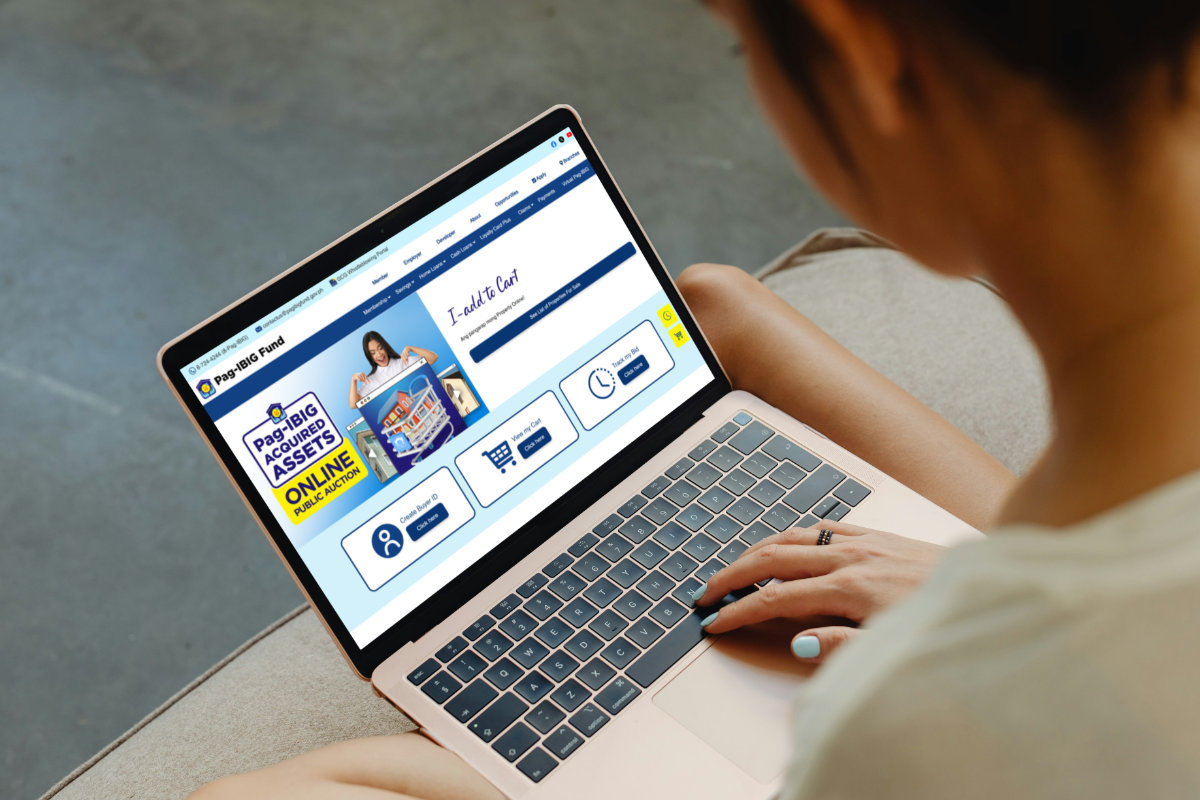
Most Filipinos dream of having their own house. Unfortunately, the costs of purchasing or building your dream home can be prohibitively expensive.
That’s why many smart and budget-conscious homebuyers are turning to foreclosed properties, and Pag-IBIG Fund has one of the best options available: the Acquired Assets Online Public Auction, or OPA. These are real properties – houses, lots, condominiums – that were repossessed by the Pag-IBIG and are now being sold at public auction, often well below market value. You can browse listings and place bids using a computer or cellphone with an Internet connection.
In this comprehensive guide, I’ll walk you through everything you need to know about the Pag-IBIG Acquired Assets OPA, including the requirements, eligibility, and a complete step-by-step walkthrough of the registration process so that you can get your Buyer ID and start bidding on repossessed properties.
Table of Contents
What is the Pag-IBIG Acquired Assets Online Public Auction?
The Pag-IBIG Fund – formally known as the Home Development Mutual Fund (HDMF) – regularly acquires properties from borrowers who defaulted on their housing loans. Instead of letting these properties sit idle and collect dust, Pag-IBIG offers them for sale to the public through a bidding mechanism called the Online Public Auction (OPA).
In the past, prospective buyers of foreclosed properties had to personally visit the Pag-IBIG branch and submit documents in order to bid on these assets. That all changed with the launch of the OPA in September 2024. Nowadays, there’s no need to go to the Pag-IBIG office to bid on foreclosed and repossessed properties; everything is done online through the OPA portal.
The OPA is open to both individual buyers and companies registered with Pag-IBIG Fund. Listings include residential lots, townhouses, condominiums, and house-and-lot properties across different parts of the Philippines.
Because these are foreclosed assets, starting bid prices are typically lower than what you’d find on the open market. You can even acquire properties through Pag-IBIG housing loan financing, making it a budget-friendly option for many Filipinos.
Before you can bid on any property, though, you’ll need to create a Buyer ID on the OPA platform. I’ll teach you how to do it step-by-step with minimal hassle.
Pag-IBIG OPA Registration Requirements
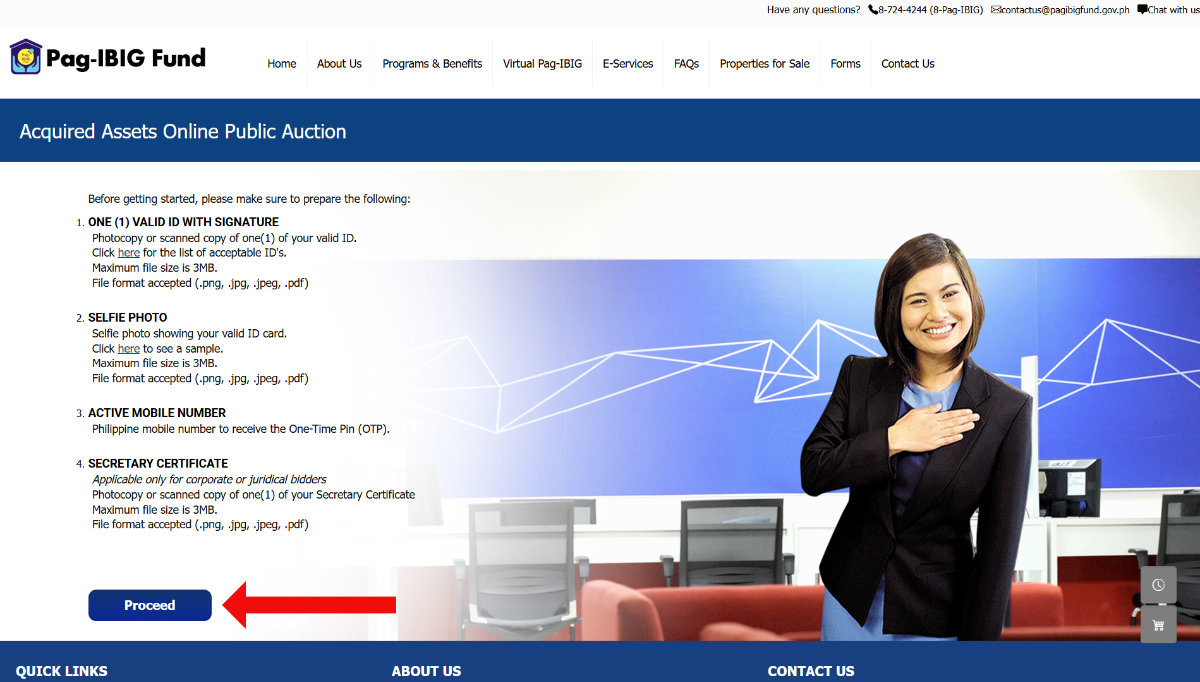
Before you proceed with the registration, prepare the following requirements:
- Valid ID with signature – Prepare a photo or a scanned copy of your valid government-issued ID (e.g., National ID, UMID, passport, driver’s license, NBI clearance).
- Selfie photo showing your valid ID – Also prepare a selfie photo of yourself holding your valid government-issued ID.
- Active mobile number – This is where you will receive a One-Time PIN (OTP) for account activation.
- Secretary certificate – This document is required only for corporate or juridical bidders. If you’re an individual, you don’t need this.
Note: Make sure that the file size of your documents are less than 3MB and that they are in .png, .jpeg, .jpg, or .pdf formats.
How to Register for the Pag-IBIG Acquired Assets OPA (Step-by-Step)
Now that your requirements are ready, let’s get started with the process of registering with the Pag-IBIG Acquired Assets Online Public Auction and getting your Buyer ID.
Step 1: Go to the Acquired Assets OPA Website
Open your browser and go to the official Pag-IBIG Acquired Assets Online Public Auction website.
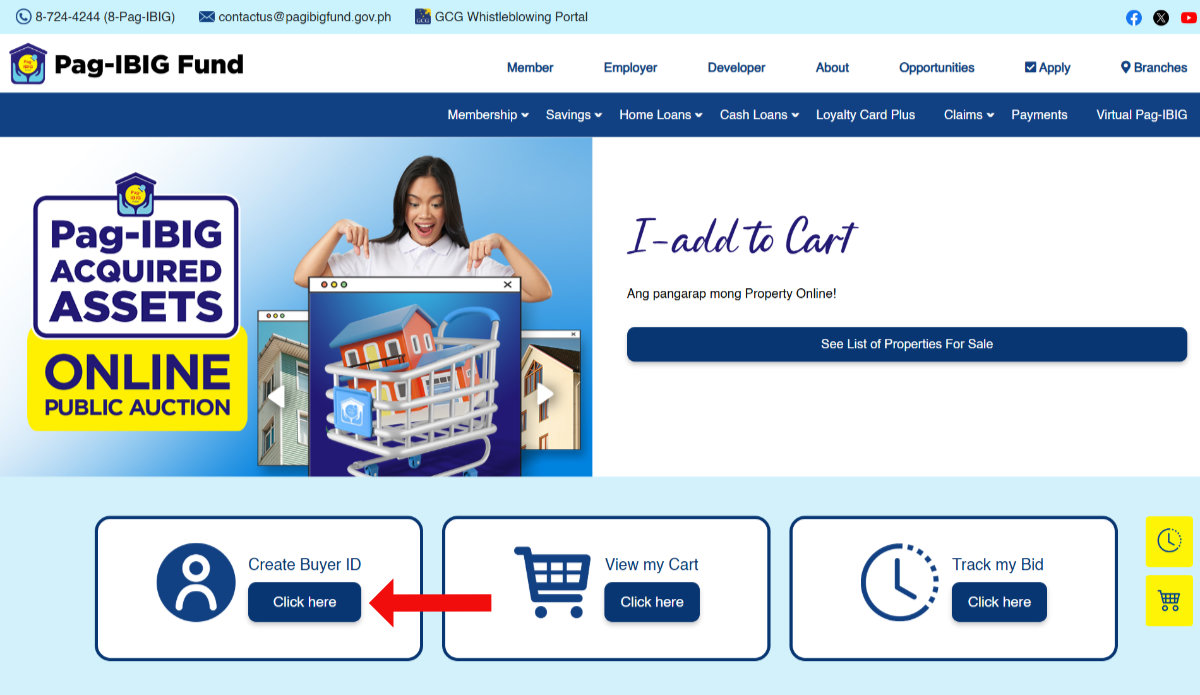
Step 2: Click “Create Buyer ID”
On the homepage, look for the “Create Buyer ID” section. Click the “Click Here” button to begin the registration process.
Step 3: Read the Requirements
A page will appear listing all the requirements and information you’ll need to complete your registration. Read through these carefully to make sure you have everything ready.
Once you’ve reviewed the requirements, click “Proceed” to continue.
Step 4: Select Your Bidder Type
You’ll be asked to choose between two bidder types:
- Individual – Select this if you’re registering as a personal buyer.
- Juridical/Company Bidder Registered with Pag-IBIG Fund – Select this if you’re registering on behalf of a business or company.
After selecting the appropriate bidder type, click “Proceed”.

Step 5: Enter Your Bidder Verification Details
The next screen asks you to enter your basic personal details for verification:
- Last Name – Provide your surname or family name.
- First Name – Enter your given name.
- Name Extension – Leave blank if you don’t have a name suffix such as Jr., III, IV.
- Middle Name – Check the “No middle name” box if you don’t have one.
- Date of Birth (mm/dd/yyyy format) – Click the calendar icon on the right to open the date picker.
- Phone Number – Enter your 10-digit mobile number starting with “9.”
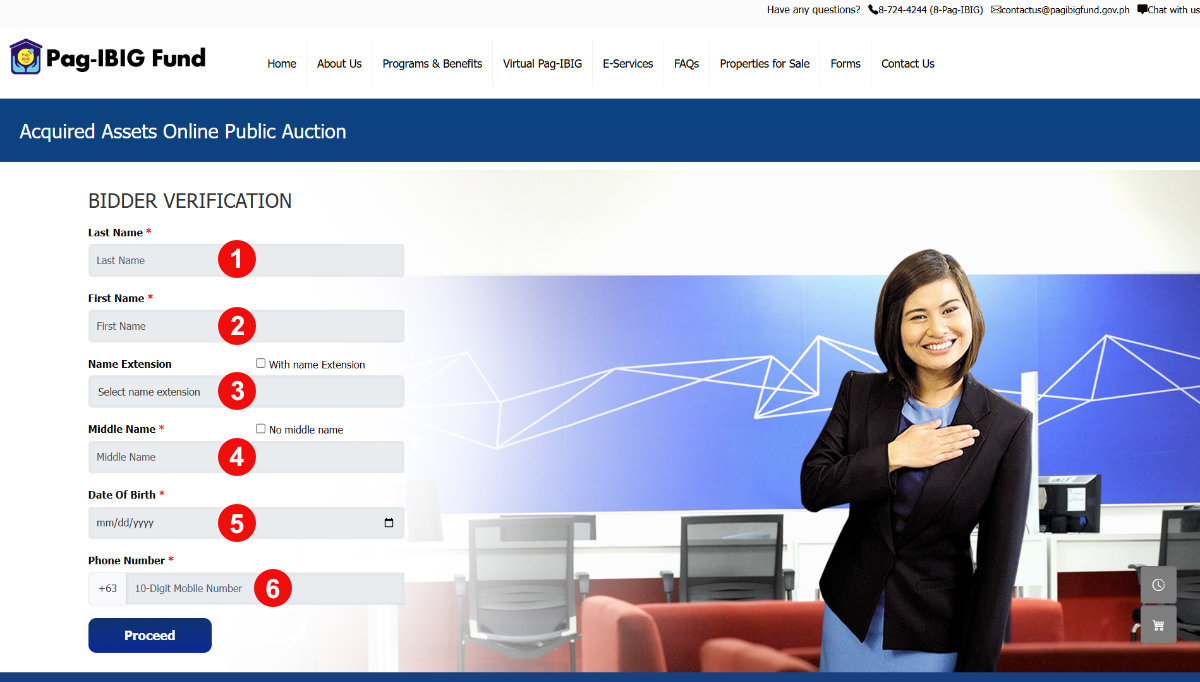
Double-check your mobile number before proceeding. An OTP will be sent here and you’ll need it in the next step. Once everything looks correct, click “Proceed”.
Step 6: Enter the OTP
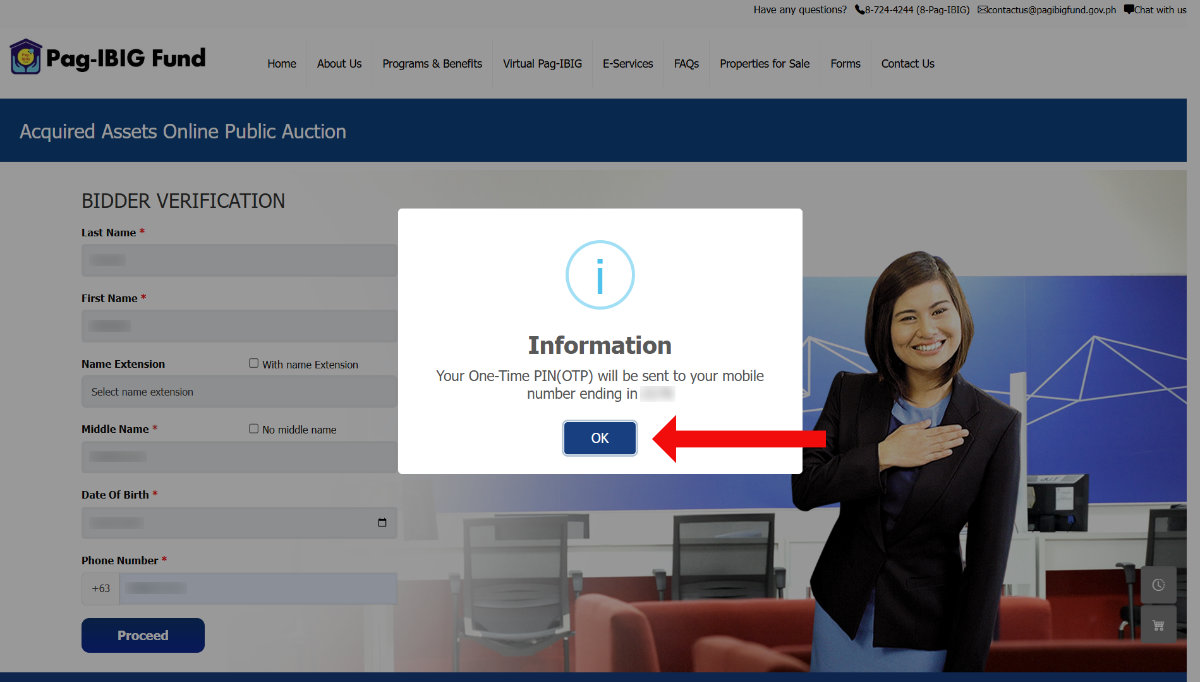
After submitting your bidder verification details, the system will send a One-Time PIN (OTP) to the mobile number you provided. A confirmation message will appear on the screen notifying you that the OTP has been sent.
Click “OK” to dismiss the notification, then check your SMS inbox for the OTP.
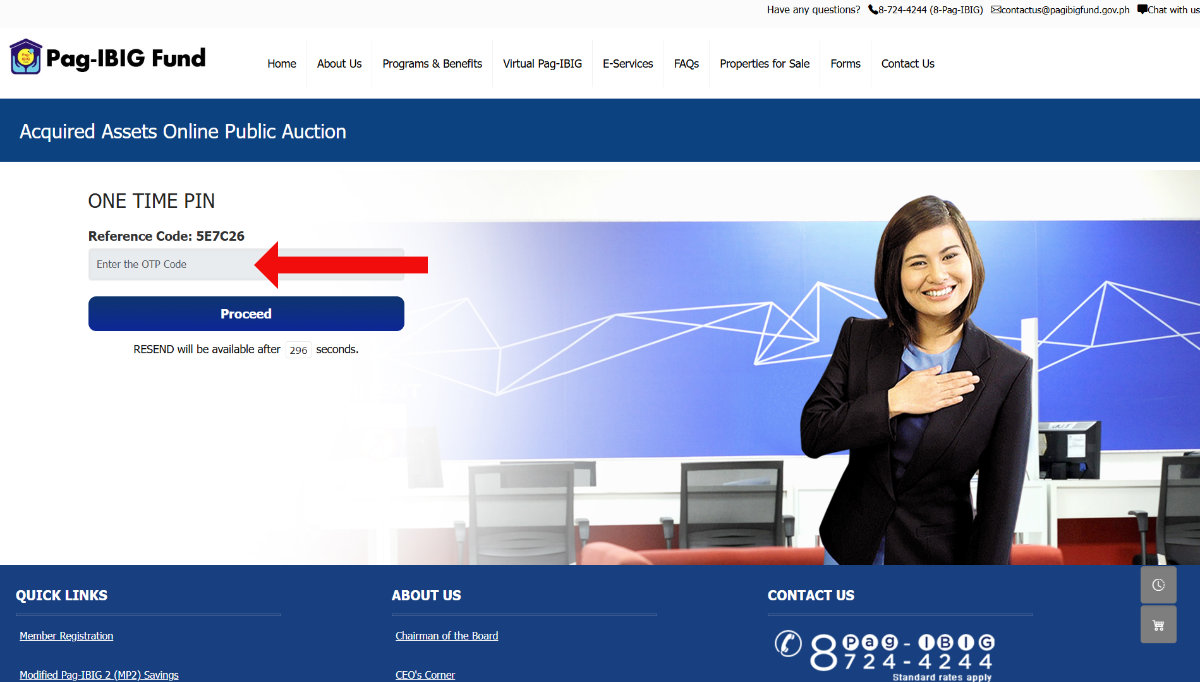
Type the OTP you received into the “Enter the OTP code” field. Once you’ve entered the code, click “Proceed” to continue to the next step.
If you didn’t receive the OTP, check if you have signal and request a resend. Make sure you entered the correct mobile number in Step 5.
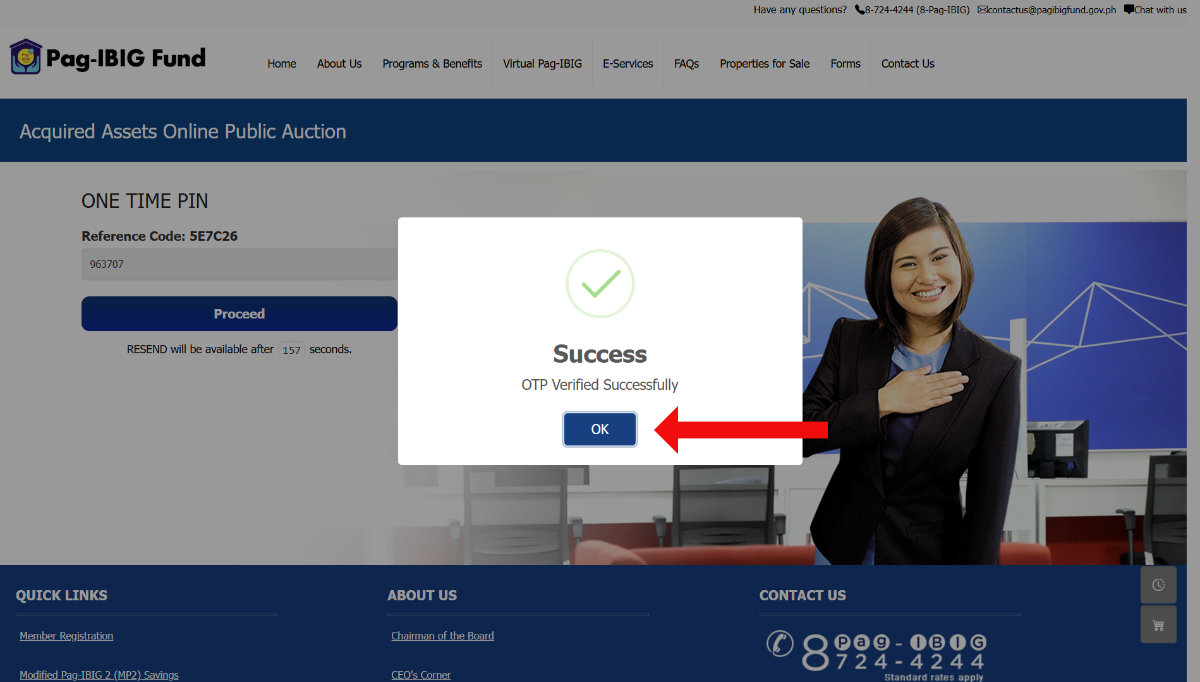
The system will confirm that your OTP has been verified successfully. A message will appear on the screen stating that your OTP verification was successful.
Click “OK” to proceed to the final registration step.
Step 7: Enter Your Bidder Information
This is where you fill in the rest of your registration details. The form will ask for your complete bidder information, which typically includes:
- First Name
- Last Name
- Middle Name
- Name Extension – Leave blank if you don’t have a name suffix such as Jr., III, IV.
- Gender – Select your sex at birth.
- Date of Birth
- Marital Status – Select your civil status (e.g., single, married).
- Citizenship – The default is “Filipino.”
- Pag-IBIG Member – Select “Yes” if you’re a member of the Pag-IBIG Fund.
- Permanent Home Address – Provide your permanent home address including region, province, city/municipality, and barangay.
- Present Home Address (optional) – If your permanent and present home addresses are one and the same, check the box for “Same as Permanent Home Address.”
- Pag-IBIG MID Number/RTN (optional)
- SSS/GSIS ID No. (optional)
- Tax Identification Number (TIN) (optional)
- Common Reference Number (CRN) (optional) – Read this article to know your CRN.
- Cellphone No.
- Personal Email Address
- Home Telephone No. Area Code (optional) – Check out this article for the list of area codes.
- Home Telephone No. (optional)
- Employer/Business Telephone No. Area Code (optional)
- Employer/Business Telephone No. (optional)
- Employer/Business Name (optional)
- Employer/Business Address (optional)
- Preferred Mailing Address – Choose where mail from the Pag-IBIG Fund will be sent to.
- Valid ID with Signature – Click “Upload ID” to upload a photo or scanned copy of your valid government-issued ID.
- Selfie Photo – Click “Upload Selfie Photo” to upload a selfie photo of yourself holding your valid government-issued ID.
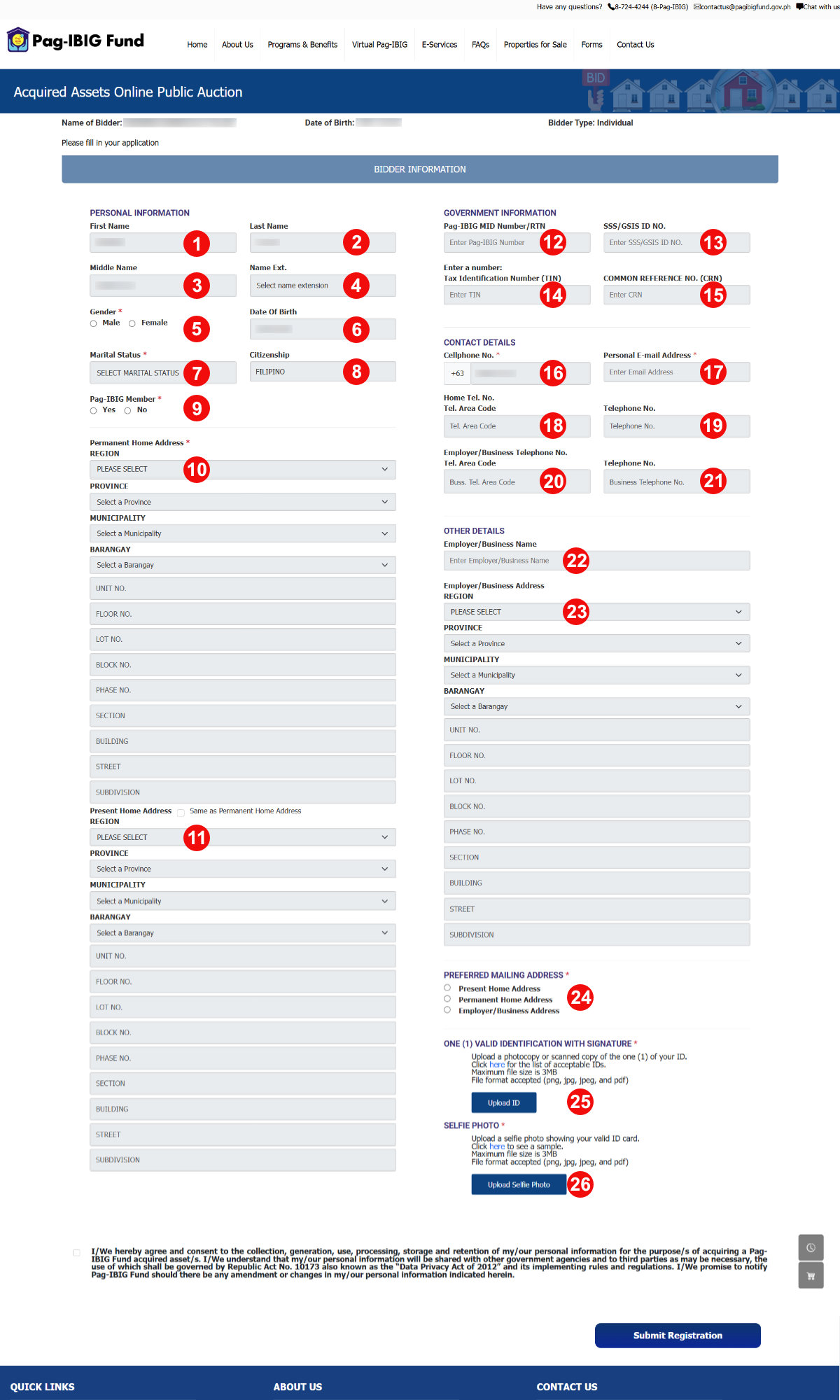
Take your time to fill out this form correctly and accurately. Don’t forget to check the box indicating your agreement to the data privacy and processing statement.
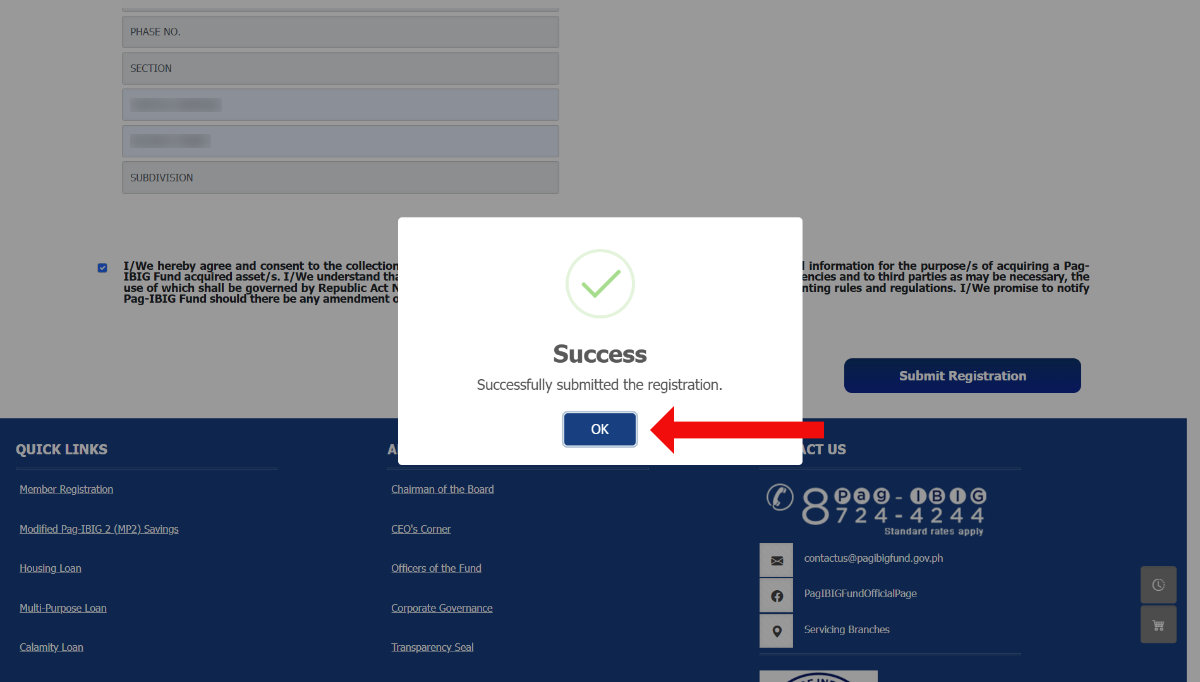
Once you’ve completed the form, click “Submit Registration”.
Step 8: Registration Complete
Congratulations, you’ve successfully submitted your registration to the Pag-IBIG Acquired Assets Online Public Auction! Click “OK” to continue.
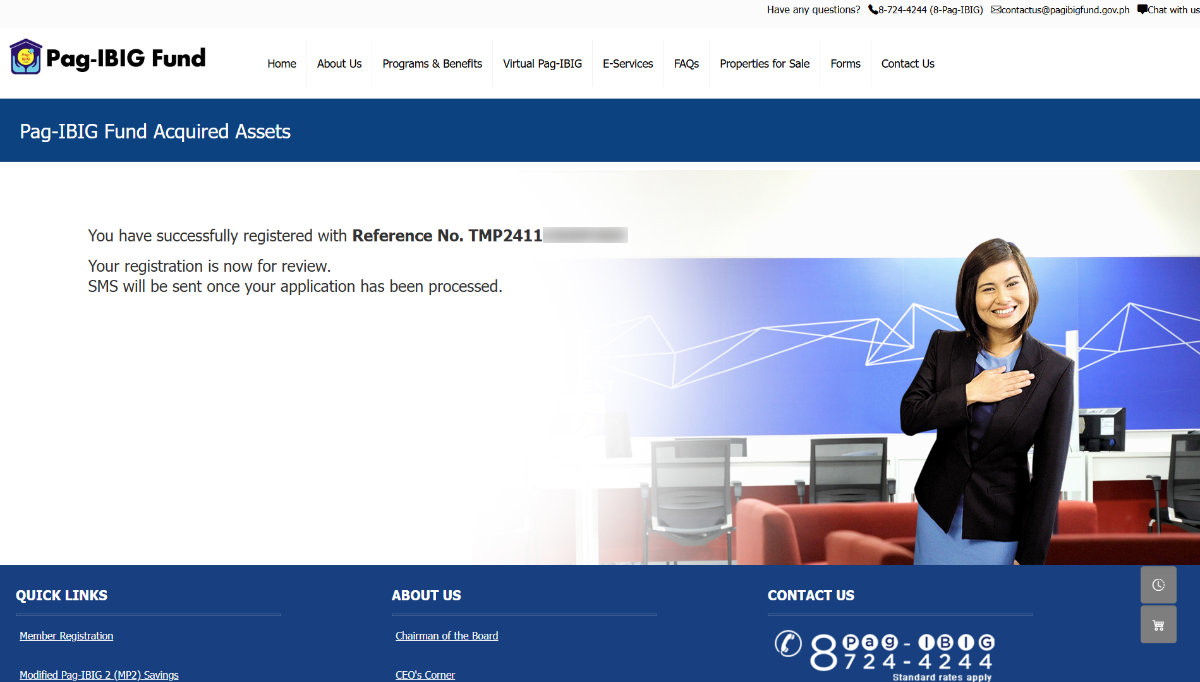
An SMS notification will be sent to your mobile number once your application has been processed and your Buyer ID has been activated. Processing may take a few working days.
If your application is approved, you will receive an SMS like this:
Congratulations, LUIS! Your registration has been approved! You may now submit your offer to bid at the Online Public Auction page in the Pag-IBIG website using your assigned Buyer ID 1234A567B89C.
What Happens After Registration?
Once your Buyer ID is activated, you can:
- Browse available properties – Log in to the OPA portal and filter listings by location, property type, occupancy status, area, and price range.
- View property details – Each listing includes property information, minimum bid price, and auction schedule.
- Place your bid – When an auction opens for a property you’re interested in, you can submit your bid directly through the platform.
- Monitor your bids – Track the status of your active bids through your OPA account dashboard.
Keep in mind that winning a bid doesn’t automatically finalize the purchase. You’ll still need to complete the required documentation and payment steps as specified by the Pag-IBIG Fund.
Tips for First-Time Pag-IBIG OPA Bidders
Do your research before bidding. Just because a property is a foreclosed asset doesn’t mean it’s automatically a great deal. Check the property’s location, condition, occupancy status, and comparable market values in the area before you commit.
Visit the property if possible. Pag-IBIG typically holds property inspection schedules before auctions. Take advantage of these inspections to assess the actual condition of the home.
Set a firm budget. Auction bidding can get quite competitive. Decide on your maximum bid and stick to it. Consider not only the bid price but also the transfer taxes, registration fees, and potential repair costs.
Watch out for occupied properties. Some foreclosed properties may still have occupants. The occupancy status of properties are declared on the OPA listing, but these may not be accurate. Make sure that you understand the legal implications before bidding on these.
Frequently Asked Questions
Is there a fee to register for the Pag-IBIG OPA?
No. Creating a Buyer ID on the Pag-IBIG Acquired Assets OPA platform is completely free. You only need to spend money if you’re the winning bidder and you decide to proceed with the purchase.
Do I need to be a Pag-IBIG member to register as a buyer?
Individual buyers are not required to be Pag-IBIG members to register and bid. However, if you plan to use a Pag-IBIG housing loan to finance your winning bid, you’ll need to be a Pag-IBIG member and meet the contribution requirements.
How long does it take for my Buyer ID to be activated?
Processing time varies, but expect to wait for 1-2 business days after submitting your registration. Pag-IBIG will send an SMS to your registered mobile number once your Buyer ID is activated.
What happens if my registration is not approved?
If your registration is unsuccessful due to incomplete or mismatched information, you can try registering again with the proper requirements.
How can I contact Pag-IBIG regarding my registration?
Should you have any questions about your registration, you may call the Pag-IBIG Fund at (02) 8724-4244 or send an email to [email protected].
Wrapping Up
The Pag-IBIG Acquired Assets Online Public Auction is one of the most practical ways for Filipinos to get started with home ownership, especially those with limited finances. Foreclosed properties are priced competitively, the bidding process is completely online, and registration is free.
Getting your Buyer ID is the first step, and as you can see, it only takes a few minutes to complete. Once you’re registered, take the time to browse through the listings, inspect properties personally, and do your due diligence before placing a bid.
I wish you luck in your homebuying journey! If you’ve already gone through the OPA registration or have questions about bidding, you may leave a comment below. I’d love to hear about your experience!