Valorant is the kind of game where your mic matters. You are constantly talking, calling out flanks, coordinating pushes, and warning teammates. So when I decided to test a voice changer during live ranked matches, I wanted to know one thing: would it actually hold up, or would it just get in the way?
I spent a week testing iTop Voicy across multiple sessions. Here is everything I noticed.
Why I Decided to Test This
I had seen voice changers mentioned in gaming communities before, but I always assumed they were more of a party trick than a real tool. Then a teammate used one during a casual match, and the audio quality genuinely surprised me. It did not sound cheap or distorted. That got my attention.
I looked into a few options and landed on iTop Voicy. It had good reviews, looked easy to set up, and, importantly, wasn’t going to slow my system down mid-match. That last part mattered a lot to me.
Getting It Set Up
I am not someone who enjoys spending an hour in settings menus before I can play. So I was relieved that this took less than five minutes from download to in-game use.
Here is exactly what I did:
- Step 1: Downloaded and installed iTop Voicy on my Windows PC.
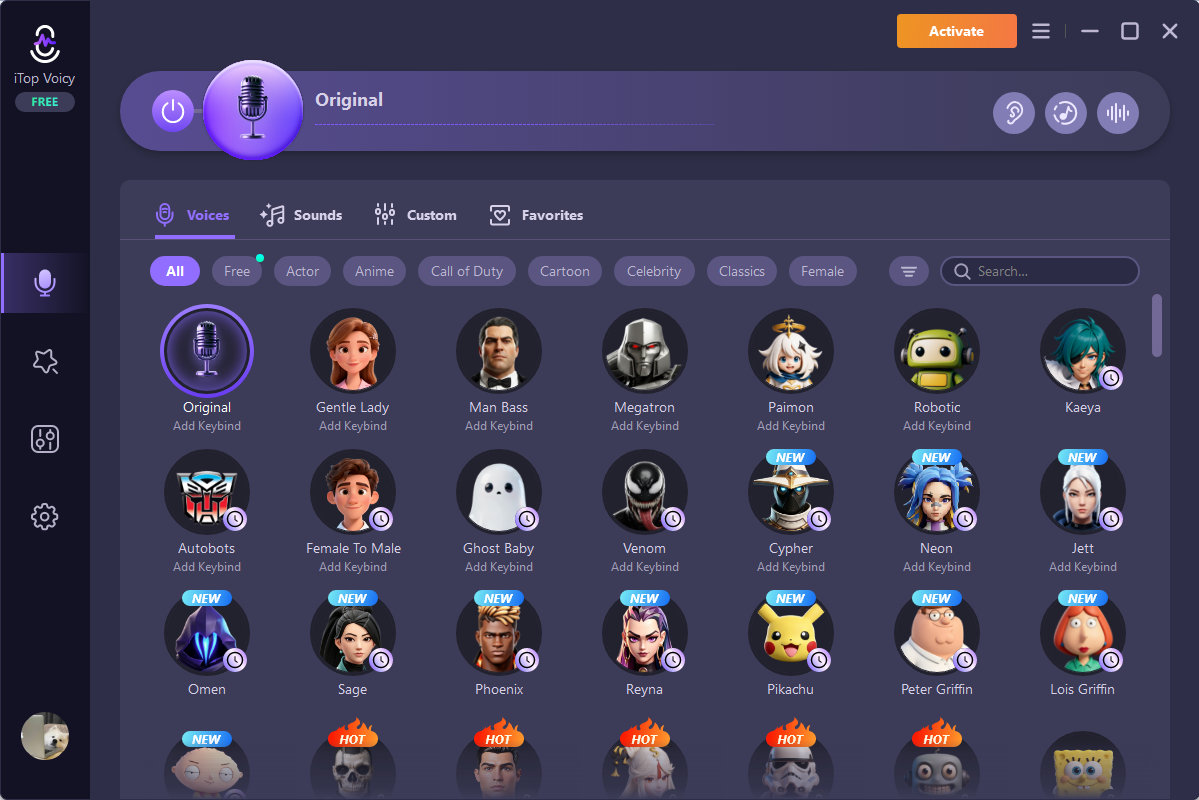
- Step 2: Opened the app and picked a voice effect. There are quite a few: robot, deep male, female, cartoon, and more. In the latest version, they also added VALORANT character voices such as Neon, Jett, Sage, and Phoenix, and these voices are currently free to use.

- Step 3: Went into Valorant’s audio settings and selected iTop Voicy as my microphone input.

- Step 4: Jumped into a match and started talking. The voice change happened instantly, in real time.
No driver issues, no confusing configuration. It just worked, which is honestly the best thing I can say about any piece of software.
How It Performed in Real Matches
This is where things got interesting. I wasn’t just testing audio quality in a quiet room; I was using it during actual ranked games, where clear communication is everything.
The real-time processing was smooth. When I called out an enemy, the changed voice came through without any delay. My teammates could understand me clearly, which was my main concern going in. A voice changer that makes you sound cool but impossible to understand is useless in a competitive game.
What I Genuinely Liked
A few things stood out after a full week of testing:
- No lag during live comms: In the Valorant game, even a half-second delay in your callout costs a round. There was none of that here.
- It didn’t affect my performance: My frame rate stayed the same. The app was lightweight.
- Works beyond just Valorant: I used it on Discord, too, without any extra setup. That kind of flexibility is useful.
- Quick to learn: I didn’t need a tutorial. The interface is clean and simple.
What Bothered Me
I want to be fair here.
Some of the more dramatic effects, the alien voice and the cartoon filter, made my speech harder to understand. Fun in a casual lobby, but not something I would use in ranked. If clear comms matter to you, stick to the subtler options.
The free version also has limits. You get a taste of what the app can do, but the better effects sit behind a paywall. It is not outrageously priced, but it is something to keep in mind before you download it, expecting the full experience for free.
Works only on Windows, at least for now.
Something I Did Not Expect
I was not planning to write this, but it felt honest to include. The voice effect I used actually changed how my teammates responded to me.
When I used a deeper voice filter, people responded to my callouts more quickly. When I switched to a lighter voice, the whole team felt relaxed. It is a small thing, but it reminded me how much tone shapes communication, even inside a video game.
So, Is It Worth It?
If you want a voice changer for PC that works reliably without slowing your game down, iTop Voicy is a solid choice. The setup is painless, the real-time performance is genuinely good, and it plays nicely with Valorant.
Curious, or do you just want to add something different to your sessions? It holds up better than I expected going in. The free version is enough to test the waters. Just know that the full experience costs a little extra.
For what it does, it does it well.