Decent housing is the dream of every Filipino family. Do you know that you can achieve your dream of affordable housing with the help of the Home Development Mutual Fund (HDMF) or commonly known as the Pag-IBIG Fund? Aside from housing loans and assistance, you can also find Pag-IBIG acquired assets which you can buy for a cheaper price below their market value.
What is a Pag-IBIG Acquired Asset?
The HDMF or Pag-IBIG fund was established as a national savings program that provides home financing to Filipinos who are otherwise not able to acquire housing on their own. The agency offers housing loans with interest rates that are lower than the prevailing market rate, at only 4.5% per annum with loan terms of up to 30 years.
Oftentimes, the borrower fails in his obligation to pay his housing loan repayments. A Pag-IBIG acquired asset is a property that is foreclosed or repossessed due to non-payment of housing loans by the owner. The property is auctioned off to the public at a lower price in order to recover the unpaid loan.
If you cannot afford to buy a brand new house, then you might be interested in buying a Pag-IBIG acquired asset. Pag-IBIG Fund acquired assets usually have prices lower than the market value. Furthermore, some Pag-IBIG acquired assets are located in prime locations such as urban and suburban areas. Such properties are in high demand though so you might want to act quickly to acquire them.
How to Check Pag-IBIG Acquired Assets Online
The Pag-IBIG Fund website offers a quick and easy way to find Pag-IBIG acquired assets that you can purchase. The list of Pag-IBIG acquired assets is updated every Tuesday and Friday for National Capital Region (NCR) accounts and every Friday only for provincial accounts.
Here are the steps to find Pag-IBIG acquired assets:
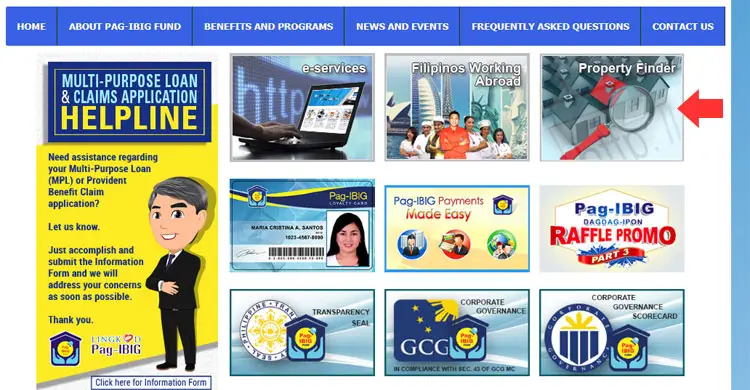
Step 1: Visit the Pag-IBIG Fund website and click “Property Finder.” Or you can go straight to the Acquired Assets page here.
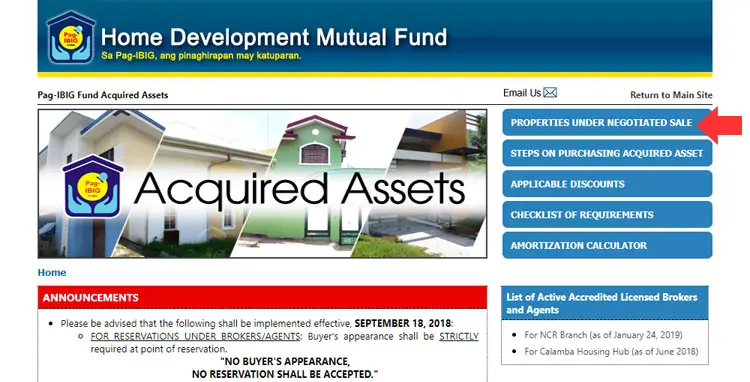
Step 2: On the Pag-IBIG Acquired Assets page, click “Properties Under Negotiated Sale” on the right side.
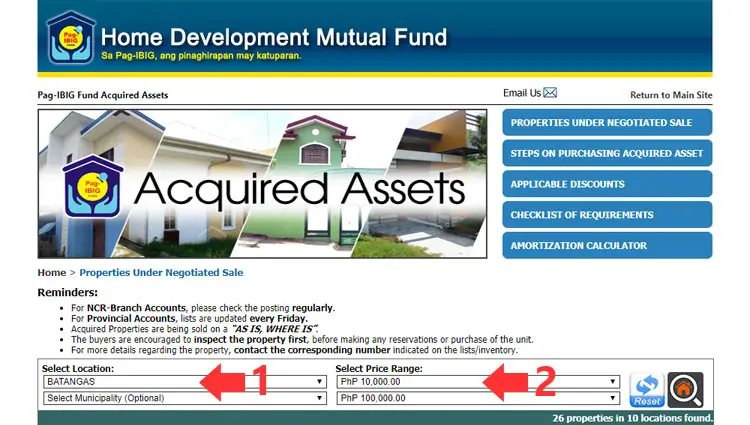
Step 3: Choose your desired location (province and municipality) from the dropdown box as well as the price range.
If there is a match for your search criteria, the page will automatically show all the available properties based on the location and price range.
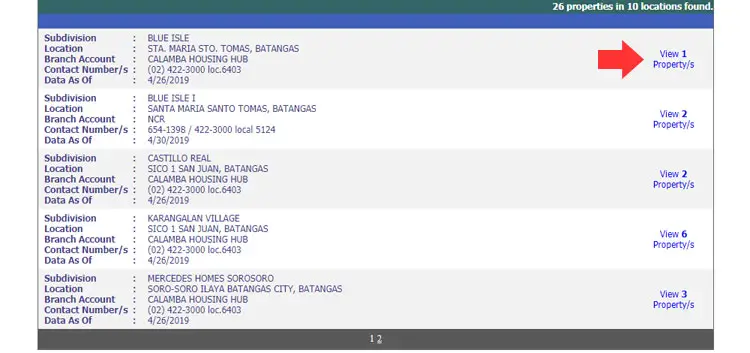
Step 4: The search results will give you some important information about the properties such as:
- Subdivision – the name of the subdivision where the property is located
- Location – the address of the subdivision
- Branch Account – the Pag-IBIG office in charge of the property and its sale
- Contact Number – the number of the Pag-IBIG office to call for inquiries
- Data As Of – the date in which the property information was last updated
Click the link on the right side of your chosen property for more information about it, as shown in the screenshot below.
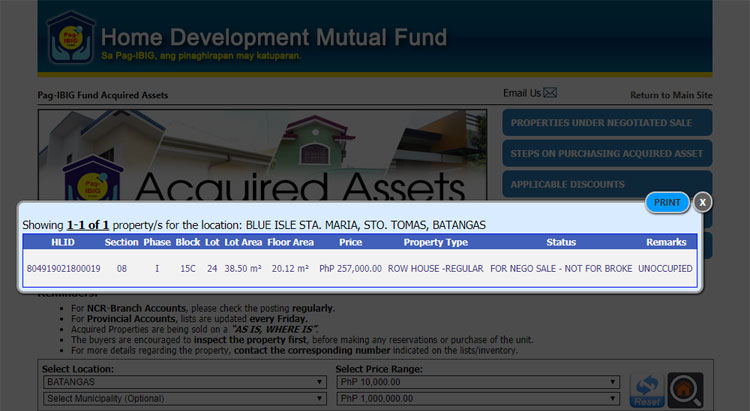
Step 5: A popup will appear with additional information about the property, such as lot area, floor area, price, property type, status and remarks.
The price indicated is the value of the property and is subject to adjustments based on the modes of payment which are cash, installment and Pag-IBIG housing loan. If you pay by cash, you get a 30% discount off the listed price which is payable within one month. For installment, you can avail of a 20% discount and payment terms of up to 12 months, with an interest rate of 1% per month or 12% per annum. Should you avail of a Pag-IBIG housing loan, you can get a 10% discount, payable up to 30 years, provided that the borrower’s age doesn’t exceed 70 years old at the date of loan maturity.
You can have the information printed by clicking the “Print” button.
Steps in Purchasing Pag-IBIG Acquired Assets Under Negotiated Sale
Purchasing a Pag-IBIG acquired asset is easier than buying foreclosed properties from banks. Since these properties are under Pag-IBIG, you can take advantage of a housing loan or an installment plan to pay for your purchase through affordable monthly payments.
Here are the steps to purchase a Pag-IBIG acquired asset:
- Reserve the property and pay the ₱1,000 non-refundable reservation fee.
- Bring one valid ID (company ID, driver’s license, passport, etc.) for verification.
- Choose from the following modes of payment:
- Cash – 30% discount, payable within one month
- Installment – 20% discount, payable up to 12 months at 12% interest per annum
- Housing loan – 10% discount for qualified members of the Pag-IBIG Fund, payable up to 30 years
- If you want to buy the property through a Pag-IBIG housing loan, you must submit the complete documentary requirements within 30 days from payment of the reservation fee. Pay the ₱2,000 processing fee and ₱100 documentary stamp tax.
- Receive the Notice of Approval of Loan and pay the one year advance insurance premiums within 30 days.
- Execute and submit the notarized Deed of Conditional Sale and other mortgage documents evidencing the loan in favor of the Pag-IBIG Fund.
Some Important Tips and Reminders
Buying Pag-IBIG foreclosed properties is not as easy as 1-2-3. As a buyer, you have to exercise due diligence before investing your hard-earned money. Here are some things to consider before you purchase Pag-IBIG Fund acquired assets:
- Inspect the property personally first before making a reservation or purchase.
- Properties are sold “as is, where is” or “what you see is what you get.” This means that some properties may have damages to them or may need some improvement to be habitable.
- Determine the reason for the foreclosure. If possible, try to meet with the previous owner or the neighbors to know the exact cause of the foreclosure.
- Seek expert advice. You can bring a real estate professional, engineer or architect to assess the property for you. They can tell you what improvements or repairs you need to make, if any.
- Calculate your costs. Aside from monthly payments, you might also consider incidental expenses such as local taxes, registration fees, and repair and maintenance costs. These things could add up quickly and become a financial burden. You can use an amortization calculator to know your monthly payments if you avail of a Pag-IBIG housing loan.
- Real estate brokers and agents are not allowed to accept or collect any payments including downpayments and reservation fees. Pay directly to the Pag-IBIG Fund office only.
Conclusions
Pag-IBIG acquired assets are a great way to put a roof above your head or to expand your investment portfolio. Real estate generally appreciates in value over time so those properties that you purchase for less than a million pesos could be worth several millions a few years from now. Buying a Pag-IBIG acquired asset is definitely a worthy investment that will pay off handsome dividends in the end.
If you have any questions or clarifications about Pag-IBIG acquired assets, you may contact the Pag-IBIG Fund at (02) 724-4244 or send an email to [email protected].