The SSS emergency loan is a short-term cash loan that the Social Security System (SSS) opens to its members whenever the national government declares a State of National Calamity or a State of National Emergency.
It carries 7% annual interest, charges no service fee, and gives the borrower six months before the first payment becomes due. If you’re reading this, you probably already heard that the application window is open and you want to know whether you qualify or not.
The emergency loan and the calamity loan are two different products. The calamity loan follows a list of declared areas, so your city or province has to be on it. The emergency loan, on the other hand, takes effect nationwide when a Presidential Proclamation or Executive Order places the entire country under a declared calamity or emergency.
This guide covers the current rules under SSS Circular No. 2026-003, which repealed the older Circular No. 2025-011. I walk you through the eligibility requirements, how the loanable amount is computed, and the application process inside My.SSS.
Disclaimer: This article is for general informational purposes only and does not constitute financial, legal, or professional advice. While every effort was made to ensure accuracy based on SSS Circular No. 2026-003 and other official sources available at the time of writing, SSS rules, deadlines, and procedures are subject to change without prior notice. Tech Pilipinas and the author of this article are not affiliated with, endorsed by, or acting on behalf of the Social Security System. Readers are encouraged to verify current requirements and deadlines directly with SSS through sss.gov.ph, the My.SSS portal, or an official SSS branch before making any financial decisions.
Table of Contents
Why the SSS Emergency Loan is Available in 2026
The current emergency loan window traces back to Proclamation No. 1077, which President Ferdinand Marcos Jr. signed on November 5, 2025, placing the country under a State of National Calamity for one year following the destruction caused by Typhoon Tino. SSS rolled out the loan program in December 2025, and the President announced it publicly on December 18, 2025.
Circular 2026-003 sets the availment period at one year from the SSS announcement, or for the duration of the declaration, whichever comes first, and SSS can reset the clock by rolling out a new ELP. That is what happened here. SSS Vice President Carlo Villacorta confirmed in a Radyo Pilipinas interview that the emergency loan remains open, with applications accepted until April 30, 2027.
Villacorta described the coverage as tied to members in areas under a state of calamity, whether from typhoons, flooding, or other disasters, rather than to a single fixed declaration, so the window covers qualified SSS members nationwide for as long as the extended period runs.
Who Can Apply for the SSS Emergency Loan
The loan is open to employed members, kasambahay and other household workers, self-employed members, voluntary members, non-working spouses, and land-based OFWs. Sea-based OFWs are not included.
To qualify for the SSS emergency loan, you need to have:
- At least 18 monthly contributions in total
- At least 6 contributions must be posted within the last 12 months before the month you apply
- If you are self-employed, voluntary, a non-working spouse, or a land-based OFW, you also need at least 6 posted contributions under your current membership type
- If you are employed, your employer must be up to date in paying and reporting your contributions and loan payments for the past two months
Take note that SSS counts posted contributions, which are the payments that already appear on your SSS record. A payment that you made a few days may not be posted yet, so check it in your My.SSS account.
You also need to meet all of these requirements:
- You are at least 18 years old and below 65 when you apply
- Your home address on your SSS record is a Philippine address
- Your mobile number and email address in your SSS record are updated
- You have registered a disbursement bank account or card with SSS to receive the money
Note: If you don’t have a disbursement account yet, read this guide to learn how to enroll a disbursement bank account in SSS DAEM.
Your application will be rejected if any of these apply to you:
- You have an SSS loan that is already past its due date and still unpaid
- You have missed more than three (3) monthly payments on any SSS loan
- You have an outstanding Restructured Loan, which is an old unpaid loan that SSS allowed you to repay under a new arrangement
- You were previously banned by SSS for committing fraud
- You already received a final benefit such as retirement or permanent total disability, unless that benefit was cancelled because you went back to work or recovered
How Much You Can Borrow
Your loan amount depends on your Monthly Salary Credit or MSC. Your MSC is not your actual salary. It is the salary bracket that SSS assigns to you based on how much you earn, and it’s what your contributions are computed from.
SSS takes the average of your last 12 posted MSCs, then applies a percentage based on how many contributions you have. The result is then rounded up to the nearest thousand.
| Number of Posted Contributions | You Can Borrow |
|---|---|
| 18 to 35 | Half of your average MSC |
| 36 or more | Your full average MSC |
For example, if your average MSC is ₱15,000 and you have 40 posted contributions, you can borrow ₱15,000. If you only have 25 contributions, half of ₱15,000 is ₱7,500, which rounds up to ₱8,000.
You can also apply for less than your maximum if you want a smaller monthly payment. SSS releases whichever is lower: your computed maximum or the amount you asked for.
You may have seen news reports saying the loan goes up to ₱20,000, and there’s a reason why. The highest MSC in 2026 is ₱35,000, but only the first ₱20,000 of it belongs to the regular SSS program.
Anything above ₱20,000 goes to a separate retirement savings fund called WISP. Since this loan is computed only from the regular SSS program, ₱20,000 is the ceiling no matter how big your salary is.
If you still owe money on a previous emergency loan or calamity loan, SSS subtracts that balance from your new loan first. Whatever is left is credited to your account.
How to Apply for the SSS Emergency Loan Online
Follow this step-by-step guide to apply for the SSS emergency loan online:
Step 1: Login to My.SSS and Open the Emergency Loan Page
Open the My.SSS portal and login to account with your User ID and password. If you forgot your login credentials, read this article to learn how to retrieve them.
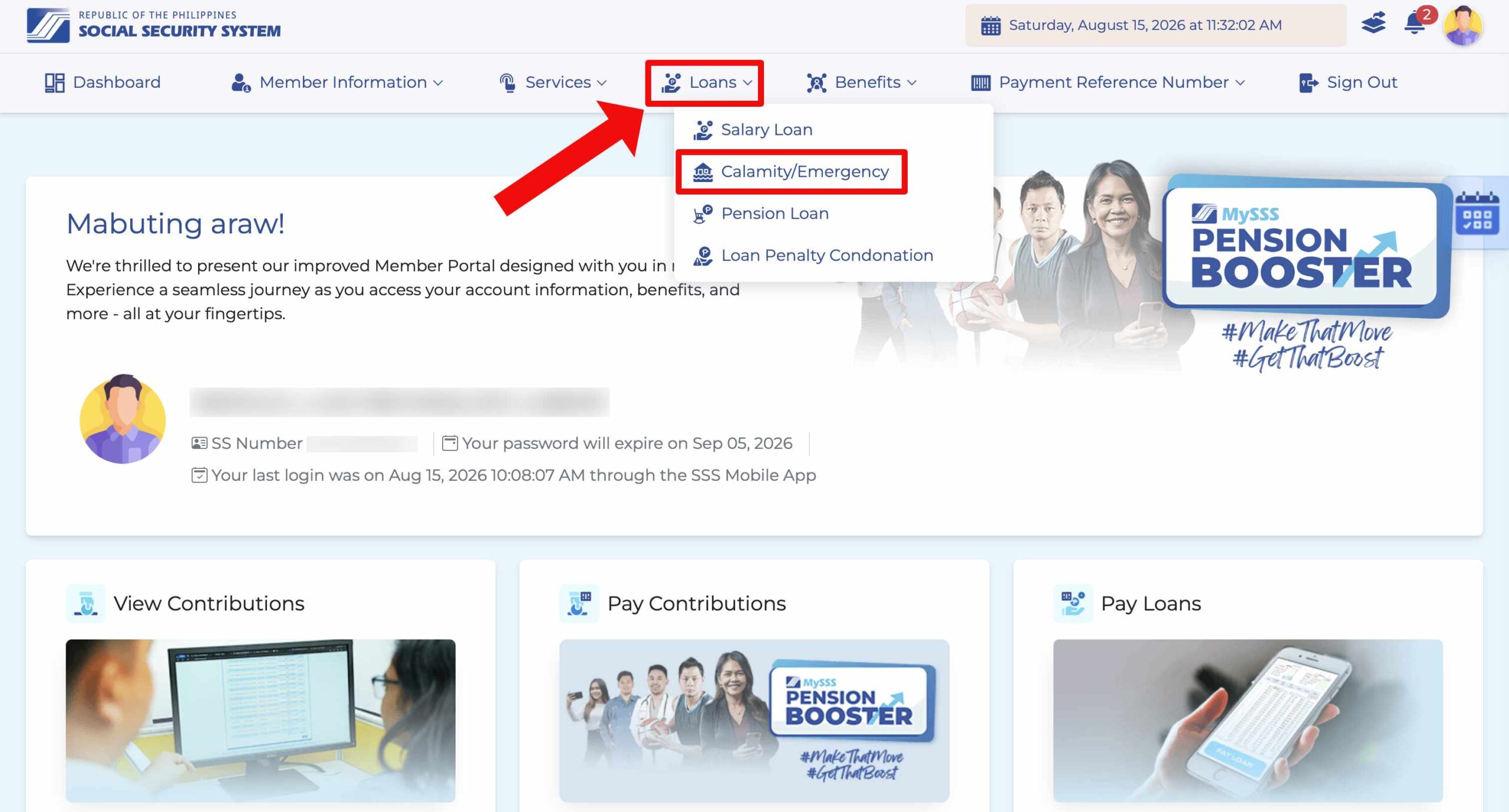
Once you’re logged in, click Loans in the top menu, and then select Calamity/Emergency from the dropdown. This brings you to the Loan Application page. Read the important reminders at the top, particularly the rules on your disbursement bank account, and then scroll down.
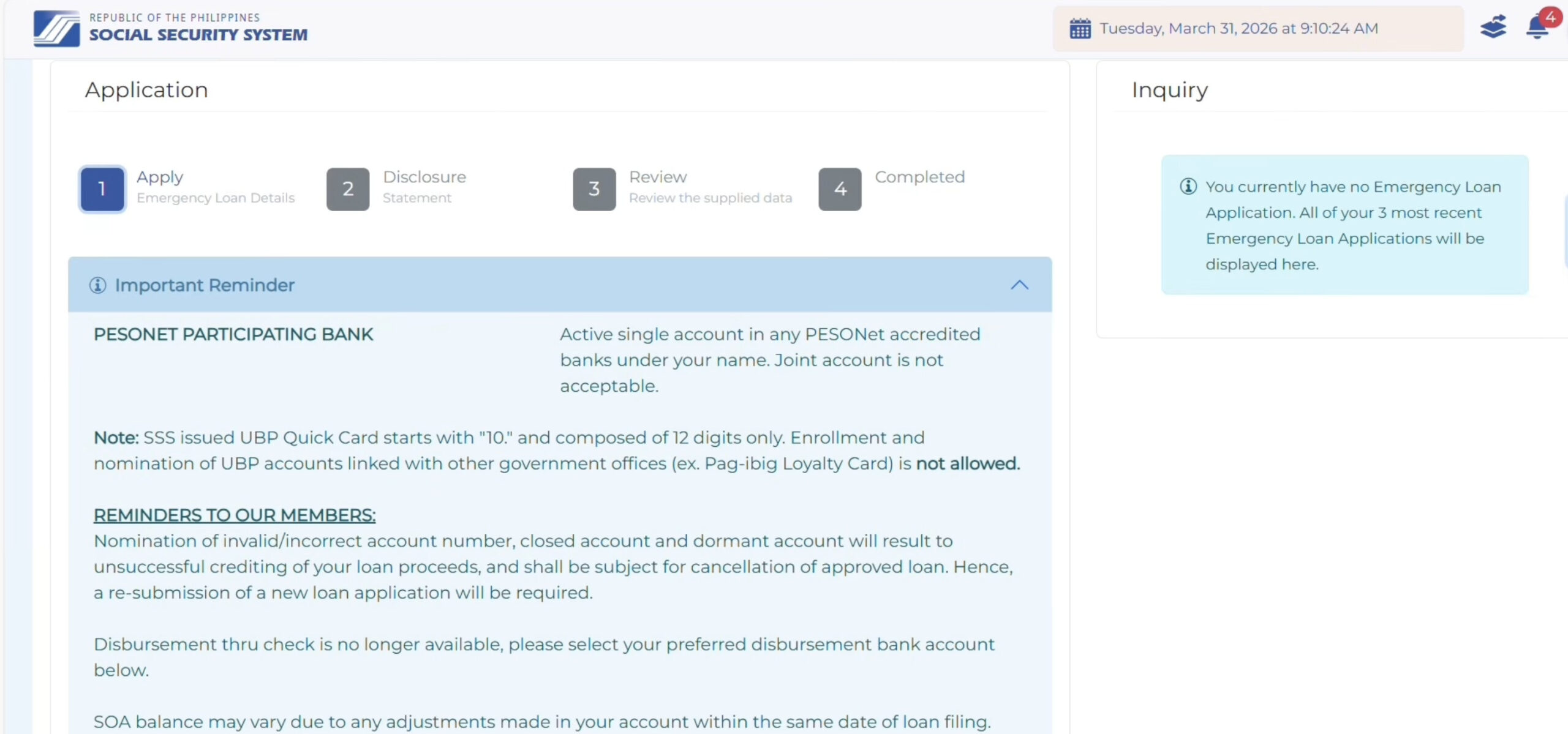
Step 2: Enter Your Loan Amount and Disbursement Bank
Under Loan Amount & Disbursement Bank, select “Emergency Loan” in the Calamity/Emergency field, enter the amount you want to borrow in the Loanable Amount field, and choose your Disbursement Bank. Click Next when done.
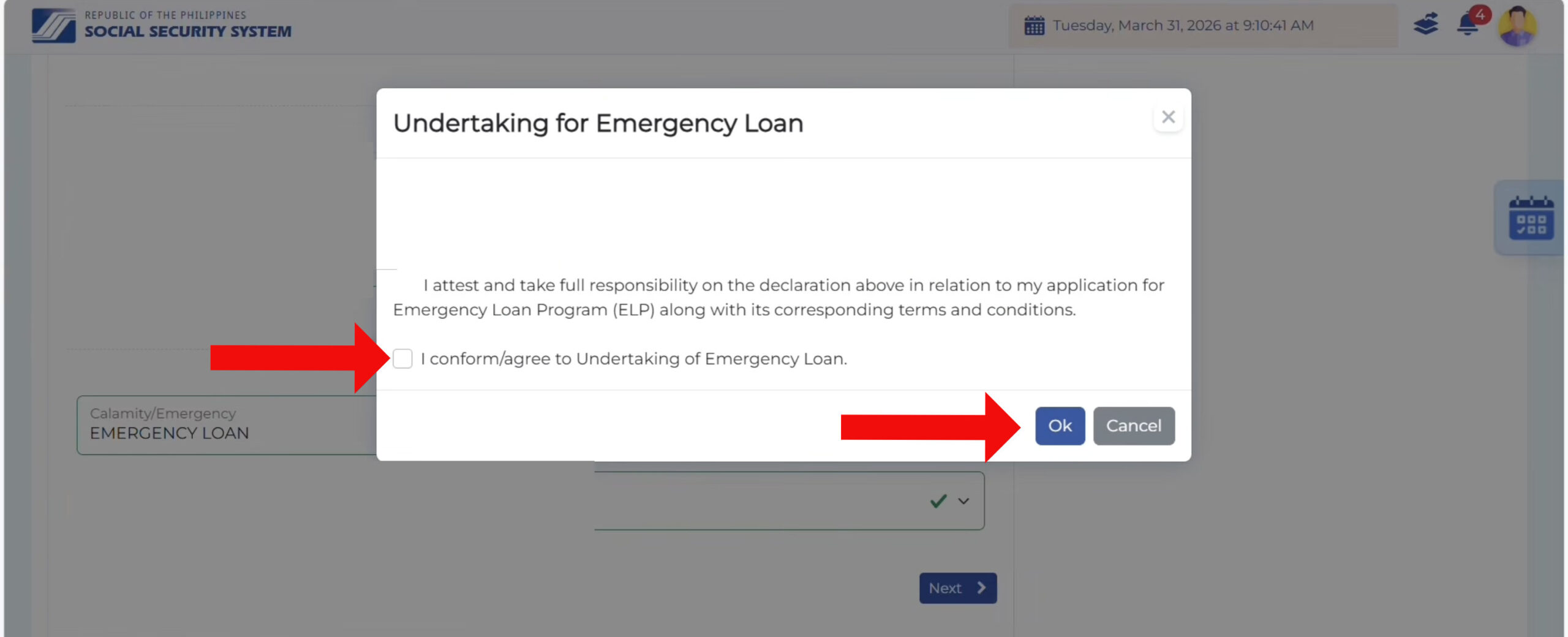
A pop-up named Undertaking for Emergency Loan will appear. Check the box for “I conform/agree to Undertaking of Emergency Loan,” and then click OK.
Step 3: Agree to the Consent and Data Privacy Statement
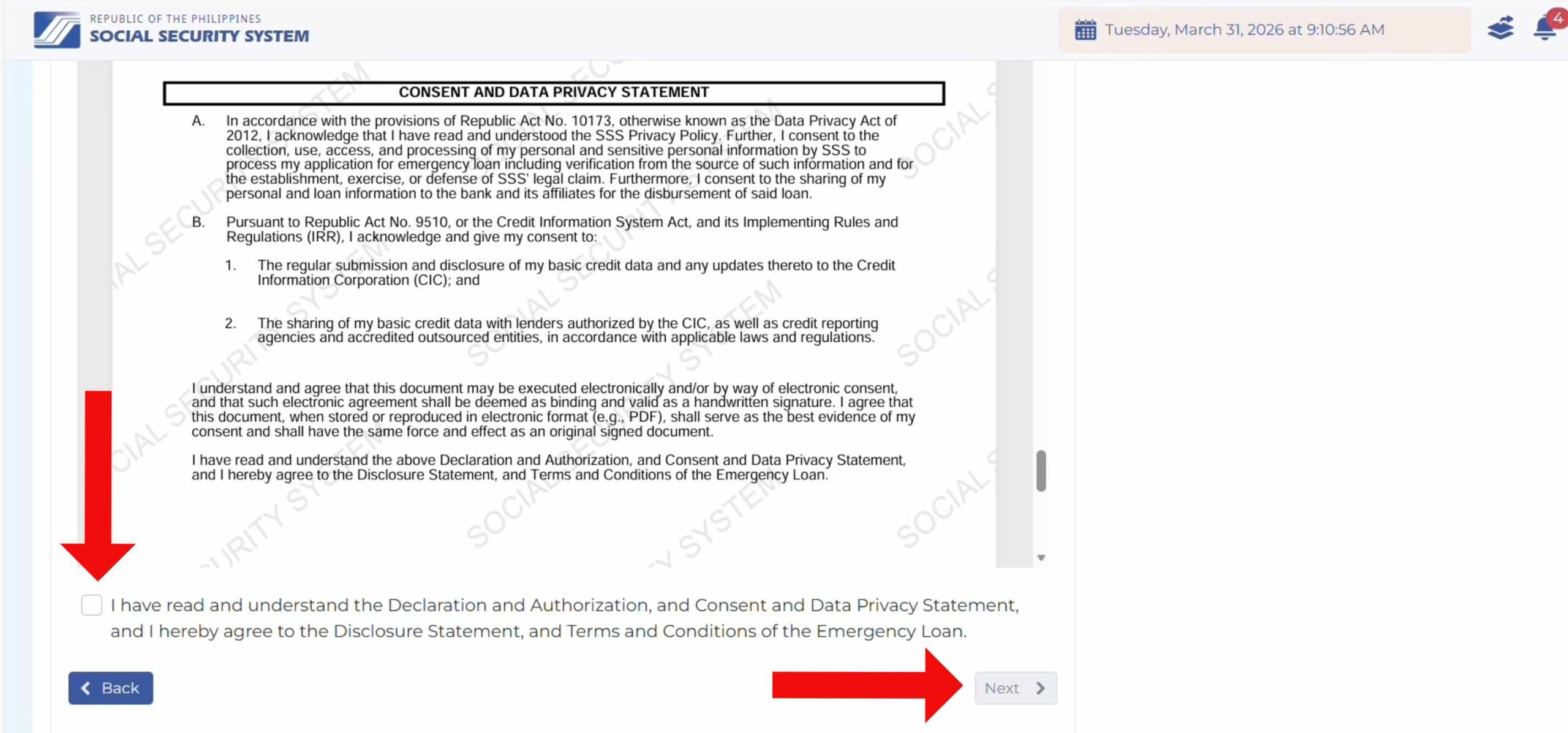
You will be shown the Consent and Data Privacy Statement.
Read it carefully, check the box confirming that you have read and understood the Declaration and Authorization, Consent, and Data Privacy Statement, and then click Next.
Step 4: Review Your Details and Submit
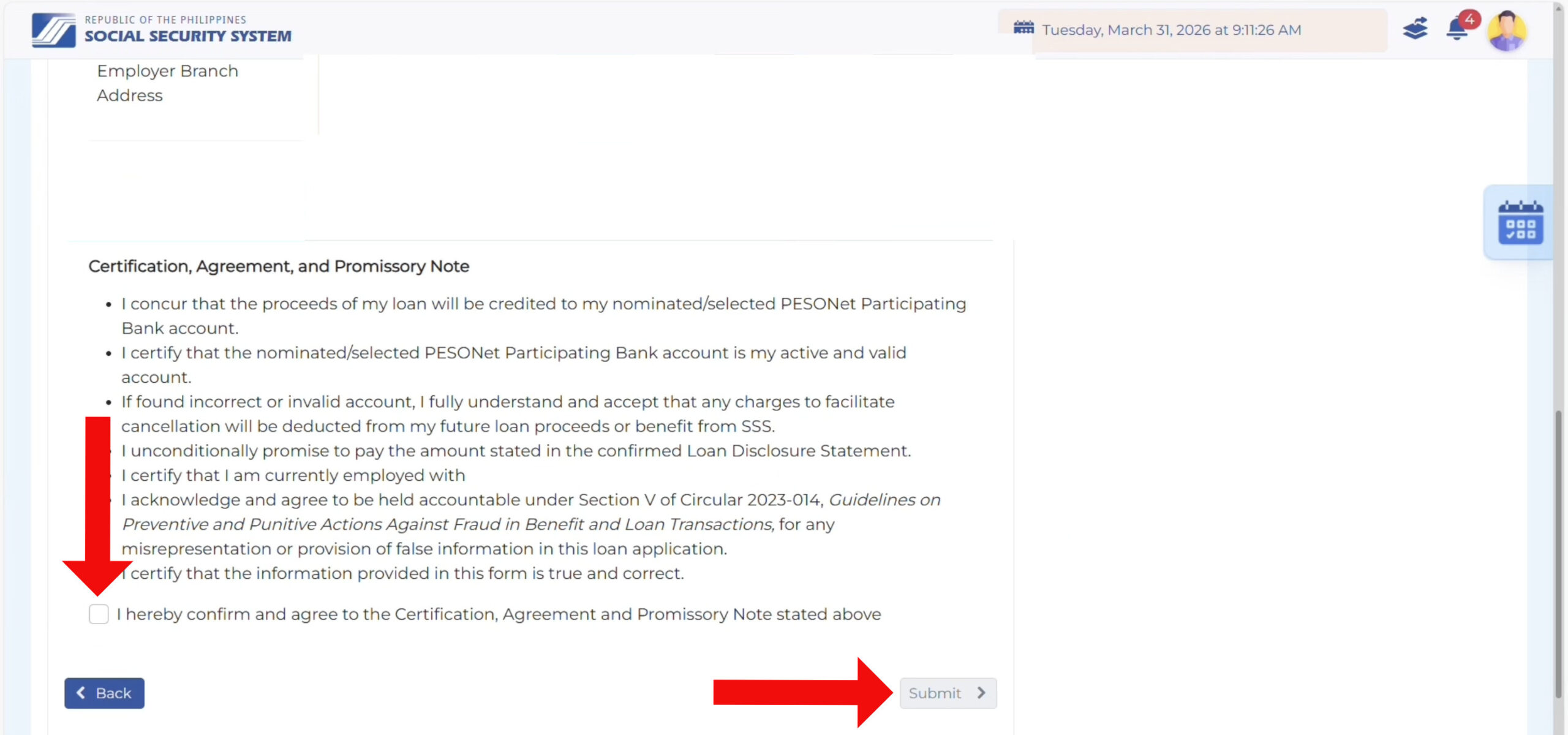
Review your loan details on the following page. Read the Certification, Agreement, and Promissory Note, check the box for “I hereby confirm and agree to the Certification, Agreement and Promissory Note stated above,” and then click Submit.
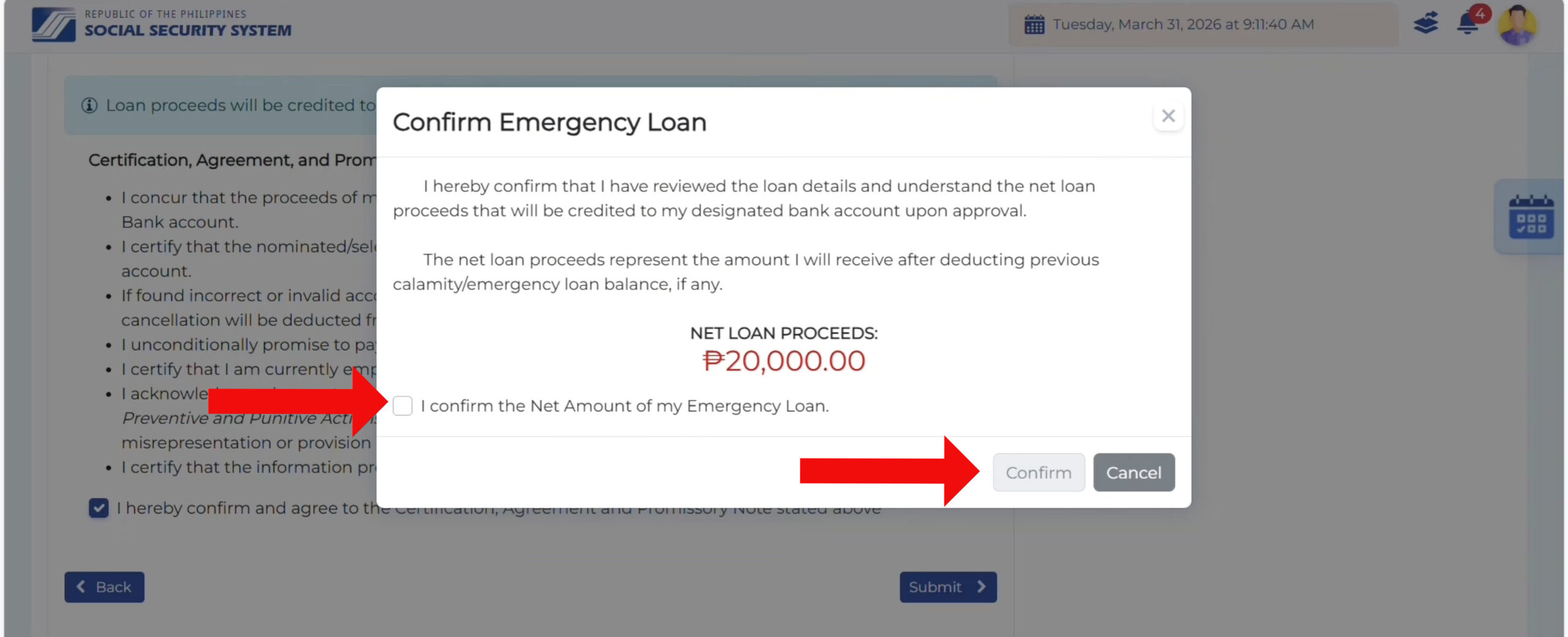
A Confirm Emergency Loan pop-up will show your net loan proceeds, which is your approved amount after any deduction for an existing emergency or calamity loan balance. Check the confirmation box, and then click Confirm.
Step 5: SSS Emergency Loan Application Submitted
Congratulations! You have successfully submitted your SSS emergency loan application. Your loan proceeds will be credited to your selected disbursement account.
Take note of your transaction number as you might need it in case of follow-up.
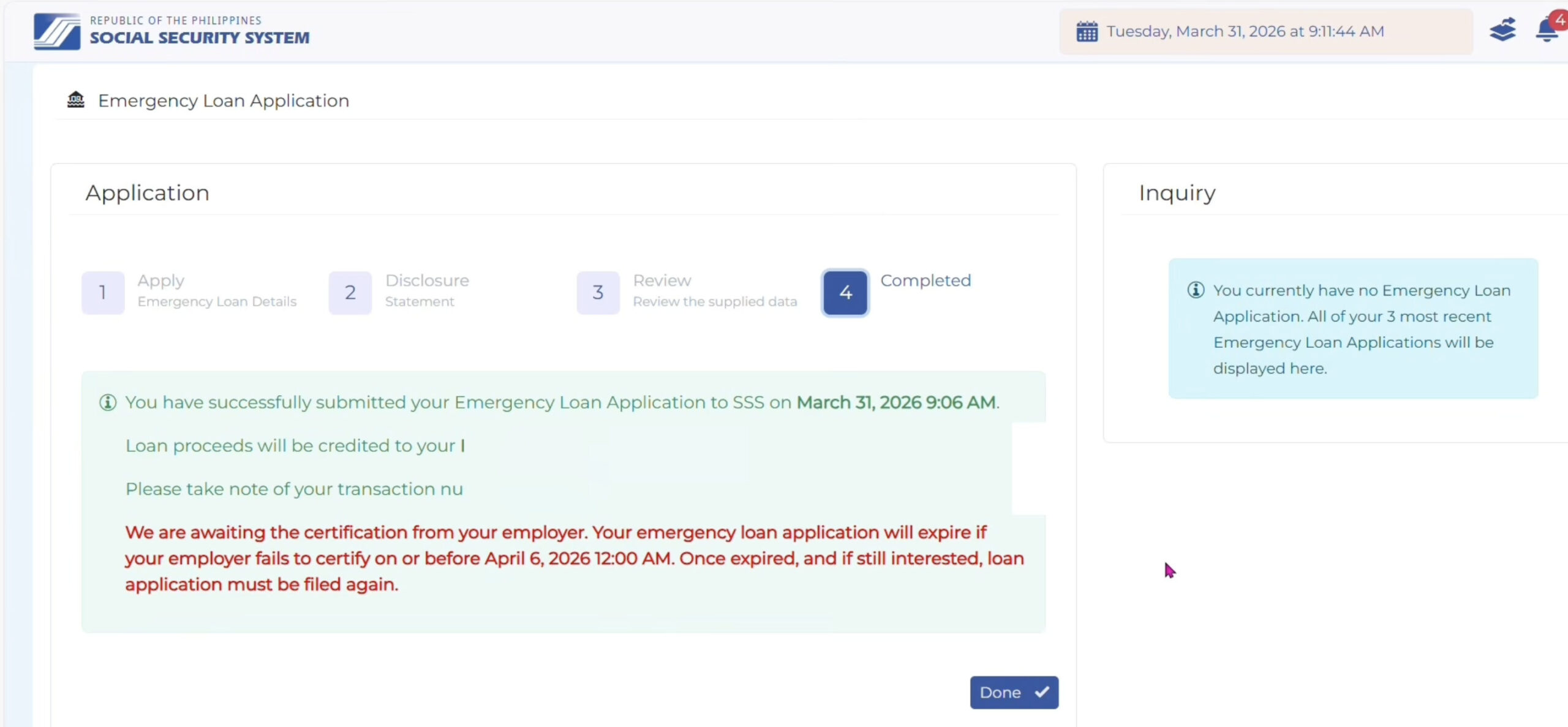
If you’re an employed member, your loan will only be approved after your employer certifies it by the specified date and time, generally within one week of filing. Should this deadline lapse without certification, your loan application will expire and a new application can be filed.
Employed members are advised to follow up with their employer’s HR or payroll office promptly upon submission, instead of waiting for the certification to happen.
Interest, Grace Period, and Monthly Payments
Most borrowers are charged 7% interest per annum, computed on a diminishing principal balance so that interest decreases as the loan is paid down. The rate increases to 10% for members who availed of penalty condonation within the past five years.
The loan term runs for 30 months, consisting of a six-month moratorium followed by 24 equal monthly amortizations. During the moratorium, no payment is due.
The moratorium doesn’t eliminate interest, however. Interest continues to accrue during this period and is distributed evenly across the subsequent 24 monthly amortizations rather than collected upfront. This accrued interest doesn’t earn further interest.
When Payments Are Due
Each payment is due on the last day of the month after the month it covers.
SSS gives this example in the circular. If your loan is dated May 6, 2026, your first payment covers December 2026 and is due on January 31, 2027. Your January 2027 payment is then due February 28, 2027. If a deadline falls on a weekend or holiday, you can pay the next working day.
If you are employed, your employer deducts the payment from your salary. Everyone else has to generate a Payment Reference Number (PRN) from their SSS account and pay at an SSS branch or an accredited payment center.
If You Miss Payments
Emergency loan amortizations remitted after the due date are subject to a penalty of one percent (1%) per month, computed for every day of delay.
A loan is considered in default when the total unpaid obligation exceeds six (6) monthly amortizations, or when a balance remains unpaid after the loan term. In either case, the full outstanding balance becomes due and demandable in full.
Any unpaid balance shall be deducted from whatever benefit is due to the member or their beneficiaries, including retirement benefits and death benefits payable to survivors.
Frequently Asked Questions
Do I need to live in a calamity-hit area to get the SSS emergency loan?
No. The emergency loan covers SSS members all over the country while a national calamity or emergency is in effect. You only need a Philippine home address on your SSS record. The loan that depends on where you live is the calamity loan, which is a different program.
How many contributions do I need for the SSS emergency loan?
You need at least 18 contributions posted to your record, and at least 6 of those must fall within the 12 months before you apply. Self-employed members, voluntary members, non-working spouses, and land-based OFWs also need at least 6 posted contributions under their current membership type.
Can I apply for the SSS emergency loan at a branch?
No, SSS emergency loan applications are done online through your My.SSS account.
Why is the emergency loan option not showing in my My.SSS account?
If the option to apply for an emergency loan is not available in your My.SSS account, this could mean that the program is closed at the moment, or that your account did not pass one of the automatic eligibility checks.
Can I apply if I still have an old SSS loan?
It depends on the condition of that loan. You cannot apply for a new loan if your existing loan is past due and unpaid, if you have missed more than three payments, or if you have a Restructured Loan.
When do I start paying the SSS emergency loan?
Your first payment covers the seventh month after your loan date, and it is due at the end of the month after that. Using the SSS example, a loan dated May 6, 2026 has a first payment covering December 2026, due January 31, 2027.
Can I renew my SSS emergency loan?
Only if the government issues a new calamity or emergency declaration separate from the one your current loan came from. You also need to have no overdue loans and no more than three missed payments. Your old balance is deducted from the new loan, and you must be left with at least ₱1,000, or ₱100 for kasambahay.
What happens if I cannot pay the SSS emergency loan?
A penalty of one percent (1%) per month is charged on any missed payment. Once the unpaid amount exceeds six (6) monthly amortizations, the loan is considered in default, and SSS may demand the full outstanding balance without prior notice. Any remaining balance is deducted from the member’s future SSS benefits, including claims subsequently filed by their beneficiaries.
Final Thoughts
When a typhoon damages your home or an emergency drains your savings, the SSS emergency loan is one of the few sources of financial assistance that doesn’t make you jump through hoops. There is no collateral, no co-maker, and no credit investigation.
If you are a qualified SSS member, you get much-needed cash and six months before you have to think about paying the money back. For a lot of Filipino families, that breathing room is the difference between recovering on their own terms and falling into debt with a lender who charges exorbitant interest.
If you have any questions and concerns, you may call the SSS 24/7 hotline 1455 or email [email protected].