If you are a Group 2 or Group 3 beneficiary of the UPLIFT cash assistance program, the September 14 to October 16 window is your second opportunity to receive the ₱2,000 you are owed, and this time, it’s worth taking seriously. The first tranche in July did not go smoothly for many beneficiaries, whether that meant a payout that never arrived, a disbursement account that was rejected, or a notification that went unread.
I’ve been following this program since its launch, and one thing I noticed is that the funds are allocated, but they don’t reach the beneficiaries automatically just because their names appeared on the list. Some UPLIFT beneficiaries never received their cash aid because of various account issues, and DSWD and SSS have subsequently issued guidelines on how to resolve them.
This guide outlines what to prepare and verify for each group, based on official DSWD announcements and guidelines. If you belong to either group, now is the time to resolve any account issues that prevent you from receiving your payout.
What UPLIFT Is and Why This Payout Matters
UPLIFT, short for the Unified Package for Livelihood, Industry, Food and Transport, is a ₱55-billion program intended to help 7.5 million poor, near-poor, and low-income households cope with the country’s ongoing energy emergency.
It provides ₱2,000 a month from July through December, distributed across three groups: existing 4Ps and Walang Gutom Program members (Group 1), poor and near-poor households identified through the 2024 Community-Based Monitoring System or CBMS (Group 2), and low-income workers linked through the Social Security System (Group 3).
The July payout for Groups 2 and 3 encountered some problems. SSS reported that 132,496 Group 3 members had their payments returned due to invalid or inactive accounts, and DSWD’s own figures suggested that roughly 522,000 additional Group 3 members nationwide still lacked a working disbursement account as of early August. Group 2, meanwhile, remained on a manual, cash-based payout because a considerable number of beneficiaries had yet to obtain a National ID or enroll a bank or e-wallet account for digital disbursement.
Group 2: What to Prepare Before Your Payout
Group 2 covers poor and near-poor households identified through the 2024 CBMS. The payout for this round remains manual, the same arrangement used in July. This gives beneficiaries enough time to obtain a National ID or a bank/e-wallet account before the program shifts to fully digital disbursement.
1. Bring your National ID if you already have one
This is the primary document that the DSWD expects beneficiaries to present at the payout venue. If you have already claimed your physical or digital National ID, make sure that you have it ready once your local government unit announces the payout schedule.
2. Use an accepted alternative if you don’t have a National ID
DSWD said that beneficiaries without a National ID may still be paid using either:
- A National ID proof of application (the receipt or slip issued upon application) or
- Any other government-issued ID
3. Watch for a separate notice from your LGU
DSWD didn’t specify a per-barangay schedule or venue; that information comes through your barangay. Monitor your barangay’s announcements, official Facebook page, or any notice from a barangay official.
4. Check your registration status on the UPLIFT G2P portal
Before the payout window opens, you can verify whether you are listed as a Group 2 beneficiary through the official UPLIFT G2P portal at uplift-g2p.dswd.gov.ph. If your name doesn’t appear there, you can clarify your status with your barangay instead of proceeding to the payout venue.
Group 3: What to Fix Before Crediting Starts
Group 3 covers low-income workers linked through SSS. Crediting for this second tranche also begins on September 14, and funds are credited directly to an enrolled disbursement bank account or e-wallet.
If you received a notification on their My.SSS inbox that you are qualified for assistance but didn’t receive the ₱2,000 payout (due to wrong account details or an inactive disbursement account), make sure that you read the notification to update or active your disbursement account before the deadline set by SSS.
Here’s what to do to ensure that you will receive your UPLIFT payout:
1. Check your My.SSS inbox for a notification
Login to your My.SSS and look for the bell icon on the top right portion of the dashboard. Click the bell to open your Notifications list.
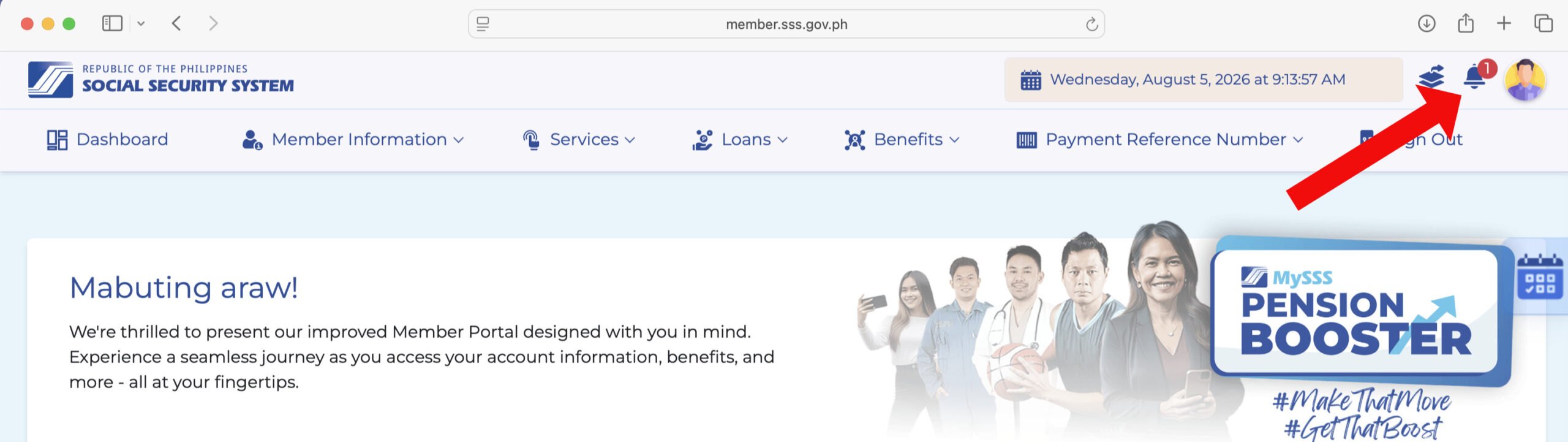
2. Click the notification to view your status of your crediting
Select the specific notification regarding your UPLIFT cash assistance, such as “UPLIFT Assistance Inquiry.” You may click “View All Notifications” if you don’t see it, as it might have been buried by newer notifications.
Here’s an example of a failed crediting due to an invalid account number:

3. Update or reactivate your disbursement account through DAEM
If it says that the status of crediting is unsuccessful due to an invalid or inactive account, proceed to the Disbursement Account Enrollment Module (DAEM) and add or update your bank account. Read this article to learn how to enroll your bank account in SSS DAEM.
Make sure that you resolve your account issues, if any, before the deadline set by SSS. Note: October 16 is the end of the second payout period, not the deadline for fixing your account issues with SSS.
Aside from invalid account numbers, the next most common issue is a disbursement account that previously worked but later became dormant. This often happens to a bank account with no recorded activity for several months and was automatically deactivated. If your account shows as inactive (instead of invalid), you may only need to login to your bank account and complete a basic transaction to reactivate it before re-enrolling it in DAEM.
If unsure on what steps to take, call the SSS hotline 1455 or email [email protected] to ask about your specific case.
Frequently Asked Questions
Do I need to apply for the second UPLIFT payout?
No. UPLIFT does not require a separate application for the second tranche. If you were already identified as a Group 2 or Group 3 beneficiary, you are automatically included in this payout cycle; what remains is confirming that your ID or account details are correct and current.
What if my barangay has not announced a schedule yet?
The September 14 to October 16 window is the payout period DSWD set nationally, but the specific date and venue for Group 2 beneficiaries are determined separately by each local government unit. If your barangay has not posted anything throughout the window, follow up directly at the barangay hall instead of waiting.
I never received a My.SSS notification. Does that mean I was not approved?
Not necessarily. The September notice specifically addresses Group 3 members who were informed that they qualify but were not paid due to an account error. If you are uncertain of your status, check your notifications in My.SSS.
Can I still be paid if I don’t have a National ID?
Yes. For Group 2 beneficiaries, the DSWD has confirmed that a National ID proof of application or any other government-issued ID is accepted in place of the National ID at the manual payout.
What is the difference between an “invalid” and an “inactive” account status?
An invalid account number generally means the details on file don’t correspond to an actual account, often due to a typo or an outdated number. An inactive account means that the account exists but has had no recent activity or was suspended, which is common with bank accounts and e-wallets that are not used for extended periods. Both are corrected through DAEM, though an inactive account may require a small transaction first to restore it to active status.