




If you need to prove your Taxpayer Identification Number (TIN) for a bank, a government transaction, or a new employer, one of the most reliable documents you can get is a TIN verification slip from the Bureau of Internal Revenue (BIR). It’s an official, stamped document that confirms your TIN, your RDO (Revenue District Office), and your taxpayer classification – straight from the source.
Do you know that you don’t have to travel all the way to your home RDO to get a TIN verification slip? That’s right! You can walk into any BIR branch or office in the country, and they’ll process it for you on the spot. I personally verified my TIN at a BIR office in Cebu even though my home RDO is in a completely different city. That alone should save a lot of Filipino taxpayers a long and unnecessary trip!
In this guide, I’ll walk you through exactly how to get a TIN verification slip in person, step by step. I’ll also cover the faster online options – through the BIR ORUS website, the Revie chatbot, and email – so that you can choose whatever method works best for your situation.
Table of Contents
What is a TIN Verification Slip?
A TIN verification slip is an official document issued by the BIR that confirms your registered taxpayer information. It typically shows:
- Your complete name
- Your Taxpayer Identification Number (TIN)
- Your Revenue District Office (RDO)
- Your taxpayer classification (e.g., individual, employee, self-employed)
It’s stamped and signed by a BIR officer, which makes it a credible proof of TIN registration for banks, government agencies, employers, and other institutions that need to verify your identity as a taxpayer.
Method 1: Walk-in at Any BIR Branch (In Person)
This is the traditional method and still the most reliable and foolproof way to get a TIN verification slip, especially if you need it for a requirement that specifically asks for a physical, signed document.
What You Need to Bring
- One valid government-issued ID (National ID, UMID, passport, driver’s license, etc.)
- If you’re getting the slip on behalf of someone else, you’ll need:
- A notarized Authorization Letter or a Special Power of Attorney (SPA)
- A copy of the authorized person’s valid ID
Note: The TIN verification slip must be obtained in person. BIR will not release it to an unauthorized representative without the proper legal documents listed above.
Step-by-Step Process
Step 1: Go to any BIR branch or office. As previously mentioned, you don’t need to go to the RDO where you are registered. Any BIR Revenue District Office or BIR branch nationwide can process your TIN verification. This is really convenient; if your RDO is in a different province or city, you can just go to the nearest BIR office where you currently are.
Step 2: Get the TIN verification slip form from the guard. When you arrive, approach the security guard at the entrance and tell them you need a TIN verification slip. The guard will hand you a small form – this is the slip you need to fill out.
Step 3: Fill out the slip. The form is straightforward. You’ll need to write:
- Taxpayer Identification Number (TIN)
- Last Name
- First Name
- Middle Name
- Date of Birth
- Address
Fill out all the fields clearly and completely, preferably in block or capital letters.
Important: Don’t write your RDO and taxpayer classification. The BIR officer-in-charge will be the one to do that.
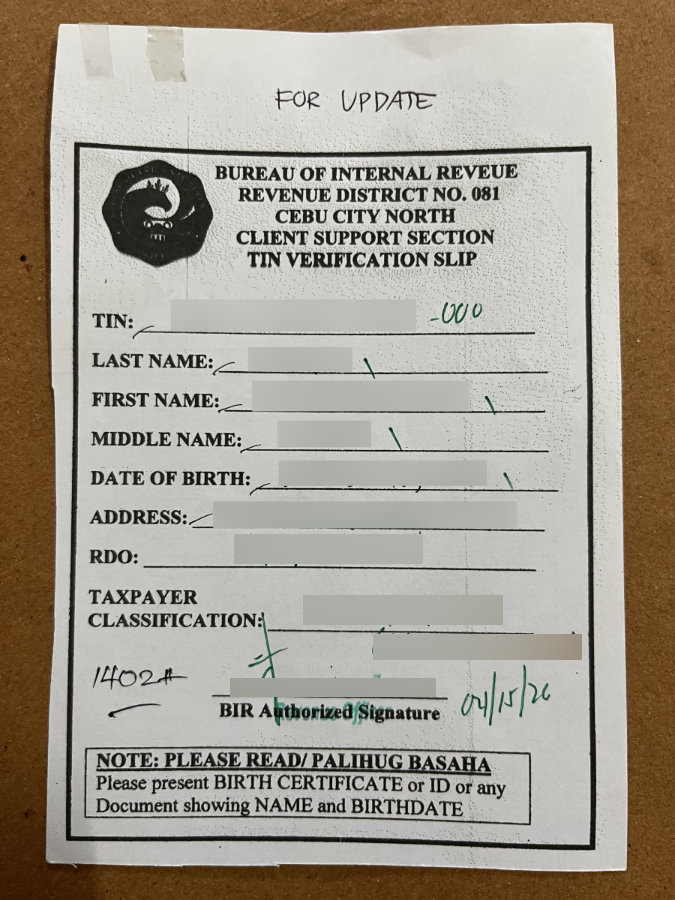
Step 4: Submit the slip to the officer inside. Once you’ve filled out the slip, look for the “TIN Verification” sign and give it to the guard or the officer in charge. They’ll queue it for processing.
Step 5: Wait for your slip to be processed. Expect to wait around 30 minutes, though this can vary depending on how busy the office is. I’d suggest going early in the morning on a weekday to avoid long lines.
Step 6: Receive your stamped and signed TIN verification slip. Once processed, a BIR officer will return the slip to you, now stamped and signed. This is the official document. It will show your TIN, your RDO code, and your taxpayer classification.
That’s the entire walk-in process. As you can see, it’s pretty straightforward. There’s no scheduled appointment needed, no lengthy forms, and no filing fees. Just bring a valid government ID and show up.
Method 2: Online via BIR ORUS
If you don’t need a physical signed slip and you just want to confirm or retrieve your TIN number, the BIR Online Registration and Update System (ORUS) is the most convenient option. ORUS is the BIR’s official online platform, and it has a built-in TIN Verification feature.
This method is also what the BIR now encourages for employment verification purposes. Under Revenue Memorandum Circular (RMC) No. 31-2024, the BIR has directed employers to use ORUS or the Revie chatbot to verify employee TINs, which means that the online result from ORUS is now officially accepted as sufficient verification for employment purposes. The BIR will only issue physical TIN verification slips in exceptional cases, such as when the online system is unavailable or there are issues with duplicate TINs.
How to Use ORUS TIN Verification
Step 1: Go to orus.bir.gov.ph. Open your browser and navigate to the BIR ORUS website.
Step 2: Look for the TIN Verification option. On the ORUS website, click “Verify TIN / Search BIR-Registered Business” and then click “TIN Verification.”
On the right side of the page, click the yellow “PROCEED” button.

Step 3: Select your taxpayer’s classification. Choose “Individual” if you’re an individual taxpayer, or “Non-Individual” if you’re a business or corporate taxpayer.

Step 3: Enter your taxpayer information. Provide the following information:
- Taxpayer Identification Number (TIN)
- First Name
- Middle Name
- Last Name
- Suffix (select “N/A” if you don’t have it)
- Gender
- Date of Birth
Click the “I’m not a robot” captcha and then press “VERIFY.”
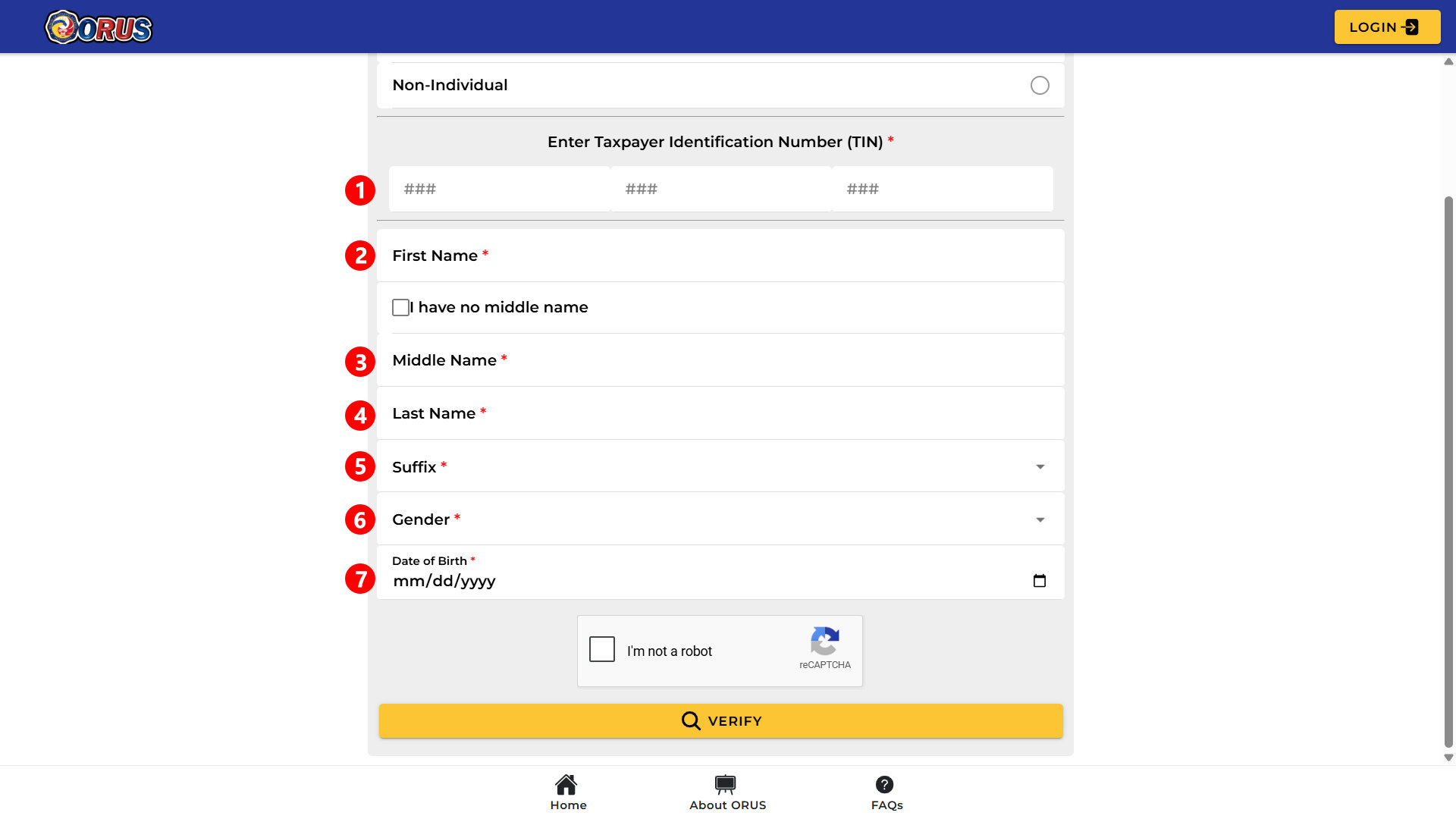
Step 4: View your TIN information. If your details match the BIR’s records, the system will display the TIN, registered name, TIN status, and remarks. For your records and future reference, make sure to take a photo or screenshot of your TIN verification result.
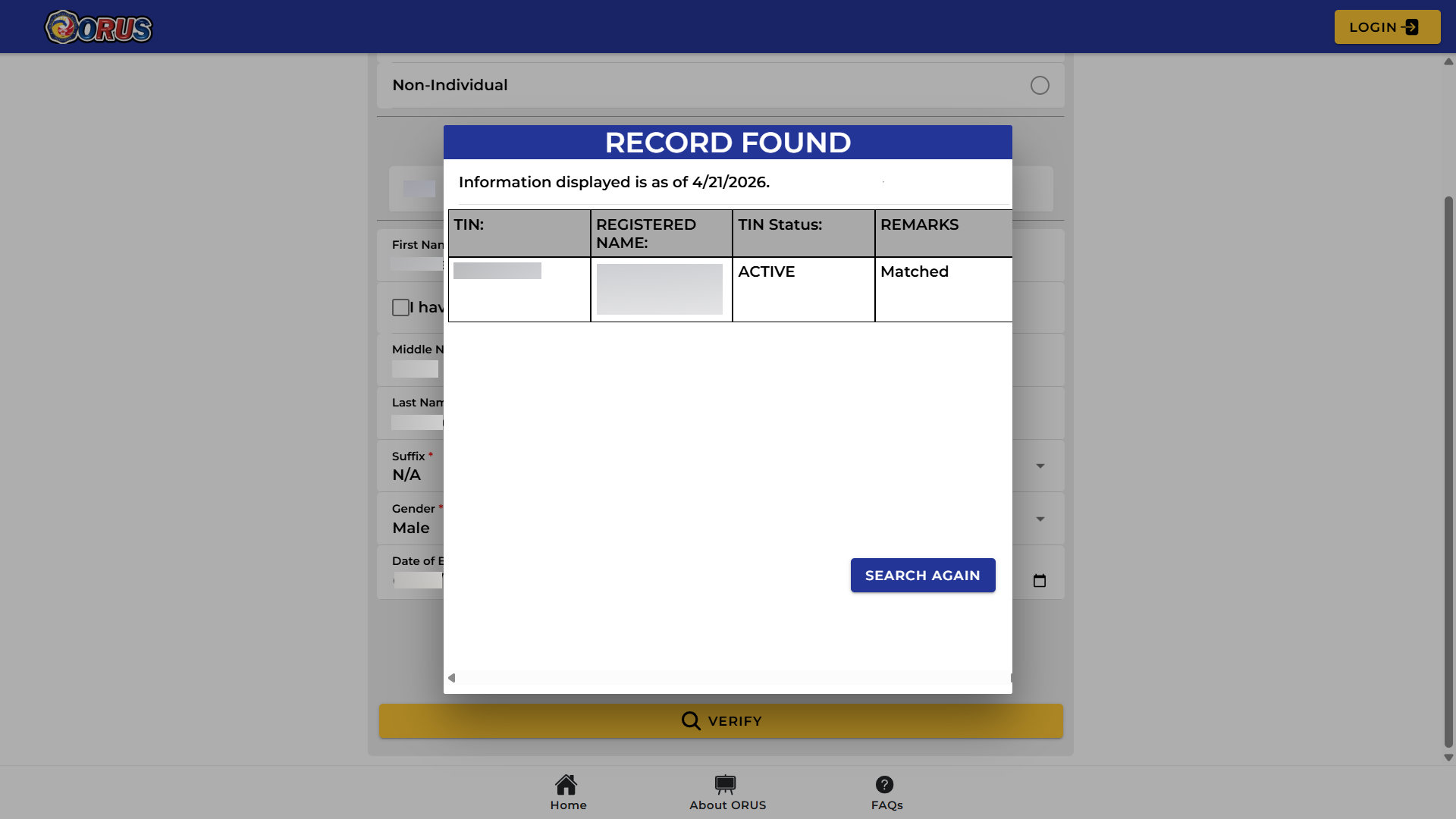
Method 3: Via BIR Chatbot “Revie”
Another quick online option is Revie, the BIR’s AI chatbot available on the official BIR website (bir.gov.ph). This is probably the quickest method for a simple TIN lookup if ORUS feels a bit overwhelming to use.
Step 1: Go to the BIR website. On your browser, open the official BIR website at www.bir.gov.ph.
Step 2: Find Revie. Look for the chatbot icon at the bottom right corner of the screen and click it to start a conversation.

Step 3: Choose your language. You can select either “English” or “Filipino” (Tagalog).
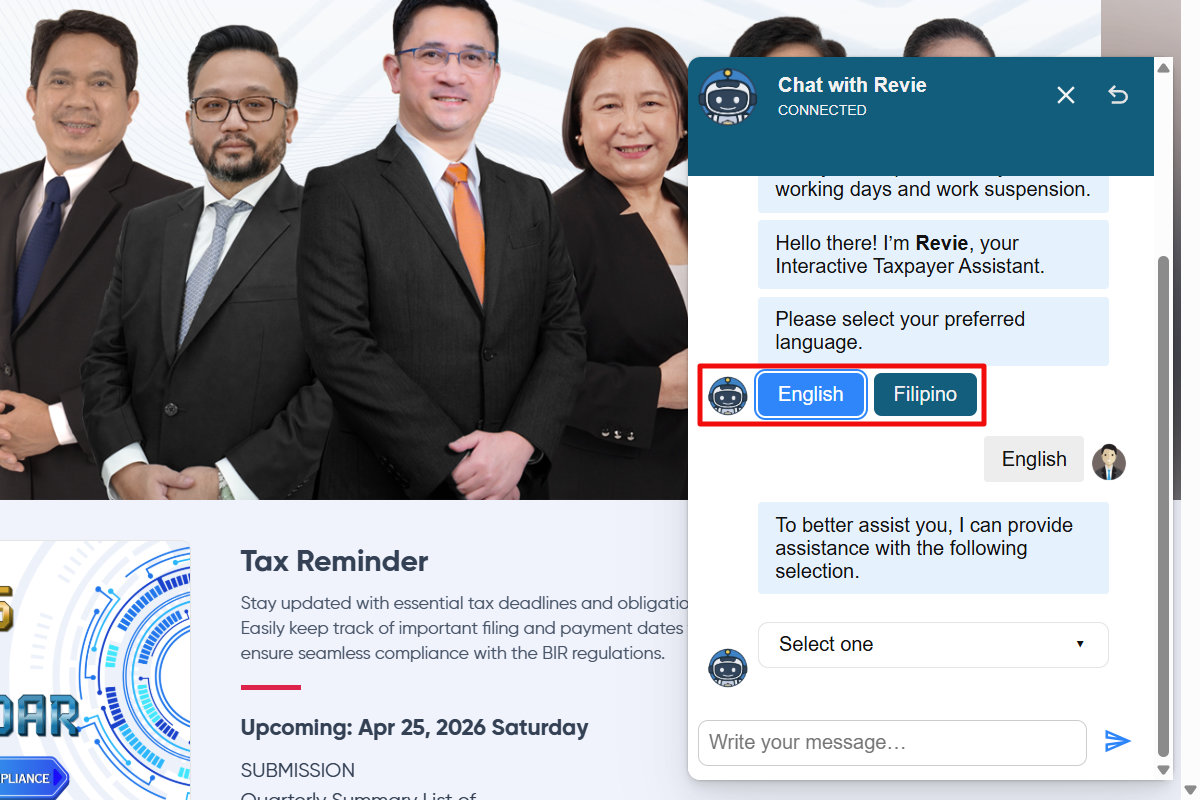
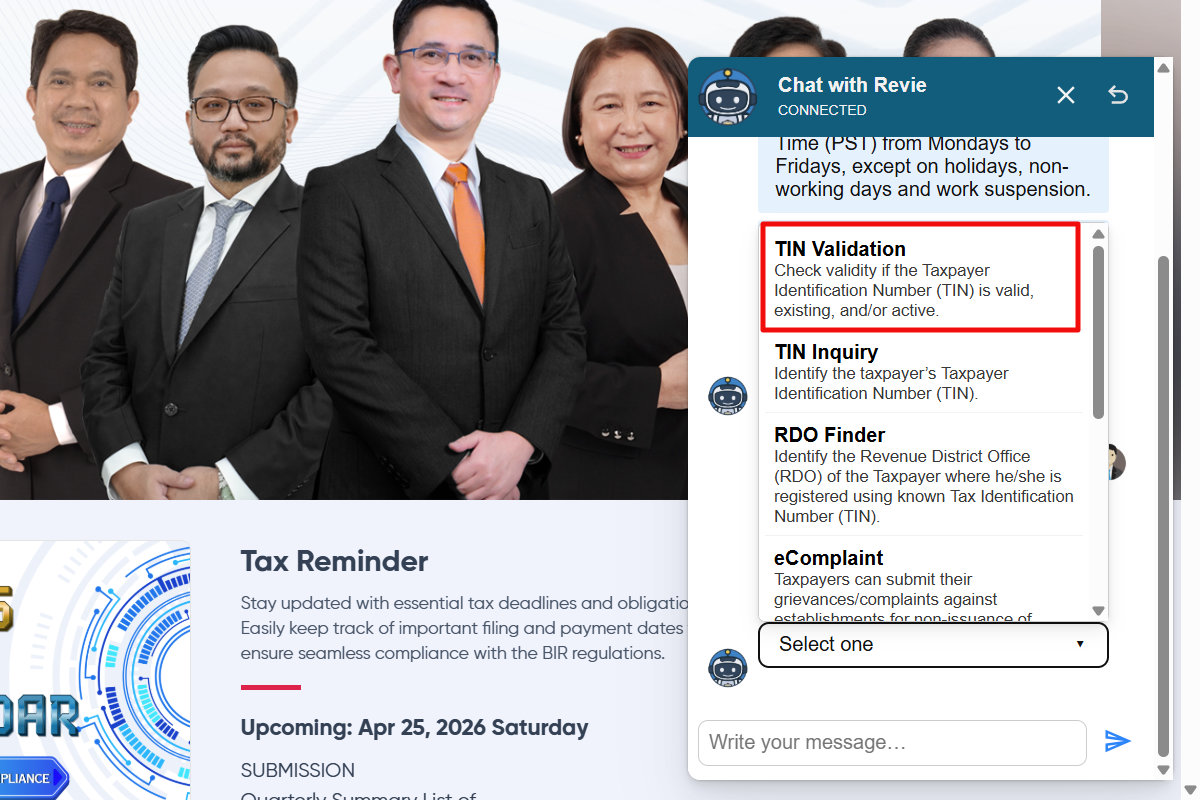
Step 4: Select “TIN Validation.” Click the “Select one” dropdown box and then choose TIN Validation to check if your Taxpayer Identification Number is valid, existing, or active.
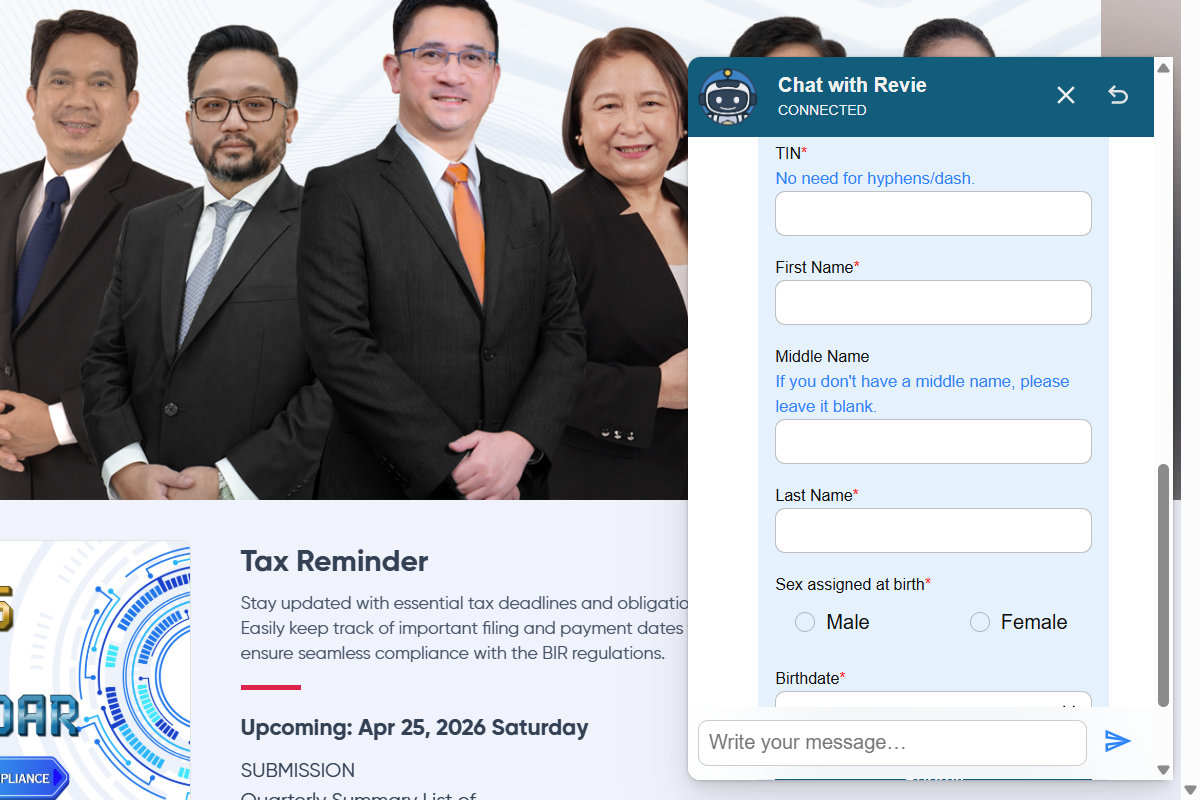
Step 5: Enter your taxpayer information:
- TIN (no need for hyphens/dashes)
- First Name
- Middle Name
- Last Name
- Sex assigned at birth
- Birthdate (mm/dd/yyyy format)
Click the “Submit” button to verify your TIN.
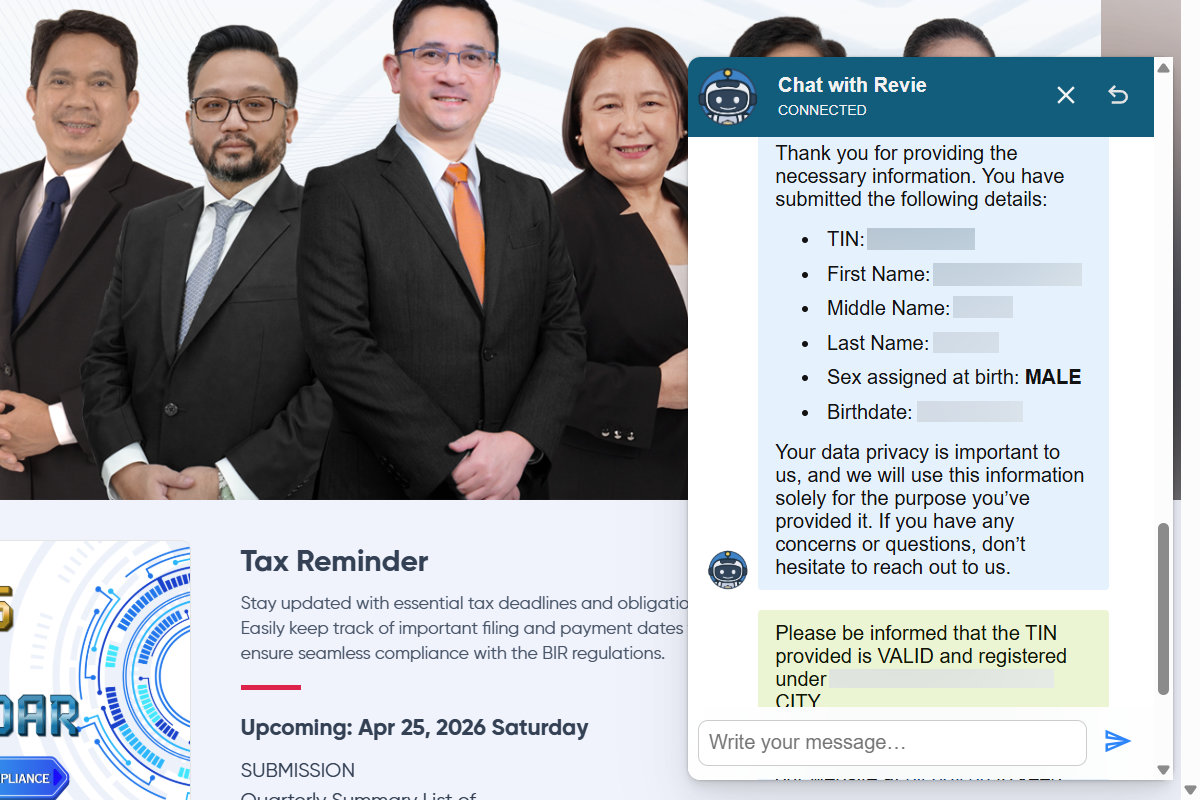
Step 6: View your TIN details. If your provided information match the BIR’s records, your TIN will be shown as valid and registered.
You can take a photo or screenshot of the result as proof of your verified and validated TIN.
Method 4: Via Email
If you’d rather not visit ORUS or chat with Revie (for whatever reason), you can also send a TIN inquiry via email. Under RMC No. 37-2024 (as amended by RMO No. 20-2024), the BIR accepts TIN verification requests sent to [email protected].
You may follow this email template (be sure to replace the details in brackets [ ] with your own):
Subject: TIN Inquiry – [Your Full Name] – [Date of Birth]
Dear BIR Customer Assistance Division,
Good day. I would like to request a TIN inquiry for the following taxpayer:
Full Name: [Your Full Name]
Date of Birth: [MM/DD/YYYY]
Sex at Birth: [Male or Female]
Address: [Your Complete Address]
Contact Number: [Your Mobile Number]
Reason for Inquiry: [e.g., I need to retrieve my TIN for employment purposes / bank account opening / government transaction]
I believe I was previously issued a TIN but I am no longer able to locate my records. I kindly request your assistance in confirming my TIN based on the information provided above.
Thank you for your time and assistance.
Respectfully,
[Your Full Name]
[Your Contact Number]
[Your Email Address]
Send the email to [email protected] together with a selfie photo with a valid government-issued ID, and a separate photo of the same ID.
This method is best if you’re overseas or can’t access ORUS easily. Just keep in mind that response times will vary, and it’s not as instant as the walk-in or ORUS methods.
Frequently Asked Questions
Can I get a TIN verification slip at any BIR branch?
Yes. You can go to any BIR branch or Revenue District Office (RDO) nationwide, regardless of where your home RDO is. You don’t need to travel to the specific RDO where your TIN is registered.
Can someone else get the TIN verification slip on my behalf?
Yes, but they will have to bring a notarized Authorization Letter or a Special Power of Attorney (SPA), along with a copy of your valid ID.
Is the TIN verification slip the same as the TIN ID?
No. The TIN verification slip is a stamped document that verifies your TIN and is usually requested for specific transactions. The TIN ID (either physical or digital) is your government-issued identification card. Both are issued by the BIR, but they serve different purposes.
Can employers request a physical TIN verification slip from employees?
Under RMC No. 31-2024, the BIR now encourages employers to verify employee TINs using ORUS or the Revie chatbot instead. A physical TIN verification slip is only issued in specific situations, such as when the online system is down, when there are duplicate TINs, or when the BIR needs to reconfirm taxpayer registration data.
Is there a fee for getting a TIN verification slip?
No. Getting a TIN verification slip is completely free of charge. Likewise, online TIN verification on the BIR ORUS website is also free.
What if my TIN information doesn’t appear on ORUS or Revie?
If the ORUS website or the Reviw chatbot can’t find your TIN, you should visit the nearest BIR RDO in person. Bring a valid ID and explain your situation. It’s possible that your records might have discrepancies or your registration hasn’t been fully migrated to the newer BIR systems yet.
Final Thoughts
Getting a TIN verification slip from the BIR is actually a pretty painless process, especially now that you know you can go to any branch, not just the RDO where you’re registered. Add the online options via ORUS and Revie, and there’s really no reason to stress about it.
I hope this guide made the whole thing crystal clear for you. Go ahead and bookmark this page (press Ctrl + D on your keyboard or ⌘ + D on a Mac) so you can refer back to it whenever you need it.