


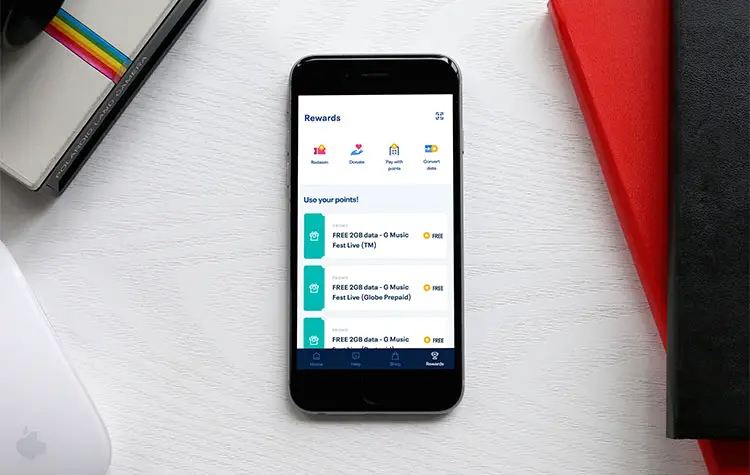
There may be times when you have so much unused mobile data that you don’t know what to do with it. Instead of allowing it to expire, why not convert your unused data to Globe Rewards points? That way, you can get back at least some of your money and you can then redeem your Globe Rewards points for prepaid promos and even GCash credits.
Globe Rewards is a fantastic rewards and loyalty program in which Globe prepaid subscribers will earn points every time they buy load and register to promos. Postpaid subscribers will earn points based on their monthly bill. Subscribers will also earn points by being a customer of Globe Rewards partner companies such as Agoda, AirAsia and BPI. And now, you can convert your unused Globe mobile data to Globe Rewards points!
Converting your unused data to Globe Rewards does make sense if you have more data that you can possibly consume. Let’s say that your Globe at Home Prepaid WiFi still has 20GB remaining and your data will expire tomorrow. So instead of allowing your data to expire, you can convert it to Globe Rewards points so it will not go to waste. Your points can then be used to claim fun rewards such as data and text promos, prepaid load, shopping vouchers, insurance, and GCash credits. You can even donate your Globe Rewards points to your chosen charity.
Sounds exciting, right? The only caveat is that this offer is only available for a limited time, until September 30, 2021 specifically. The Globe Rewards points that you’ll earn from this data-to-points conversion will also expire on that date, so be sure to redeem your points for rewards before the said date.
Nevertheless, you should take advantage of this offer while you still can. Who knows, Globe might extend this offer or run it again in the next few months. The important thing is to know how to convert your mobile data to Globe Rewards points, so that you’ll be ready when the offer pops up again in the future.
What Globe Promos and Plans are Eligible?
First things first, you’ll need to know what Globe plans and promos are eligible for converting your data to Globe Rewards points. The GBs to Points promo is available to all Globe prepaid, postpaid, Platinum, Globe at Home Prepaid WiFi, and TM users who are subscribed to the following promos and plans:
- Globe Prepaid: Go, GoSAKTO, GoSURF and GCash-exclusive promos.
- Globe Postpaid: Main data allowance from GPlan, ThePlan Plus or ThePlan, main GoSURF packs, recurring GoSURF add-ons, and rollover data.
- Globe at Home Prepaid WiFi: HomeSURF and HomeWATCH promos.
- Globe Platinum: All customers who are registered to ThePLATINUM Plan 3799 (22GB), ThePLATINUM Plan 4999 (27GB), ThePLATINUM Plan 7999 (32GB), rollover data, and add-on GoSURF and GoBOOST promos (including 5G).
- TM: All-In 20, All-In 30 and EasySURF promos.
You can only convert active and unused open-access data to Globe Rewards points. Expired data and content-specific or freebie data cannot be converted to points.
How to Convert Your Globe Mobile Data to Rewards Points
For this tutorial, you must install the New GlobeOne app which you can download from Google Play or the App Store. This app is the faster and sleeker version of the original GlobeOne app. If you have the old GlobeOne app already installed, you don’t need to remove it as both apps can work side by side.
Step 1: Open the New GlobeOne app and sign up or login to your Globe account.
Step 2: Add your account by tapping “Add account” and entering your Globe or TM number.
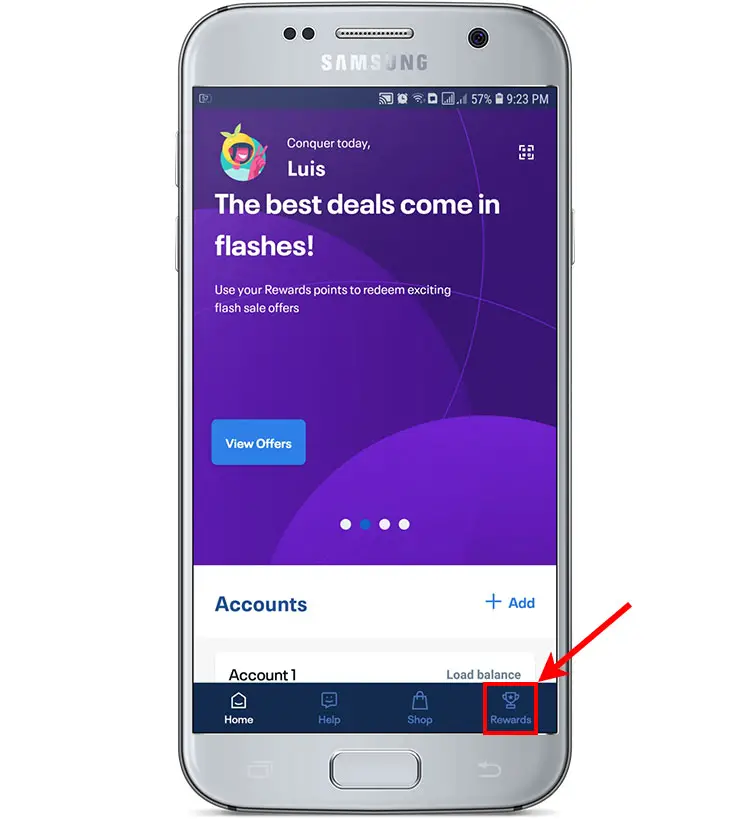
Step 3: Once your account is added, tap the “Rewards” menu at the bottom.
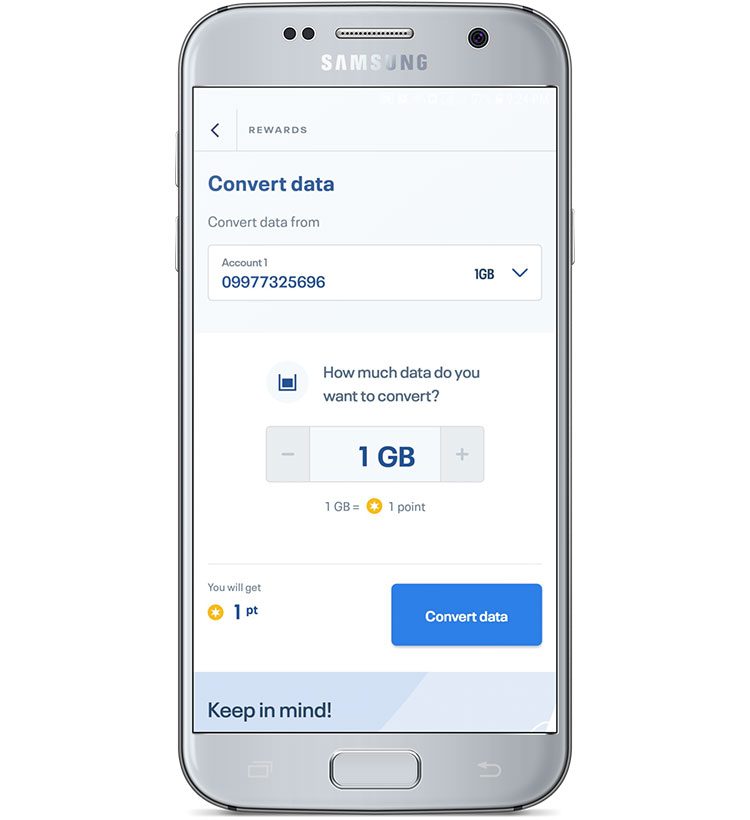
Step 4: You’re now on the Globe Rewards screen. Tap “Convert data” as shown on the screenshot below.
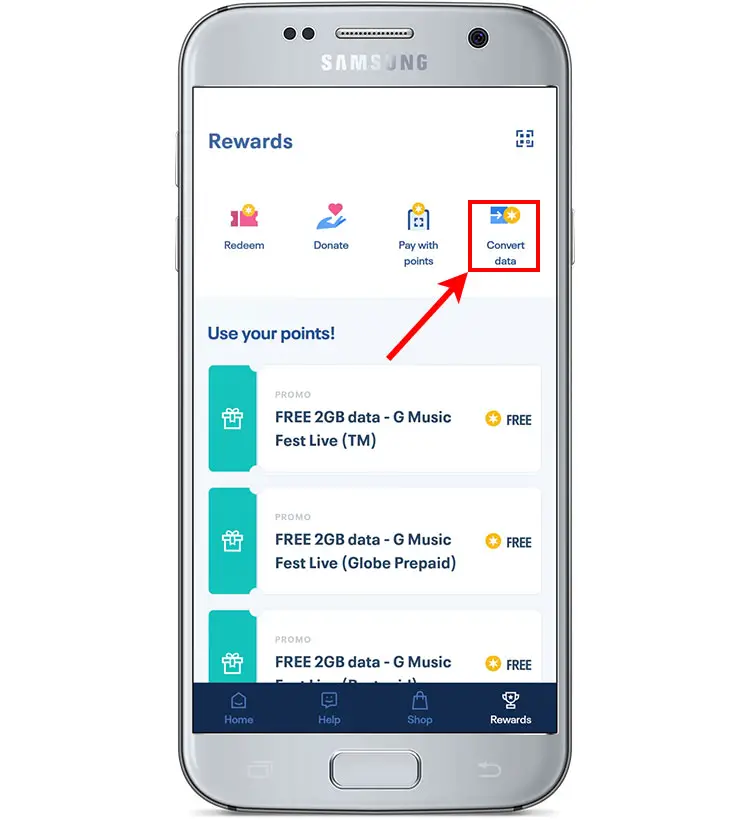
Step 5: Follow these steps to convert your data to Globe Rewards points. Take note that only open-access data can be converted to points.
- Select the account or mobile number where the data will be converted from.
- Enter the amount of data that you want to convert.
- Tap “Convert Data” to submit your request.
Wait for a few seconds for the conversion to complete.
Step 6: Congratulations! You have successfully converted your data to Globe Reward points. It will take up to 24 hours for the reward points to be credited to your account. You will also receive a text message confirming the successful data-to-points conversion.
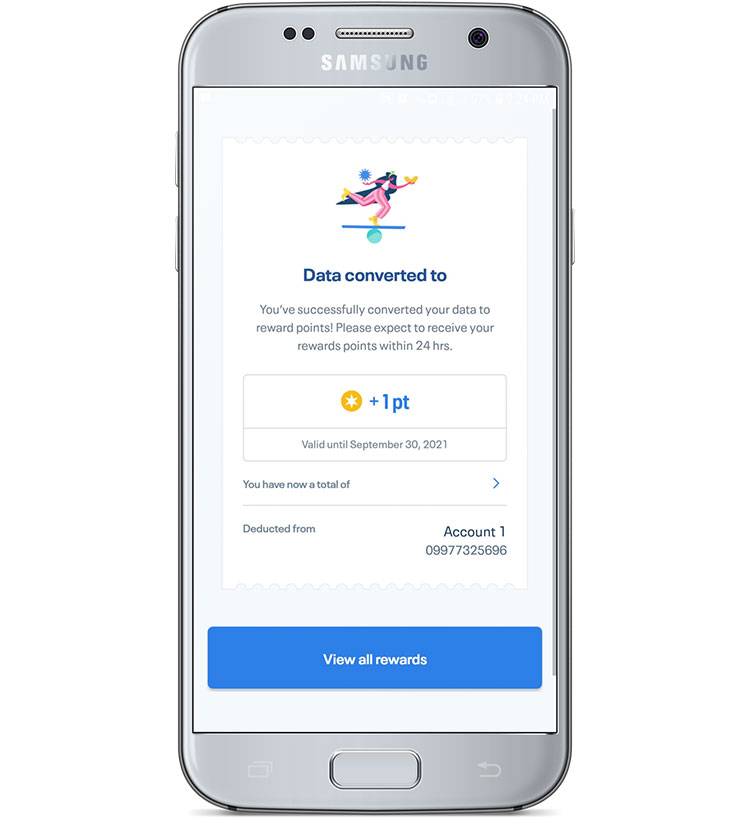
To view your reward points, just open the new GlobeOne app and select your account. You will see your points under the Reward points section.
Be sure to redeem your earned points for prepaid promos, vouchers, GCash credits and other items before the September 30, 2021 expiration date. Your regular Globe Rewards points (not earned from data conversion) will expire later on March 31, 2022.
Minimum and Maximum Limits
To ensure that everyone has the chance to earn Globe Rewards points by converting their unused data, Globe has set some limitations on the amount of data you can convert to points. Refer to the table below for the minimum and maximum limits as well as the conversion rates for your specific Globe subscription.
| Subscription | Minimum | Maximum Limit | Conversion Rate |
|---|---|---|---|
| Globe Prepaid | 1GB | 20GB per month | 1GB = 1 point |
| Globe Postpaid | 1GB | 50GB per billing cycle | 1GB = 5 points |
| Globe Platinum | 1GB | 50GB per billing cycle | 1GB = 5 points |
| Globe at Home Prepaid WiFi | 3GB | 50GB per month | 1GB = 1 point |
| TM | 1GB | 20GB per month | 1GB = 1 point |
Reasons Why You Can’t Convert Your Data
There are several reasons why you can’t convert your unused data to Globe Rewards points. Assuming that you’re already using the new GlobeOne app, the most common reason for your inability to convert your data is that you’re not registered to an eligible data promo (e.g. GoSAKTO, GoSURF) or that you’re not registered to a promo with open-access data.
Another reason is that you have insufficient data to make the conversion. Globe prepaid, postpaid, Platinum and TM subscribers must have a minimum of 1GB data to be able to convert their data while Globe at Home Prepaid WiFi users must have at least 3GB.
You will also be unable to convert your data to Globe Rewards points if you have reached already your maximum limit of 20GB per month (for Globe prepaid and TM), 50GB per month (for Globe at Home Prepaid WiFi), or 50GB per billing cycle (for Globe postpaid and Platinum).
Keep in mind that the GBs to Points promo will end on September 30, 2021 at 11:59 PM. After that, you can no longer convert your data to reward points.
Enjoy Your Rewards!
The GBs to Points promo is great news for Globe and TM subscribers who have plenty of extra, unused data that are otherwise allowed to expire. It’s also a great way to earn more points in Globe Rewards so that you can snag that Lazada voucher that you’ve long been dreaming of. So hurry and convert your data to Globe Rewards points before the promotion ends.
To know more about the Globe GBs to Points promo, visit the Globe website or call the Globe hotline 211.