
Mobile wallets like GCash are convenient because you don’t have to pay with cash. You can add money to your GCash wallet through various top-up options like online banking. One of the most popular ways to top up your GCash wallet is through UnionBank, so in this article, I’ll teach you how to transfer money from UnionBank to GCash.
UnionBank is arguably the Philippines’ premiere online bank, having been adjudged as the the “best digital bank” for 3 years in a row. In fact, you can easily open a UnionBank account using only your smartphone. UnionBank is also the best bank for PayPal. I’ve been using my UnionBank EON account for PayPal withdrawals for the past 10 years and I have rarely encountered problems.
Recently, I’ve started using Unionbank to transfer money to my GCash wallet. GCash offers the option to directly cash in from UnionBank through the GCash app. This is easier and faster than logging into the UnionBank mobile app or website and manually performing a fund transfer.
Of course, you can still transfer money to GCash using the UnionBank online banking app or website, it’s just that direct fund transfers on the GCash app are much more convenient. That’s because you don’t have to login with your password, enter the OTP and input the recipient details. Direct cash-ins only work for transferring money from your own UnionBank account, since you have to link GCash with UnionBank first.
With a UnionBank account, you can transfer money to anyone with a GCash wallet. It’s not only for topping up your own GCash account, but also for sending money to a friend, paying for purchases online, donating to a charity, and many more.
How to Send Money From UnionBank to GCash
We’ll be using the UnionBank mobile app for this tutorial. You can also use the UnionBank online banking website because the procedures are somewhat similar.
Open the UnionBank mobile app and login with your UnionBank online banking password. After successfully logging in, tap the “SEND / RECEIVE” link or tab as shown on the screenshot below.
Next, select “Other Banks & Wallets.”
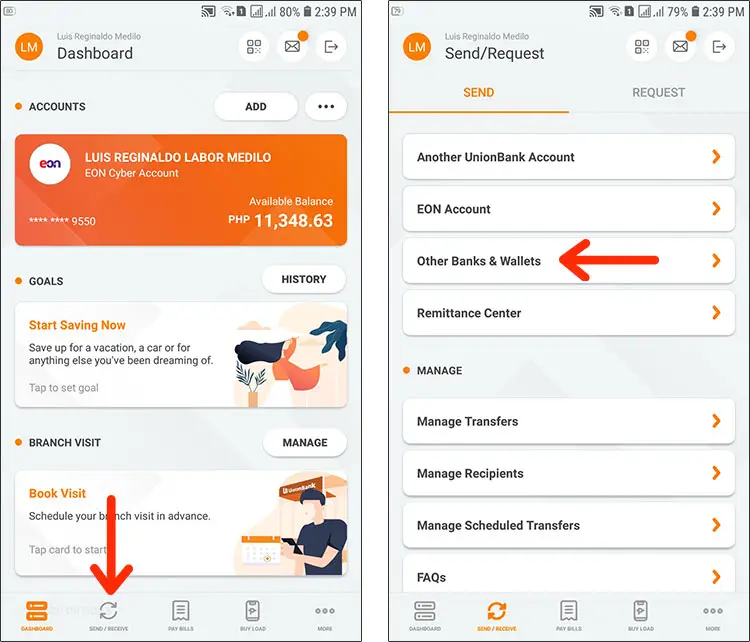
Select “InstaPay.”
You will be asked to enter your recipient payment information. But first, select the recipient bank. Tap the “Select Bank” field.
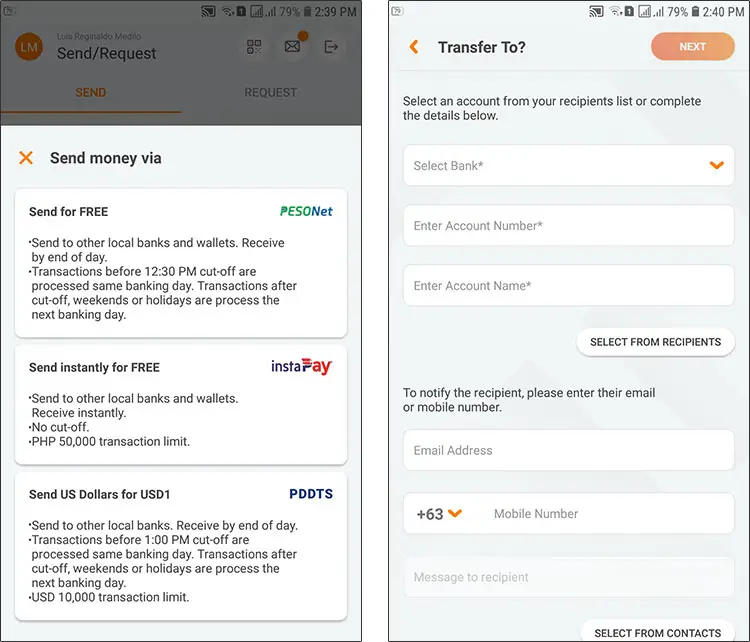
You will be shown a list of supported banks. Scroll down and choose “GCash.”
Enter the following transfer details:
- Account Number – Enter the GCash mobile number of your recipient.
- Account Name – This is the full name of the recipient.
- Email Address (optional) – Provide the recipient’s email address to notify him of the transfer.
- Mobile Number (optional) – Enter the recipient’s mobile number.
- Message to Recipient (optional) – Add a personal message that will be sent to the recipient.
Click “NEXT” when you’re done.
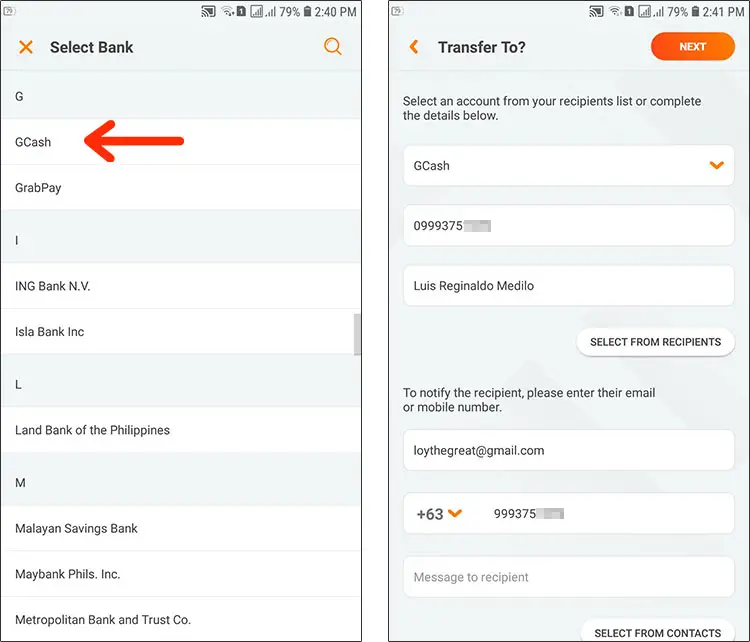
Enter the amount you want to send. Take note that the transaction limit is ₱50,000.
Select the purpose of your transaction, whether it’s donation, fund transfer or payment. If you’re transferring to your own GCash account, choose “Fund Transfer.”
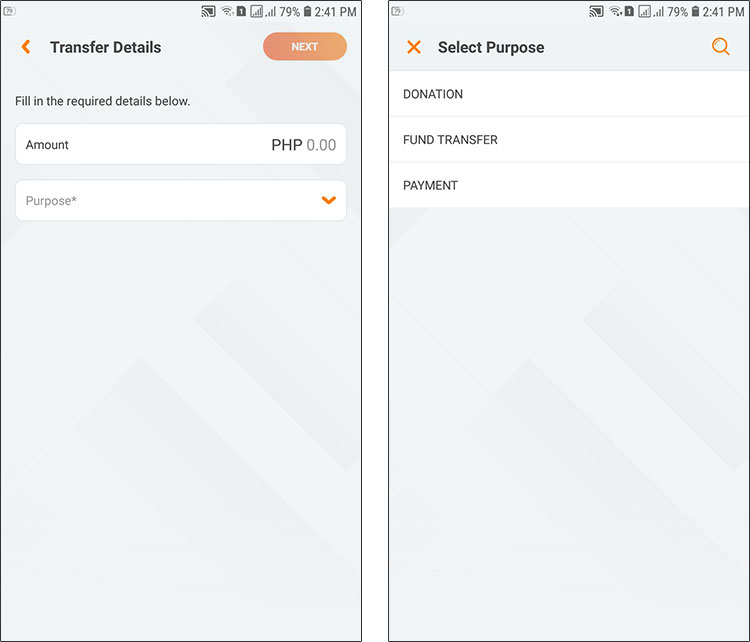
Tap “Next” to proceed.
Review your UnionBank to GCash transfer details. Make sure that the recipient’s name and account number are correct. If you want to change something, click the “Edit” link next to it.
Finally, click the “TRANSFER” button.
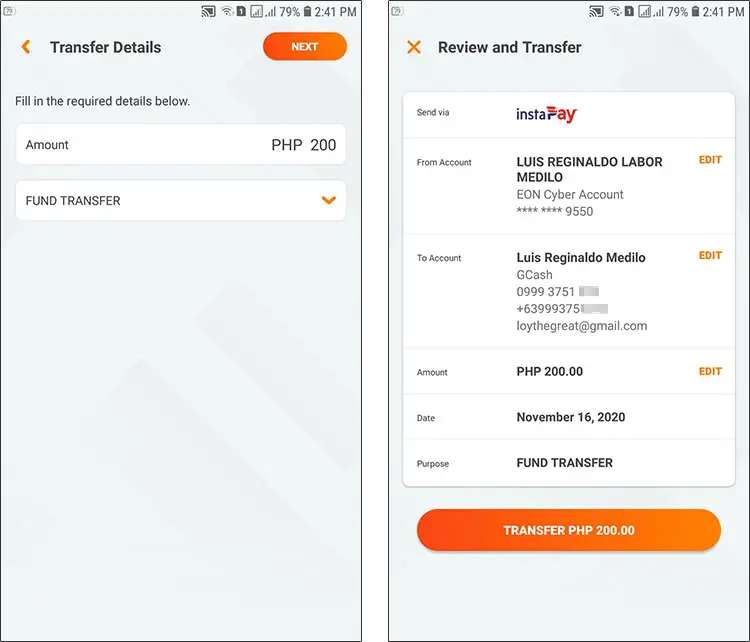
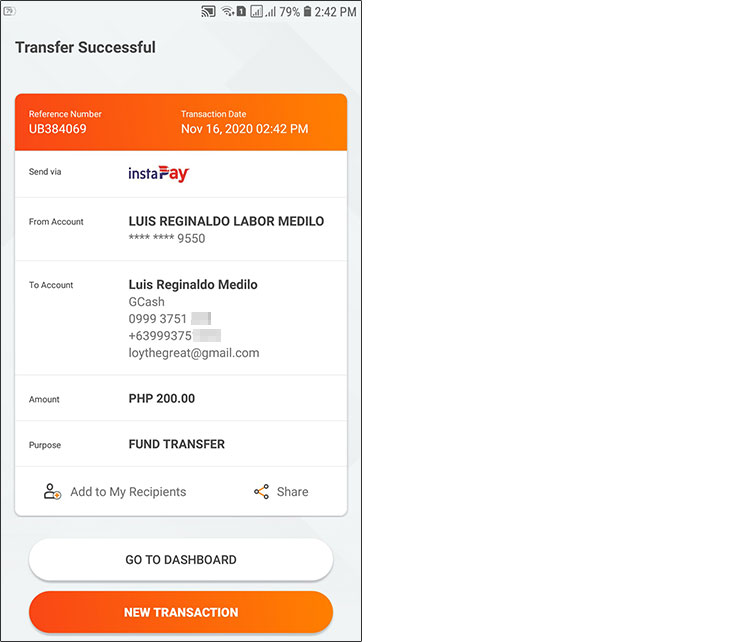
Your UnionBank to GCash transfer has been successfully processed. You and your recipient will receive emails and text messages confirming the transfer.
Since the transaction was coursed through InstaPay, your recipient will receive the money in real-time.
UnionBank to GCash Direct Cash-in Feature
Another way to transfer money from UnionBank to GCash is via the GCash cash-in feature. What you’ll do is to link your GCash account to your UnionBank account. After that, you can add money to your GCash wallet and it will be taken from your UnionBank account. You don’t have to login to your UnionBank account because it’s already linked to your GCash mobile wallet.
Obviously, this only works with your own GCash and UnionBank accounts. So if you want to send money to another GCash user, you must perform a fund transfer on UnionBank Online or the UnionBank mobile app.
Link GCash to Your UnionBank Account
The first thing you should do is to link your GCash wallet to your UnionBank account. This process is performed only once unless you unlink your accounts in the future.
Open the GCash app and login using your MPIN. Tap “Cash In” on the home screen.
Under “My Linked Accounts,” click “Manage.”
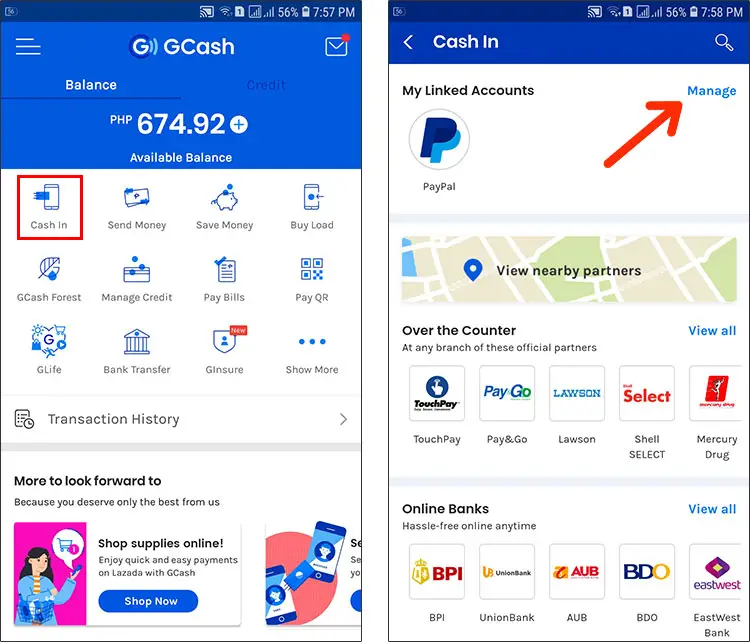
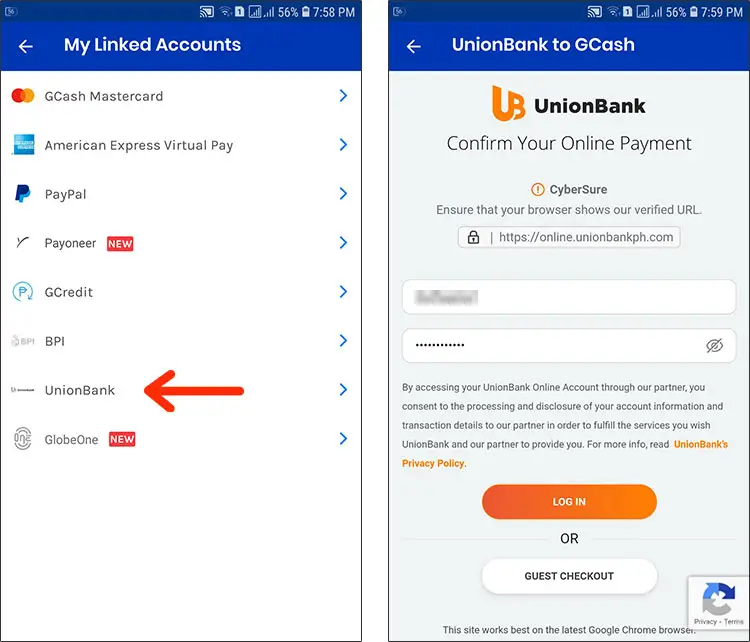
Select “UnionBank” on the list of accounts.
Enter your UnionBank Online account username and password. Tap “Log In.”
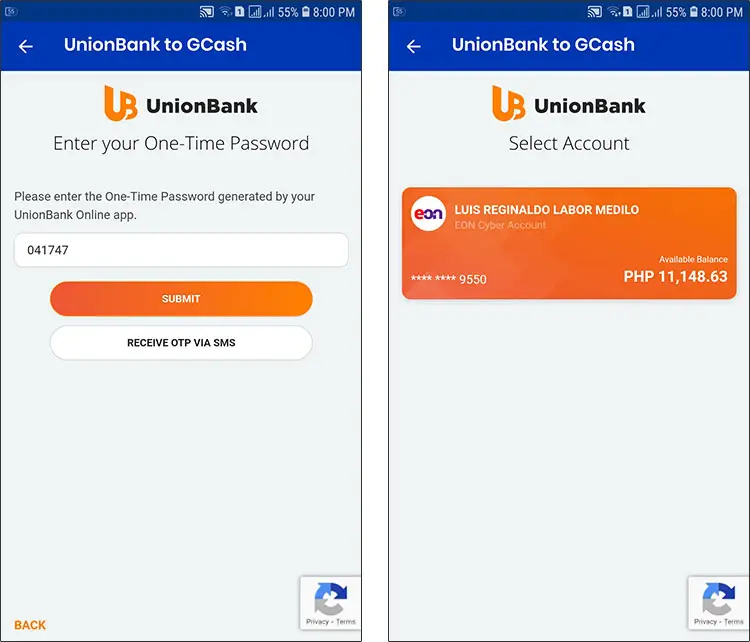
Enter the one-time password or OTP generated by the UnionBank mobile app. If you can’t generate the OTP on the app, click “Receive OTP via SMS” to receive a text message containing the OTP. Tap “Submit” to proceed.
Select the UnionBank account as the source of funds.
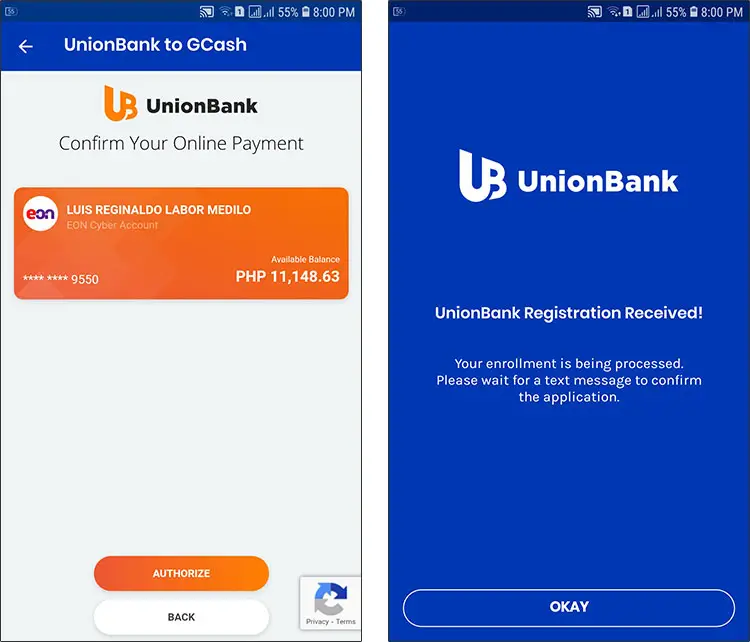
Click “Authorize.”
The linking is now being processed. You will receive a text message once your UnionBank and GCash accounts are linked successfully.
Cash In via UnionBank
After linking your GCash and UnionBank accounts, you can now cash in directly from UnionBank.
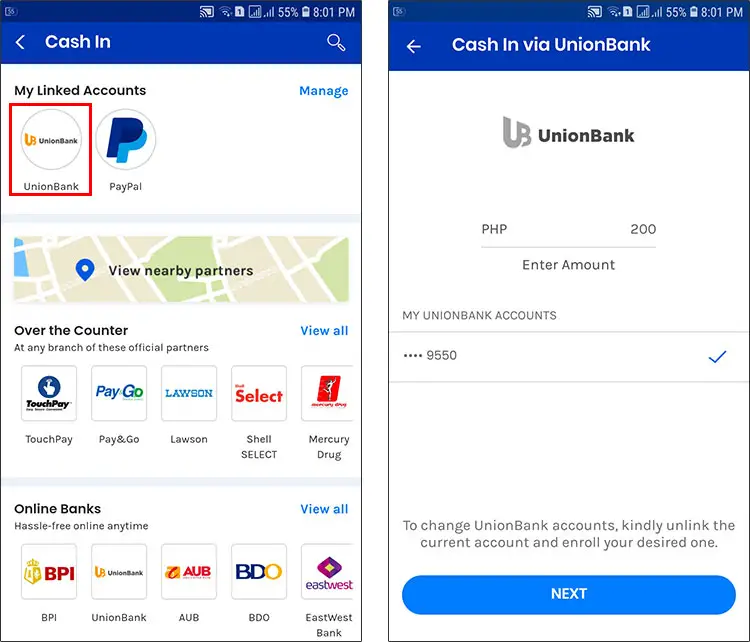
Just login to your GCash app and tap “Cash In.” Select “UnionBank” under “My Linked Accounts.”
Enter the amount to transfer and click “Next.”
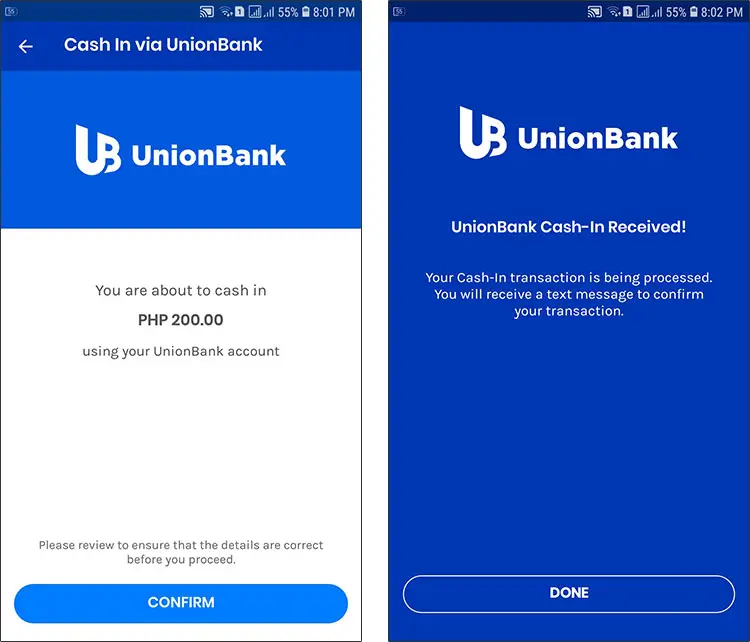
Review the transfer details and tap “Confirm.”
Easy, isn’t it? The advantage of this cash-in feature is that you can transfer money without having to login to your UnionBank account. You don’t have to enter your account information every time you add money to GCash. It’s great for making quick cash-in transactions for urgent purposes like online shopping and money transfers.
Need Help?
You just learned how easy it is to transfer money from UnionBank to GCash. You can either perform a fund transfer in UnionBank online banking, or you can link your GCash and UnionBank accounts to make direct cash-in transfers to GCash. Whatever you choose, you can quickly, easily and conveniently send money to GCash using just your smartphone or computer.
If you have any questions or concerns, call 2882 for GCash or 1-800-1888-2277 for UnionBank.