



Perhaps you have an outstanding loan with the Social Security System (SSS) that you have not repaid for several months or even years. Naturally, you might be worried that your unpaid SSS loan has ballooned to such a large amount that you’ll have a hard time paying off the full balance. Worry no more because the SSS is offering its members the chance to settle their outstanding loan obligations without penalties and at favorable installment terms! Read on because we’ll teach you how to apply for SSS loan condonation online.
Through the SSS loan condonation program, members have the opportunity to consolidate their loans and repay their outstanding loan obligations. Although the principal and the interest remain due and payable, the accrued penalties will be condoned or forgiven. Members can opt for a one-time payment or a monthly installment plan payable for six months.
Applying for SSS loan condonation can be done online using your computer or mobile phone, so you don’t need to visit the SSS branch. All you need is an active My.SSS account. After successful submission and approval of your loan condonation application, you will need to pay your consolidated or restructured loan within its prescribed payment period which is 30 days for one-time payment and six months for installment.
Table of Contents
Who Are Eligible for the SSS Loan Condonation Program?
The following SSS members are eligible to apply for the Short Term Member Loan Penalty Condonation Program (STMLPCP):
- Member-borrowers with past due loans for at least six (6) months as of the start of the condonation period;
- Member-borrowers who are less than 65 years old at the end of the installment term (for installment payment);
- Member-borrowers who have not been granted any final benefit (e.g. permanent total disability or retirement);
- Member-borrowers who have not been disqualified due to fraud against SSS;
- Member-borrowers with an active My.SSS account.
“Past due” means that the loan has an unpaid obligation consisting of principal, interest, and penalties equivalent to more than three (3) monthly amortizations, or the loan has a remaining unpaid balance after its maturity.
SSS Loan Condonation Online Application Step-by-Step Process
All SSS member-borrowers must apply for the loan penalty condonation program through the SSS website using their My.SSS account. Exceptions are members with death, disability and retirement claims who must apply for loan condonation over-the-counter at SSS branches.
Step 1: Login to Your My.SSS Account
Open the My.SSS member portal on your browser and login to your account. If you don’t have a My.SSS account yet, read this article to learn how to register.
Step 2: Go to the Loan Penalty Condonation Page
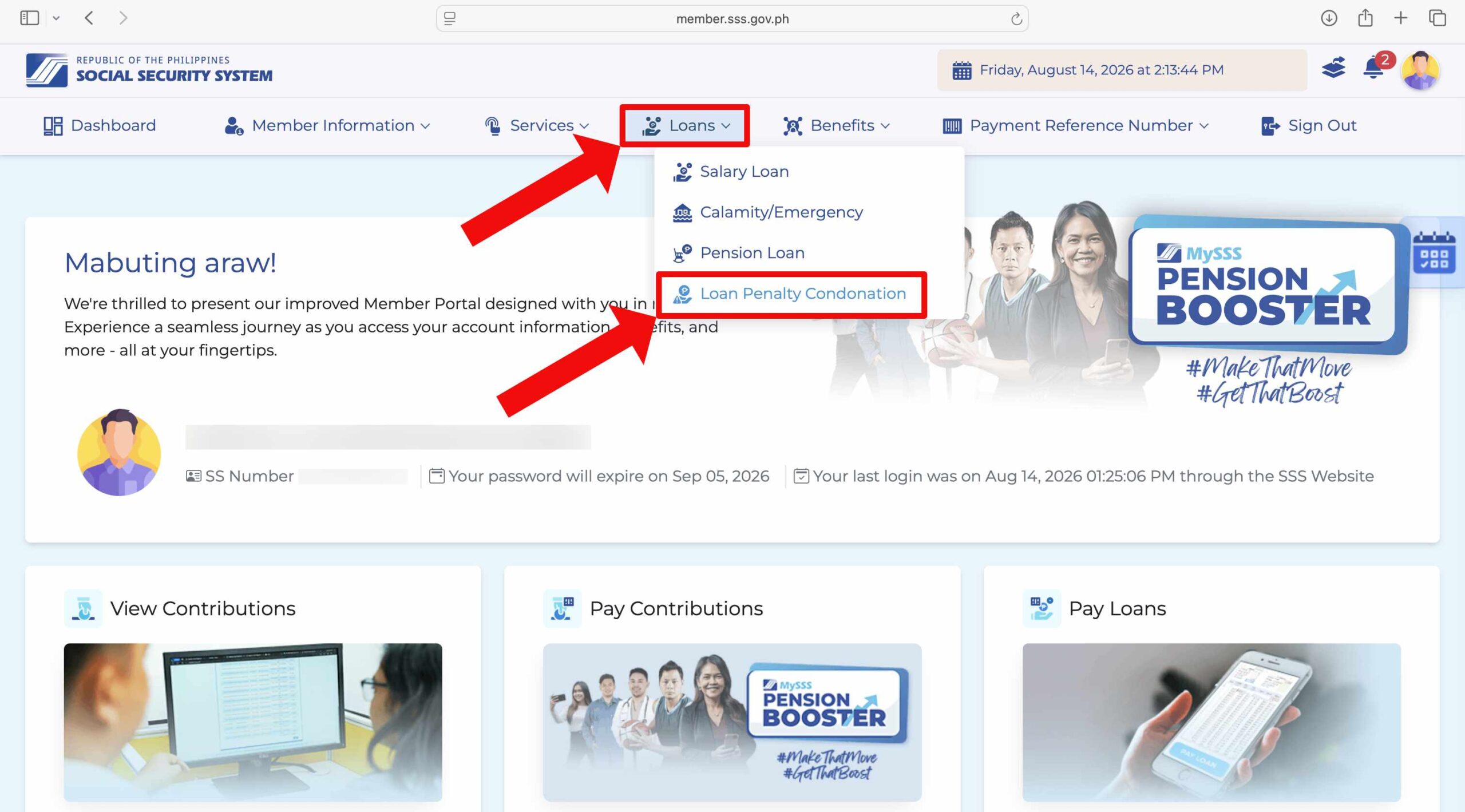
Once you’re logged in, click “Loans” on the main menu, and then select “Loan Penalty Condonation” from the dropdown.
Step 3: Review Your Consolidated Loan Details
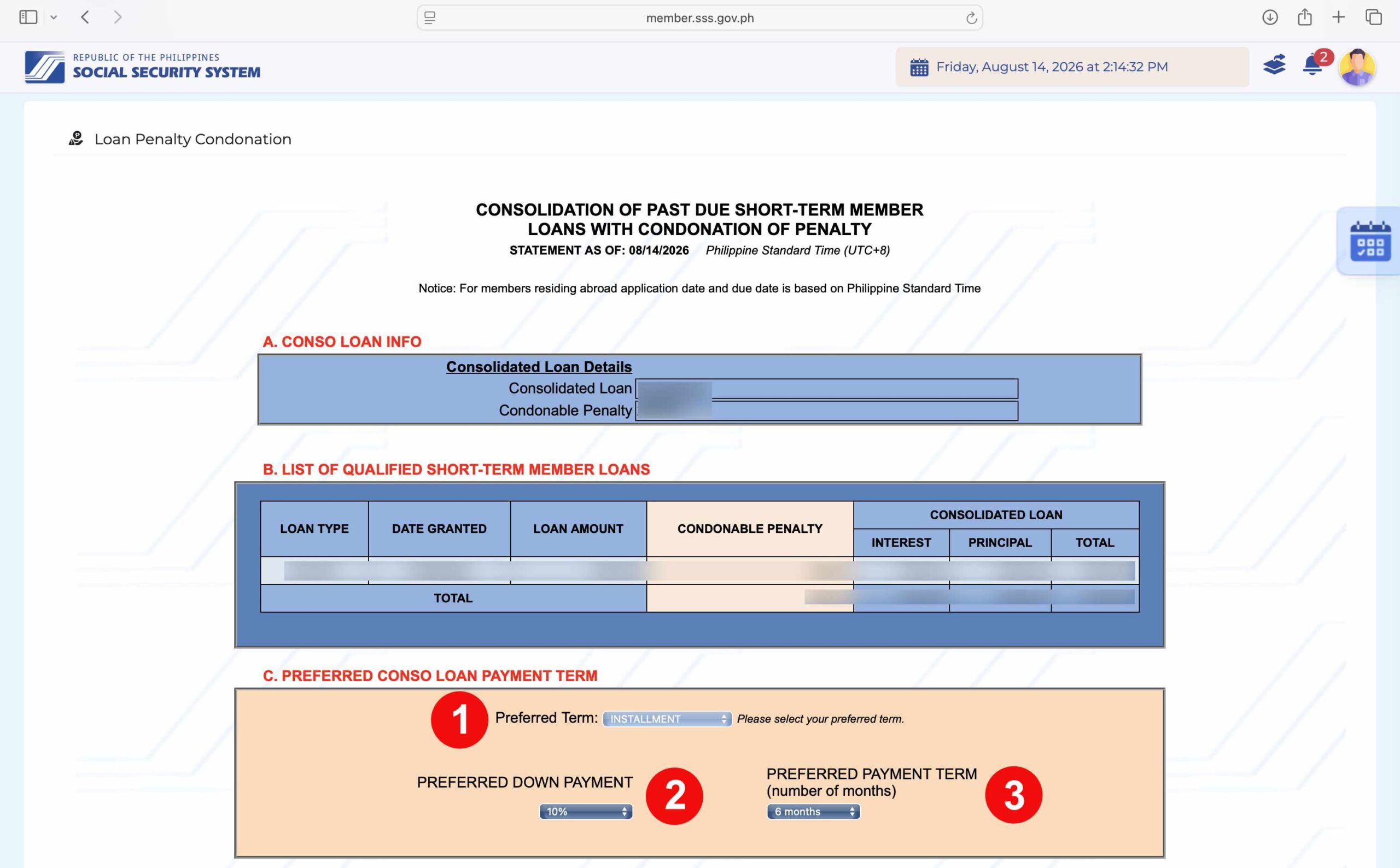
You’ll be taken to the Consolidation of Past Due Short-Term Member Loans with Condonation of Penalty page.
Section A shows your total consolidated loan amount and condonable penalty. Section B lists every qualified short-term loan being included in the consolidation, broken down by loan type, date granted, loan amount, condonable penalty, and the interest, principal, and total that make up your consolidated loan.
Step 4: Select Your Preferred Payment Term
The next step is to select your preferred term. The default payment term is “One-Time Payment,” but if you want to pay your SSS loan in monthly installments, click the dropdown field for “Preferred Term” and select “Installment.”
Scroll down to Section C: “Preferred Conso Loan Payment Term.” Here you’ll choose:
- Preferred Term – Choose either Installment or One-Time Payment.
- Preferred Down Payment – Choose your down payment as a percentage of your consolidated loan.
- Preferred Payment Term – Select the number of months to pay off the balance.
Step 5: Review the Payment Term Details
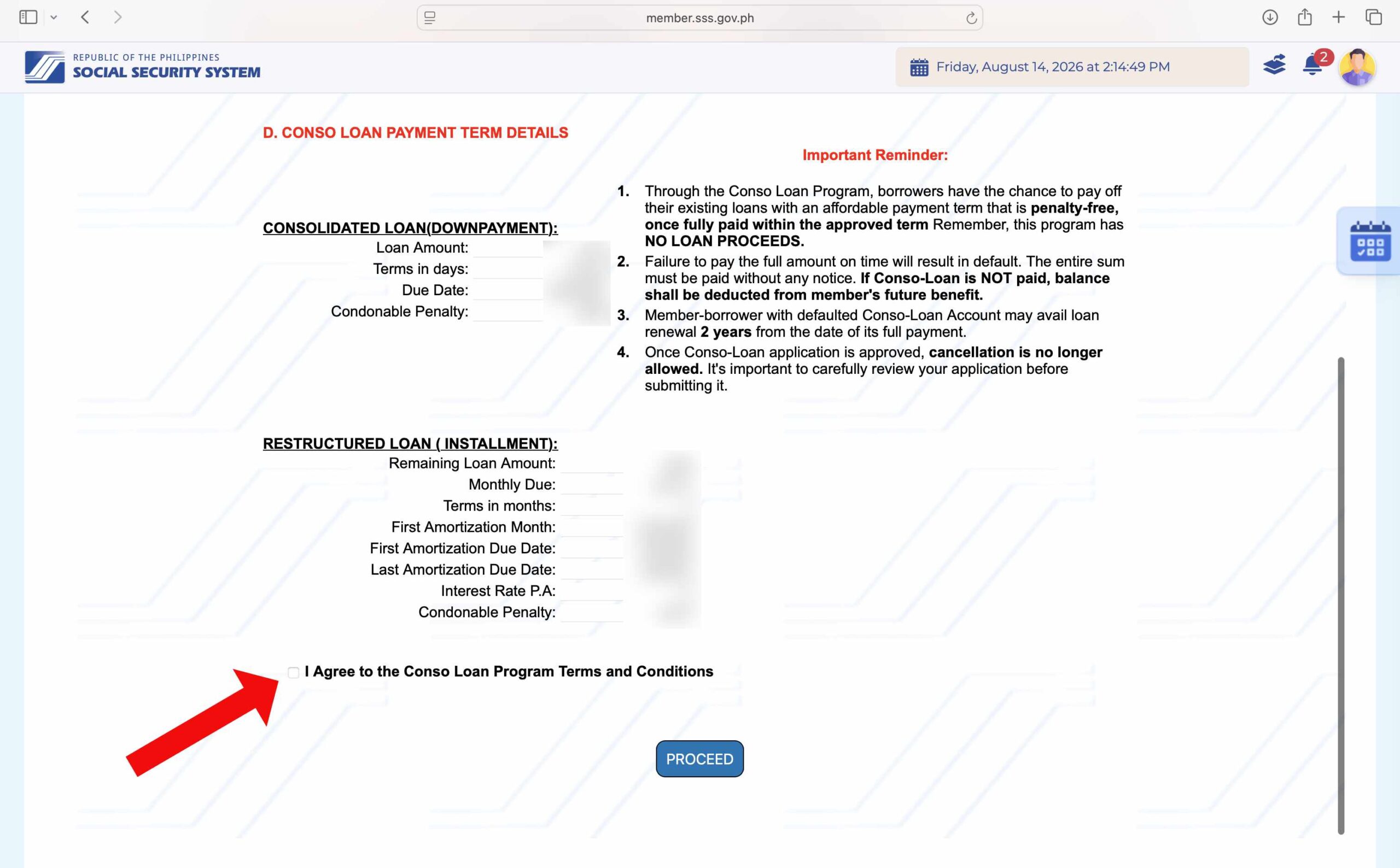
Review the Consolidated Loan (Downpayment) and Restructured Loan (Installment) details, then read the Important Reminder box carefully.
Check the box for “I Agree to the Conso Loan Program Terms and Conditions.”
A popup will show the full Terms and Conditions for Short-Term Member Loan Penalty Condonation Program (SSC Res. No. 383-s.2022 dated 08 June 2022). This covers which loans qualify, the effectivity of the program, and the eligibility requirements.
Read it carefully, and then click “>>>CONFIRM<<<“ at the top to attest that you’ve read and understood it.

With the agreement box checked, click “PROCEED” to move forward with your application.

Step 6: Review Your Schedule of Payments
Read the summary of your consolidated loan and disclosure statement. Scroll down and you’ll see a Schedule of Payments table listing your applicable month, due date, and the amortization, interest, and principal breakdown for each installment, along with your outstanding principal balance after each payment. Below the table, take note of:
- Conditional charges that may be imposed – Your condonable penalty is forgiven only if you fully pay the loan within the approved term. If your Consolidated Loan defaults, the uncondoned portion of the penalty becomes due and demandable in full. Late monthly amortizations are also charged an additional 1% penalty per month until fully paid.
- Effective Interest Rate – The annual rate applied to your restructured loan.
Once you’ve reviewed everything, click “SUBMIT.”

A confirmation popup will ask: “Are you sure you want to submit this Short-Term Member Loan Penalty Condonation Application?”
Click “SUBMIT” to finalize your application, or “CANCEL” if you want to review it again.

Step 7: Your Application is Approved
If your application goes through, you’ll see a confirmation with two important details:
- Your Loan Account Number, which identifies your consolidated loan.
- Your Payment Reference Number (PRN), along with the amount due and the payment deadline, which is 30 days from the date of your application.
A copy of your Notice of Approval will also be sent to your registered email address.

Your payment reference number (PRN), amount due and due date can be accessed by clicking “Payment Reference Number” on the main menu and then “Loans” on the dropdown. Use your PRN when paying your SSS loan through SSS-accredited payment partners and online payment apps such as GCash.
You will also receive an email along with documents pertaining to your SSS loan condonation application such as the terms and conditions, promissory note, statement of loan balances, and notice of approval. Refer to these documents or login to your My.SSS account if you have any questions about your application for SSS loan condonation.
How to Pay Your SSS Consolidated Loan and Monthly Amortizations
Now that you’ve been approved for SSS loan penalty condonation, it’s time to pay your consolidated or restructured loan before the scheduled due date. As with all short-term loans under RTPL, you’ll need your PRN before paying through any of the channels below.
Over-the-counter and bank channels
- Asia United Bank
- Bank of Commerce
- Citibank
- Deutsche Bank
- Partner Rural Bank
- Philippine National Bank (PNB)
- Rizal Commercial Banking Corporation (RCBC)
- Rural Bank of Lanuza Inc.
- Security Bank Corporation
- Union Bank of the Philippines
- Zambales Rural Bank
- Bayad Center Inc.
- SM Mart Inc.
- USSC
- MYEG (online)
OFW members can also pay through Pinoy Express Hatid Padala Services Inc. and Ventaja International Corporation.
Online and mobile app channels
If you want to pay your SSS loan online, you don’t need to line up at a bank anymore. SSS now lists these mobile app and online options for individual members:
- GCash
- Maya
- ShopeePay
- PayRemit
- SSS mobile app, which accepts GCash, Maya, BPI, or credit/debit card as supporting payment methods
- Billeroo, a bill payment facility linked from the SSS website
Read this article for the complete list of official SSS payment channels.
Frequently Asked Questions
How will I know if I’m eligible for loan condonation?
SSS member-borrowers with past due short-term loans that are delinquent for a period of six (6) months as of the start of the condonation period are eligible for loan condonation. To check if you’re eligible for the SSS loan condonation program, just login to your My.SSS account and click “Loans” and then “Penalty Condonation”
How much downpayment do I need to pay for the installment plan?
At least 10% of your total consolidated loan amount, due within 30 calendar days from the notice of approval. You can choose to pay a higher percentage as downpayment if you want to shorten your remaining balance, but 10% is the minimum. Consolidated loans of ₱5,000 and below are only eligible for one-time payment, not installment.
What interest rate applies to the installment plan?
The interest rate is 10% per annum, charged on a diminishing principal balance and amortized over your approved term.
How is my penalty condoned if I’m on the installment plan?
The condonation happens in two parts. The portion of your penalty proportionate to your downpayment percentage is condoned once you pay that downpayment on time. The remaining portion is condoned only after you fully settle the restructured installment loan within its approved term. If you default at any point, the uncondoned portion of the penalty is reimposed and becomes due and demandable in full.
What happens if my restructured loan installment defaults?
Your Consolidated Loan is considered defaulted if you fail to pay the downpayment in full on time, fail to pay the installment plan in full within its approved term, miss more than six accumulated monthly amortizations, or commit any fraudulent act against SSS. Once in default, the uncondoned portion of your penalty is reimposed, and the full outstanding balance becomes due and demandable without need for demand or notice. Late monthly amortizations are also charged an additional 1% penalty per month until fully paid.
Can I cancel my application after submitting it?
No. Once your consolidated loan application is approved, cancellation is no longer allowed, so review your application carefully before submitting it.
Will an unpaid consolidated loan affect my other SSS benefits?
Yes. Any outstanding balance of your consolidated loan, or of a defaulted consolidated loan, can be deducted from any current or future SSS benefit due to you or your beneficiaries, including short-term benefits like sickness and maternity, and final benefits like retirement, total disability, or death.
When can I apply for a new SSS loan after paying off my consolidated loan?
If you paid it off on time, you can apply for a new loan three (3) months after the date of full payment. If your consolidated loan went into default before you settled it, that waiting period extends to 2 years from the date you fully paid it off.
Where can I find my payment reference number or PRN?
Your payment reference number (PRN) can be accessed by logging in to your My.SSS account and clicking “Payment Reference Number” and then “Loans” on the main menu bar. Use the PRN when paying your loan via accredited payment partners and online payment apps
When will my payment be posted or credited to my account?
SSS loan payments are posted in real time through the Real-Time Processing of Loans (RTPL), so you should expect your payment to be credited to your account immediately. Any delays in posting are usually the responsibility of the payment partner, and your inquiries should be directed to them.
Final Thoughts
The SSS loan condonation program is a welcome development that gives each and every SSS member the opportunity to settle their outstanding loan obligations at favorable payment terms and without the burden of penalties. If you have an SSS loan that you have not paid for a long time and which has accumulated a hefty penalty, now is a great time to apply for loan condonation and avail of the chance to pay off your loan in easy and affordable monthly installments.
If you have any questions and concerns about the SSS loan penalty condonation program, you can call the SSS hotline number 1455 or email [email protected].













Thank you so much for the info. Very helpful. Good job!